
Deco BE25 problems with newest firmware

Hello,
I got my Deco BE25's accidentally updated to newest firmware, and i cant download old ones since theres only wrong versions (for outdoor deco and us versions) on TP-Link's support page, those are really messed up. I previously had 1.0.13 installed and it worked fine, 1.0.15 and 1.0.17 wasnt good for me; more lag spikes etc.
Problem with newest firmware is that i have disconnects that lasts few seconds, lights on Deco's goes red, but gets back to green quick (probably in 10-15 seconds or so).
Does anyone have EU (i live in Finland) version of older 1.0.13 firmware saved? Or could support provide it to me?
- Copy Link
- Subscribe
- Bookmark
- Report Inappropriate Content
@olawi You can try this beta firmware which can resolve many connectivity issues on different ISP's around the world. You can download the beta firmware from the link below and install it directly from Web UI. After the firmware update you can also try to change DNS servers in internet connection and DHCP servers settings.
https://static.tp-link.com/upload/beta/2025/202509/20250918/Deco_BE25_V1_wan_mask_problem.zip
- Copy Link
- Report Inappropriate Content
@olawi You can try this beta firmware which can resolve many connectivity issues on different ISP's around the world. You can download the beta firmware from the link below and install it directly from Web UI. After the firmware update you can also try to change DNS servers in internet connection and DHCP servers settings.
https://static.tp-link.com/upload/beta/2025/202509/20250918/Deco_BE25_V1_wan_mask_problem.zip
- Copy Link
- Report Inappropriate Content
Thank you! This can be installed and im installing it now :) None of the versions that TP-Links support page provides couldn't be installed, those downloads on TP-Links support page are really messed up. Wan mask problem sounds exactly what i may be issuing here. My ISP is GlobalConnect, 1GB fiber.
Already had 10 disconnects today with 1.1.0 firmware that auto-update provided.
E:
Its installed now:
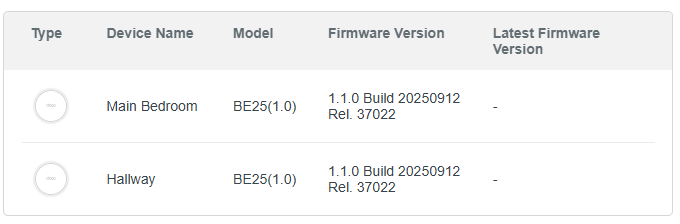
- Copy Link
- Report Inappropriate Content
@olawi I hope your issue is resolved after this firmware update.
- Copy Link
- Report Inappropriate Content
Thank you ARG, connection isn't dropping anymore.
Anyhow, theres some downsides on these new 1.1.0 firmware's; im having constant spikes on ping, i had same issue with firmwares 1.0.15 and 1.0.17. 1.0.13 was best one for me in terms of latency. I have only 5 meters between main and satellite and "they see" each other. My PC is connected to satellite deco by RJ45.
I guess im encountering interference of my downstair neighbours wifi, im using deco's on High Capacity mode (5GHz only). Is there any incoming possibilities to change wifi channels?
I remember that i found 1.0.13 posted on this forum by someone earlier this year, too bad i cant find it anymore.
- Copy Link
- Report Inappropriate Content
@olawi Yeah they are adding Channel Selection on many Deco models and recently they added on Deco X50 and Deco X55 and i hope they will add this feature on Deco BE25 aswell.
- Copy Link
- Report Inappropriate Content

just fyi - the channel selection feature is available in the latest firmware v1.1.7
- Copy Link
- Report Inappropriate Content
Information
Helpful: 4
Views: 2604
Replies: 6
Voters 2

