
ACL issues after switch replacement SG3428X 1.30 to SG3428X-M2 1.20
ACL issues after switch replacement SG3428X 1.30 to SG3428X-M2 1.20

Hey guys,
I bought a new switch (SG3428X-M2, firmware 1.20) to take advantage of the 2.5 Gbit ports.
Before that, I was using the SG3428X (non-M2), which already worked pretty well, but it didn’t have any 2.5 Gbit ports.
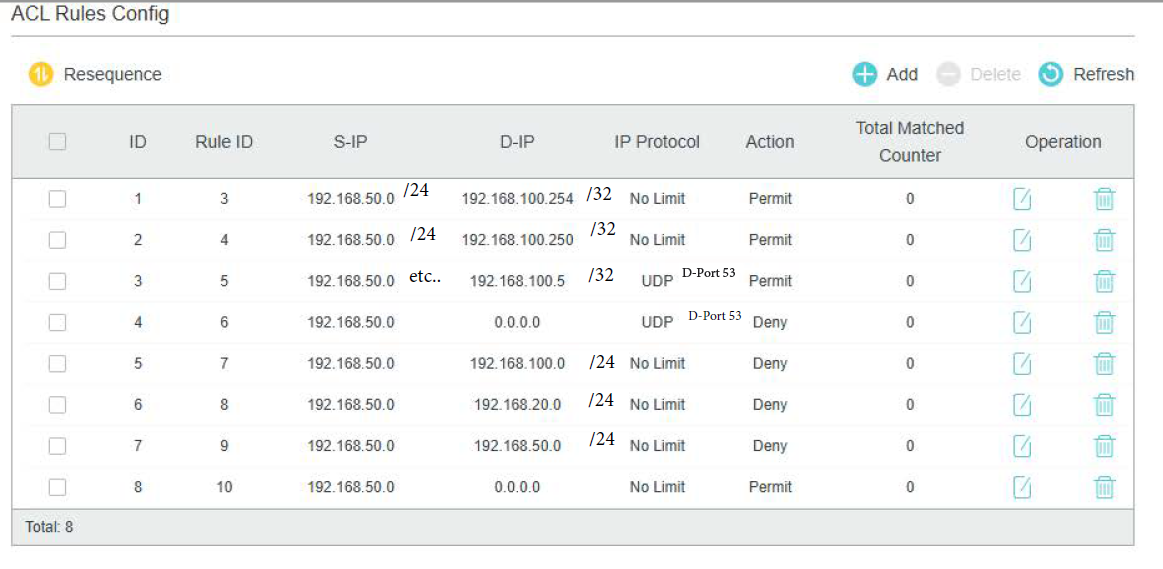
All ACL rules for VLAN 20 (IoT) and VLAN 50 (Guest) were configured and ran without any issues on the old switch.
After copying the configuration 1:1 to the new switch and setting up the ACL rules again, I suddenly started having problems.
As soon as the rules are active, you can no longer connect to the VLAN.
Neither via Wi-Fi (EAP783) nor via LAN directly on the switch does the connection work anymore.
If I remove the ACL binding, everything immediately works again.
What has been changed on the new Switch?
I'm using a raspberry PI as DHCP/DNS Server and from the Switch the L3 DHCP VLAN Relay.
- Copy Link
- Subscribe
- Bookmark
- Report Inappropriate Content

- Copy Link
- Report Inappropriate Content
@GRL If found the issue right now...
The rule to block the internal clients on the same VLAN was blocking (I guess) also the Interface connection.
After removing these rule, connection can be established finally and all other rules are hitting as expected.
(Still bind to VLAN)
I have now to sort out, how to block this... any ideas?
Maybe its "the order"?
- Copy Link
- Report Inappropriate Content
@St3ini nope, sorry, it was just a hiccup...
Still no connection possible. Client just got an APIPA If its want to connect.
And Port Binding is not a solution for me, as I have a mixed setup and the "VLAN Bind" is absolutely the right one I want to use!
I've just testet it with some unused ports and connected a Client on it, it loose directly the connection on it.
- Copy Link
- Report Inappropriate Content
Port binding is in general the right bind type to use as it will filer traffic to and from the selected ports according to the ACLs you set. In Omada Controller, switch rules are by default port-bound and in 99.99% of cases people dont change this because they work better in this mode.
VLAN binding works somewhat differently and in my experience is much more of a pain to get working properly as sometimes you need to duplicate rulesets to bind to different vlans, wheas port bound will apply to any traffic to and from a port regardless of vlan.
- Copy Link
- Report Inappropriate Content
Understood!
But its just a "small" network (30+ Devices) at my home and not all clients are just connected to the LAN.
I dont know what will happen if I create an ACL and put it on the AP Port - I expect, the connection will be lost as on the other trys befor.
Still curios about the config, as I said, on the previous switch I had no issues at all and it works like a charm!
I just created a new ACL, with just one single item and bind it to the VLAN:
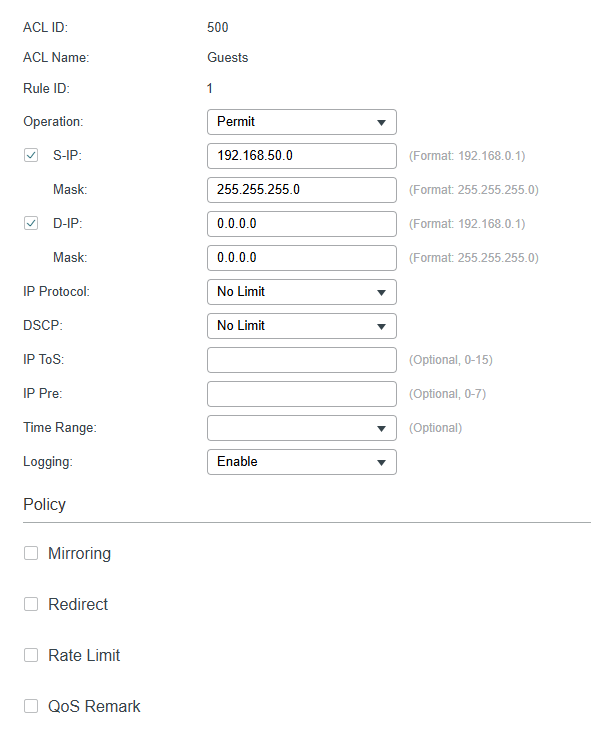
If I try to connect to it - it still blocks me.
After all checking, I guess there must be a bug or something ...
- Copy Link
- Report Inappropriate Content
I "switched" back to the old one - everthing is working fine (with EXACT THE SAME CONFIG!).
This buggy one will be shipped back... maybe next year if there is a new revision available and they fixed the issues with the ACL...
Or not... we'll see...
- Copy Link
- Report Inappropriate Content


The two switches differ at the hardware level. For your current configuration you need to add an ACL that explicitly allows DHCP traffic on the new switch: insert a permit rule at the very top that matches UDP src-port 68 → dst-port 67. On the older SG3428X chassis this rule can be omitted because the switch still forwards all DHCP packets by default. We are using IP ACLs, and the DHCP handshake is carried inside IP packets, so under normal circumstances you must create an ACL entry to permit DHCP.
- Copy Link
- Report Inappropriate Content
@Ethan-TP Sorry, but this is not working, or I'm doing something wrong.
SRC is the VLAN-Network, right?
DSTmust be the DHCP Server, right?
Or has it point to the Interface?
I've added also the vice versa rule as 2nd, but the problem still exist.
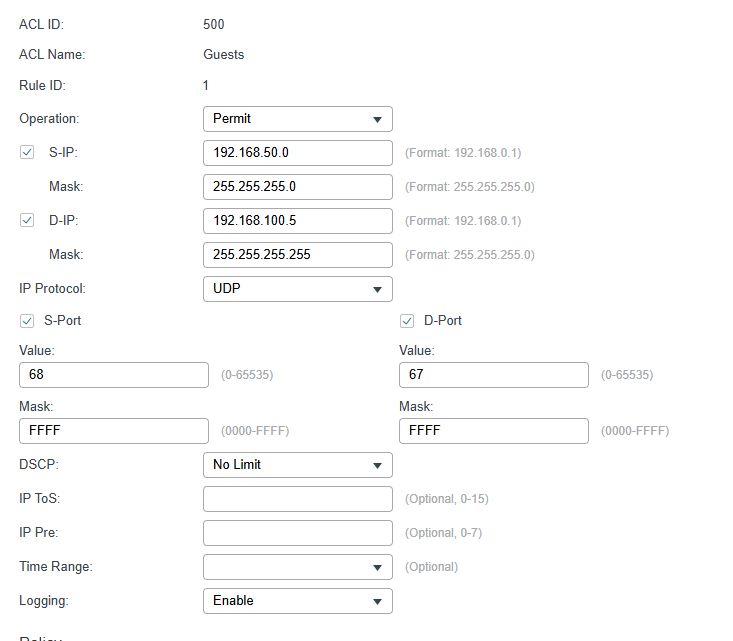
EDIT:
I got it... of course, the Client has no IP at the beginning, so SRC/DST IP has to be empty.
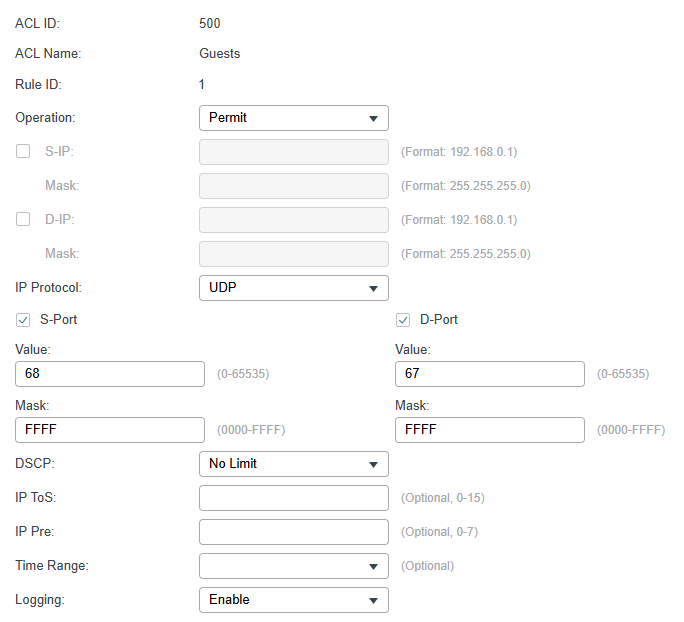
Now it hits the counter on connecting!
- Copy Link
- Report Inappropriate Content
Information
Helpful: 0
Views: 1871
Replies: 18
Voters 0
No one has voted for it yet.