
Topology

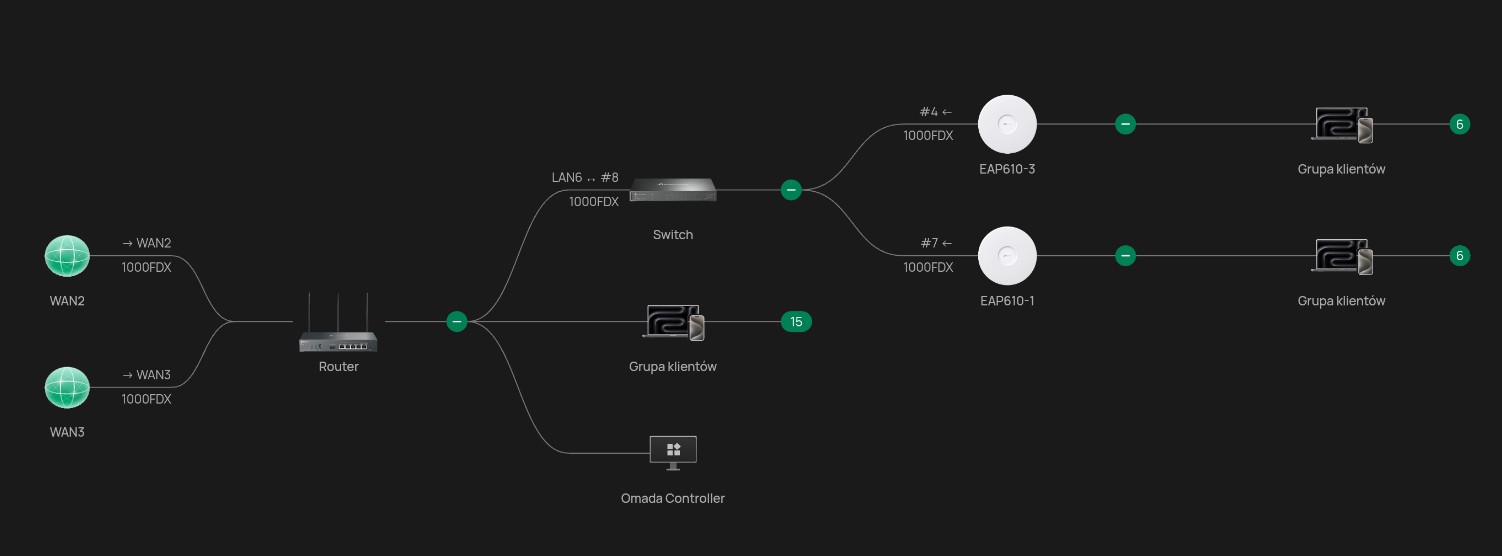
Hello. In my network with an ER706W gateway, I have two WAN connections – one primary and one backup. The controller is an Omada 6.0. I'm having a bit of a déjà vu when I view my network topology – I don't know if I have something configured incorrectly or what... The topology in my browser shows two WANs coming to the router, but the topology in the phone app only shows one WAN connection. Is this normal, or do I need to change something?
- Copy Link
- Subscribe
- Bookmark
- Report Inappropriate Content


Hi @Ronczkos
Currently, Omada APP does not yet support displaying multiple WANs. I have forward this requirement to the relevant department. Please stay tuned for future updates. Thank you for your feedback.
- Copy Link
- Report Inappropriate Content
Hi @Ronczkos
Thanks for posting here.
Are you using the Cloud-based standard controller?
Please check the Omada APP version and make sure it's up to date.
If still the same, please share the following info:
1. the screenshot of the topology page on the APP;
2. the screenshot of the topology page on the web interface;
3. The OS and brand of the phone you are using;
4. The screenshot of the APP version page.
- Copy Link
- Report Inappropriate Content
@Vincent-TP Hi Vincent, thank you for contacting me.
This may be a bit confusing, but in short, it looks like this: OC200 (currently v. 6.0.0.36, after the update, I initially had 6.0.0.19 or 6.0.0.24 - I don't remember exactly) and I've try a controller in Docker (the one from M. Bentley - currently v. 6.0.0.25) [it's a shame they can't work in a cluster (😞!!!), I was really hoping for it]. The app on my phone Xiaomi Redmi Note 14 Pro 5G - v. 5.0.46.
No matter which one controller I try (currently, Docker is working, which I switched to from OC200 after version 6.0.0.24 - in about a week I will switch to OC200 - but for now, no matter what I use, the topology image always shows the same on the input), the topology always looked the same, i.e.:
1. image from the browser
2. image from the application
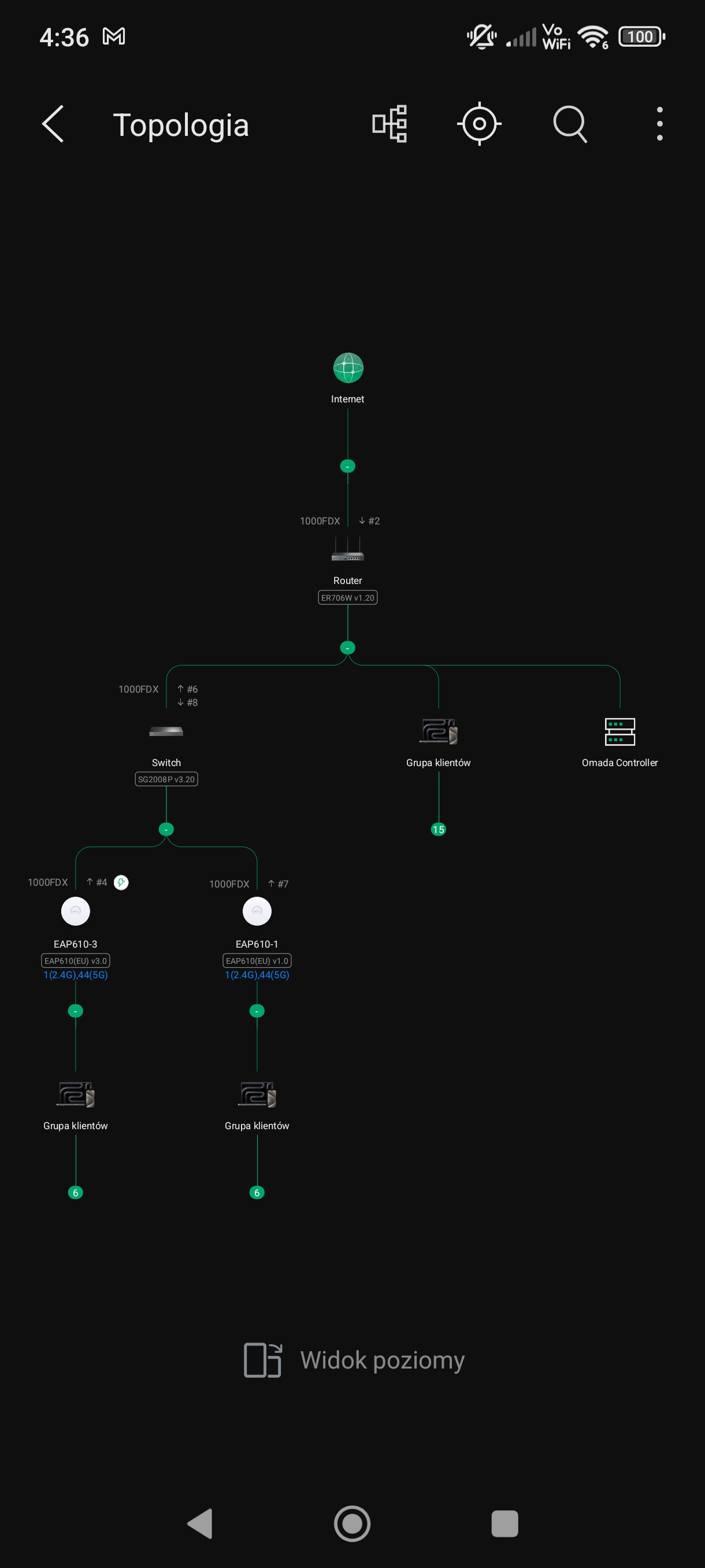
I will only add that when I used the controller version before the upgrade, i.e. 5.15.x.x - and again - no matter if on OC200 or in Docker - it always displayed the same, i.e. in the browser I saw both WANs, but in the application (I don't remember the old version of the application) only one WAN.
- Copy Link
- Report Inappropriate Content
Hi @Ronczkos
Currently, Omada APP does not yet support displaying multiple WANs. I have forward this requirement to the relevant department. Please stay tuned for future updates. Thank you for your feedback.
- Copy Link
- Report Inappropriate Content
@Vincent-TP 👍👍👍
- Copy Link
- Report Inappropriate Content
@Vincent-TP Today I downloaded the latest update of the Omada application - 5.0.62 - unfortunately the application, despite having two internet providers, still shows WAN as one input connection.
- Copy Link
- Report Inappropriate Content
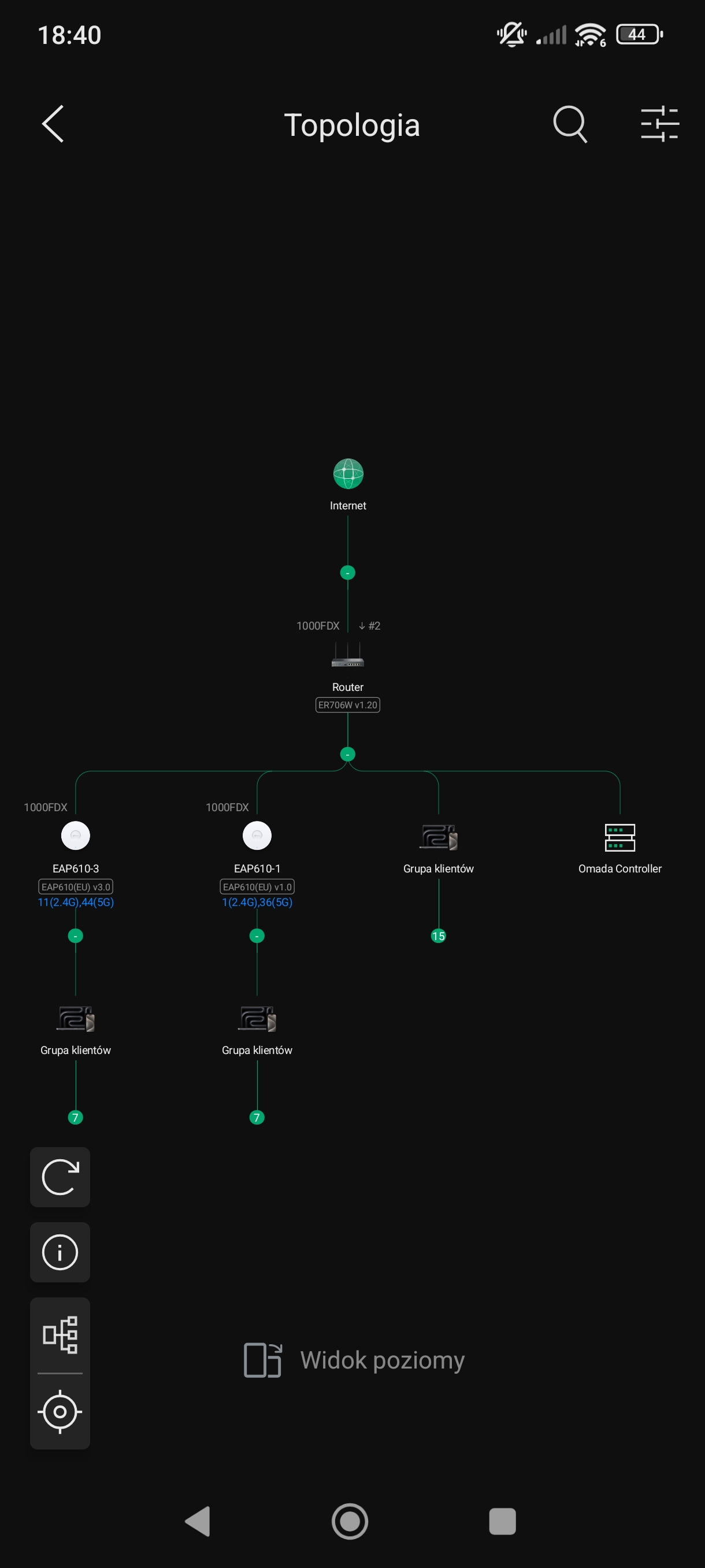 @Vincent-TP the only thing that has changed is the location of the navigation icons
- Copy Link
- Report Inappropriate Content
Hi @Ronczkos
Thank you for the info. Your feedback has been forwarded to our product team for consideration.
At this time, we cannot confirm whether or when this feature will be implemented. All requests are carefully evaluated based on technical feasibility, user demand, and development priorities. If approved, the feature would still require time for design, testing, and integration into future firmware releases.
We encourage you to keep an eye on our official release notes and community forums for updates on new features and improvements.
We appreciate your patience and continued support. If you have any further questions, feel free to contact us.
- Copy Link
- Report Inappropriate Content
Hi. Refreshing my query... Is there any information about the Omada application supporting multiple WANs in a topology?
- Copy Link
- Report Inappropriate Content
Hi @Ronczkos
We consistently receive various functional and product feedback. Whether and when to implement specific suggestions depends on multiple factors, such as the feature's urgency, the number of votes it receives, and its impact on the user experience.
Even if a feature is planned, we must also consider whether sufficient resources are available to develop it.
Currently, this feedback request is still under consideration.
You may start a new feature request post and cast your vote, as we typically prioritize feedback with higher vote counts.
Thank you for your understanding.
- Copy Link
- Report Inappropriate Content
Information
Helpful: 0
Views: 807
Replies: 9
Voters 0
No one has voted for it yet.