Archer C64 - "Conflict with existing port" error despite empty Forwarding/UPnP list

Archer C64 - "Conflict with existing port" error despite empty Forwarding/UPnP list

Archer C64 - "Conflict with existing port" error despite empty Forwarding/UPnP list
Friday
Model: Archer C64  
Hardware Version: V1
Firmware Version: 1.13.15 Build 240812 Rel.53634n(5553)

Hi everyone,

I am trying to set up Port Forwarding (Virtual Servers) on my Archer C64, but I am stuck in a loop with a conflict error that won't go away.

The Issue: When I try to add a new Port Forwarding rule for my torrent client (qBittorrent), I get the error:

"Conflicting with existing port: X. To avoid conflict, please enter another value."

The Problem:

  • My Port Forwarding table is completely empty.

  • My UPnP list is empty (and I have now disabled UPnP).

  • My Port Triggering list is empty.

  • The router still thinks port X is "in use" somewhere, likely a ghost rule from a previous UPnP session.

Troubleshooting Steps I've Taken:

  1. Disabled "Use UPnP/NAT-PMP" in qBittorrent.

  2. Disabled UPnP on the router.

  3. Checked "Port Triggering" to ensure no conflicts there (it is empty).

  4. Tried changing the port in qBittorrent to a new number (e.g., 45000) and adding that to the router, but I still face issues adding the rule.

  5. Rebooted the router (standard reboot, not factory reset).

  6. Verified that DMZ is disabled.


What is the solution?

  0      
  0      
#1
Options
4 Reply
Re:Archer C64 - "Conflict with existing port" error despite empty Forwarding/UPnP list
Friday

Mango10a wrote


4. Tried changing the port in qBittorrent to a new number (e.g., 45000) and adding that to the router, but I still face issues adding the rule.


  @Mango10a 


Hi,


Please try to do it the other way around. I mean, first create a port forwarding rule for an unused port in the Archer C64, and then change the port in qBittorrent to that new number.


  0  
  0  
#2
Options
Re:Archer C64 - "Conflict with existing port" error despite empty Forwarding/UPnP list
Saturday

  @woozle I tried, it doesnt actually opens the port that way. 

  0  
  0  
#3
Options
Re:Archer C64 - "Conflict with existing port" error despite empty Forwarding/UPnP list
Saturday

  @Mango10a https://ibb.co.com/4BvzhBm
https://ibb.co.com/VpTbVDTY

  0  
  0  
#4
Options
Re:Archer C64 - "Conflict with existing port" error despite empty Forwarding/UPnP list
Saturday

Mango10a wrote

  @woozle I tried, it doesnt actually opens the port that way. 

  @Mango10a 


But that is a different problem then, unrelated to the subject of this thread.


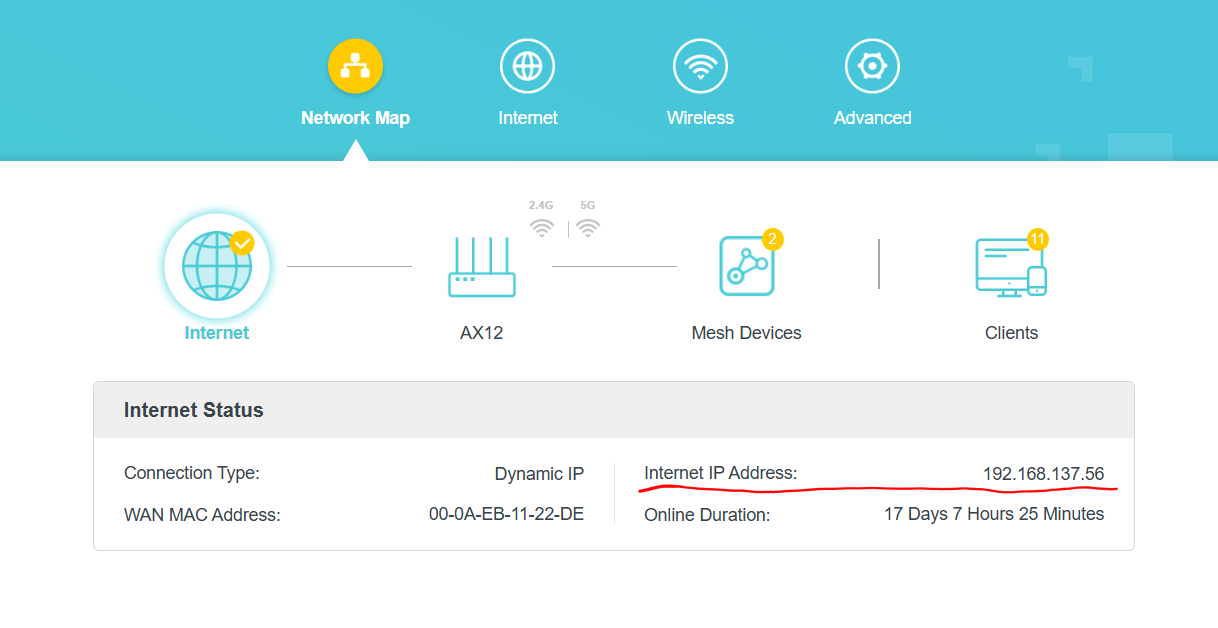
If the port you are forwarding is shown as "closed" by port checkers, then the first thing to verify is that the "Internet IP Address" of the Archer C64 is a public IP address.

In case your "Internet IP Address" happened to be within the sections 

192.168.0.0 - 192.168.255.255,

172.16.0.0 - 172.31.255.255,

10.0.0.0 - 10.255.255.255 or

100.64.0.0 - 100.127.255.255,

then it would not be a public IP address.


  1  
  1  
#5
Options