ER605 OpenVPN Client connects but LAN traffic doesn’t route through OpenVPN

ER605 OpenVPN Client connects but LAN traffic doesn’t route through OpenVPN

ER605 OpenVPN Client connects but LAN traffic doesn’t route through OpenVPN
Friday - last edited Monday
Model: ER605 (TL-R605)  
Hardware Version:
Firmware Version:

Hi everyone,

I’m using a TP-Link ER605 as an OpenVPN client and an OpenVPN Access Server (v2.14.2) hosted on DigitalOcean.

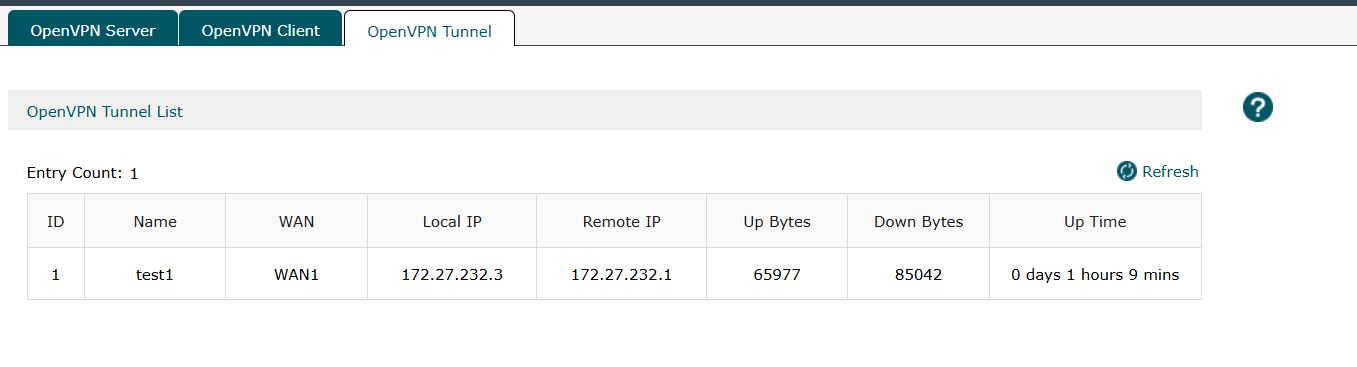
Status: The ER605 successfully connects to the OpenVPN server (connection shows Connected and tunnel logs confirm it).
Problem: Devices on the ER605 LAN do not route internet traffic through the VPN, so their public IP does not change to the DigitalOcean/VPN public IP.

I believe the issue is in Policy Routing, but I’m stuck:

What I’m trying to do

Route all LAN traffic (0.0.0.0/0) through the OpenVPN client tunnel (full-tunnel).

What I see

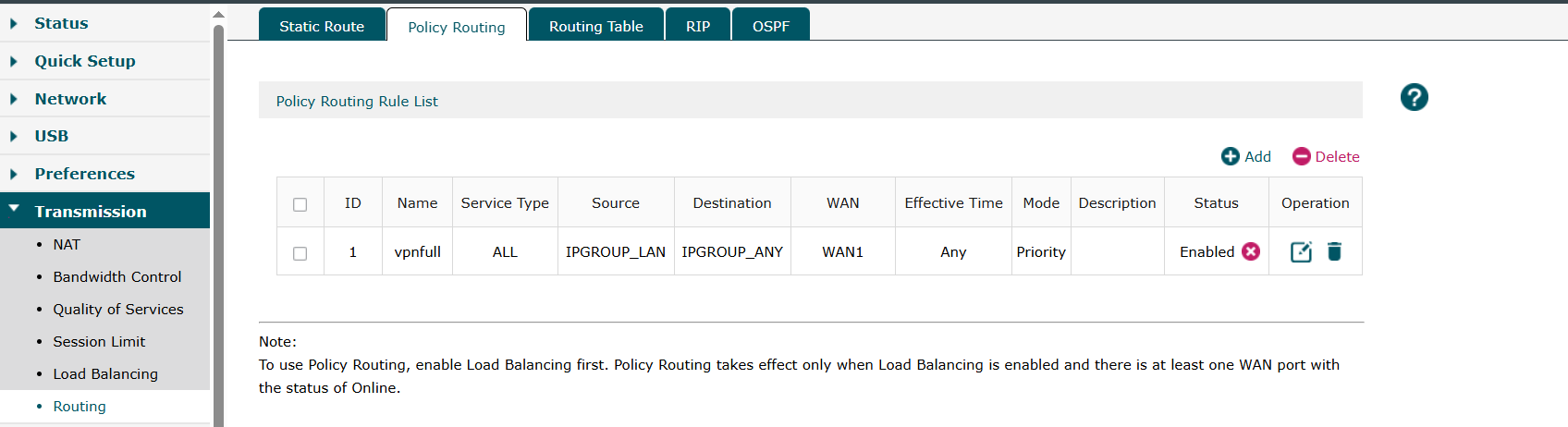
Under Transmission / Load Balancing → Policy Routing, when creating a routing rule, the “WAN” selection only shows my physical WAN interfaces (WAN1/WAN2), but I do not see any option like:

  • OpenVPN Client

  • VPN tunnel interface

  • tun0 / OpenVPN tunnel

So I can’t create a policy rule that sends LAN traffic via the VPN tunnel.

Questions

  1. On the ER605, where exactly can I select the OpenVPN client tunnel as the outbound interface for Policy Routing?

  2. Is there a required setting that makes the OpenVPN tunnel appear as a selectable interface (e.g., “Use VPN as default gateway” or “Redirect internet traffic”)?

  3. If the ER605 cannot route LAN internet via OpenVPN using policy routing, what is the correct way to force full tunnel (LAN → VPN → internet)?

  4. Is this limitation different between Standalone mode vs Omada Controller mode, and which one supports routing LAN internet through the VPN client?

Extra confirmation

On the VPN server side (OpenVPN AS), the tunnel connects successfully but I’m seeing mostly keepalive traffic and almost no real internet traffic crossing the VPN, which makes me think the router isn’t forwarding LAN traffic into the tunnel.

Any guidance or screenshots of the correct Policy Routing setup for ER605 would be greatly appreciated. Thanks!

  0      
  0      
#1
Options
1 Accepted Solution
Re:ER605 OpenVPN Client connects but LAN traffic doesn’t route through OpenVPN-Solution
Monday - last edited Monday

Hi  @sallyq909 

Thanks for posting in our business forum.

For OpenVPN connection, if the ER605 is configured as an OpenVPN Client, then it's the OpenVPN Access Server (v2.14.2) hosted on DigitalOcean that determines if the devices of Client able to access Internet via VPN tunnel.

There is no such configuration in ER605 except you can choose desired local networks inside the Client to get Internet via VPN like the screenshot below.

Best Regards! >> Omada EAP Firmware Trial Available Here << >> Get the Latest Omada SDN Controller Releases Here << *Try filtering posts on each forum by Label of [Early Access]*
Recommended Solution
  0  
  0  
#3
Options
3 Reply
Re:ER605 OpenVPN Client connects but LAN traffic doesn’t route through OpenVPN
Friday

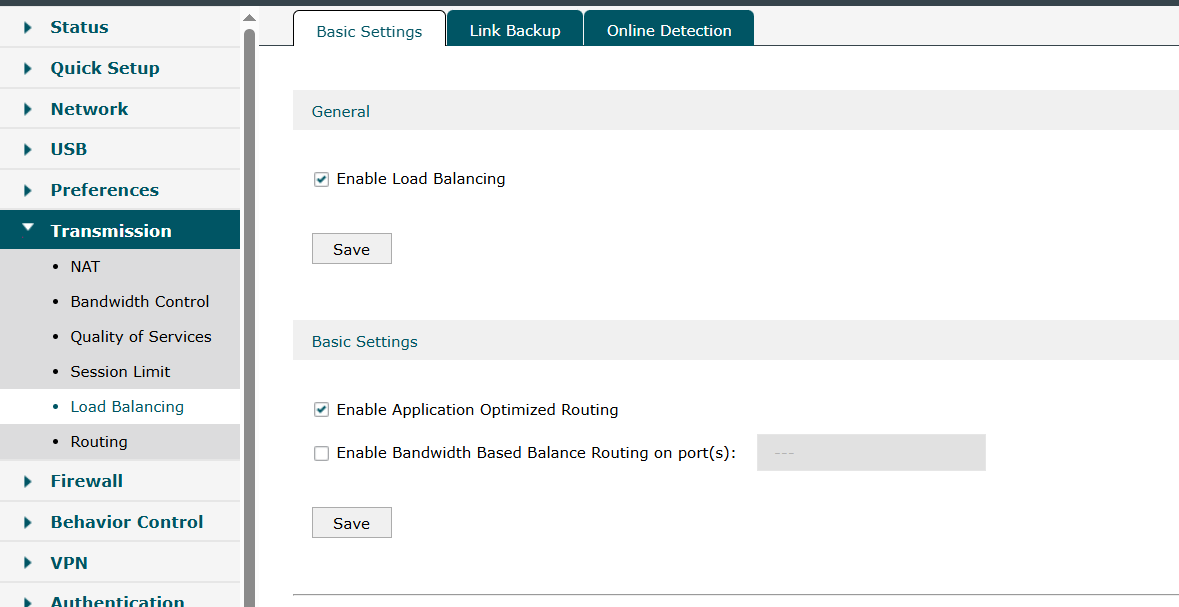
  @sallyq909  here are my current settings logs

  0  
  0  
#2
Options
Re:ER605 OpenVPN Client connects but LAN traffic doesn’t route through OpenVPN-Solution
Monday - last edited Monday

Hi  @sallyq909 

Thanks for posting in our business forum.

For OpenVPN connection, if the ER605 is configured as an OpenVPN Client, then it's the OpenVPN Access Server (v2.14.2) hosted on DigitalOcean that determines if the devices of Client able to access Internet via VPN tunnel.

There is no such configuration in ER605 except you can choose desired local networks inside the Client to get Internet via VPN like the screenshot below.

Best Regards! >> Omada EAP Firmware Trial Available Here << >> Get the Latest Omada SDN Controller Releases Here << *Try filtering posts on each forum by Label of [Early Access]*
Recommended Solution
  0  
  0  
#3
Options
Re:ER605 OpenVPN Client connects but LAN traffic doesn’t route through OpenVPN
Monday

  @Hank21 

Thanks for the clarification.

I understand that when the ER605 is configured as an OpenVPN client, the OpenVPN Access Server (v2.14.2) hosted on DigitalOcean determines whether internet traffic is pushed through the VPN tunnel.

To confirm, on the OpenVPN Access Server side:

  • redirect-gateway def1 is enabled and being pushed to the client

  • IP forwarding is enabled on the DigitalOcean server

  • NAT (iptables SNAT/MASQUERADE) is configured correctly for VPN client traffic

From the OpenVPN logs and status (check also the attached screenshots), the tunnel is established successfully and the ER605 is receiving the pushed routes.

However, despite selecting the desired local networks in the ER605 OpenVPN Client configuration (as shown in the screenshot), LAN traffic still exits via the WAN IP instead of the VPN public IP. This indicates that while the tunnel is up, traffic from LAN interfaces is not being forwarded into the tunnel.

Could you please clarify:

  1. Whether the ER605 still supports LAN → OpenVPN policy routing for full-tunnel scenarios in current firmware

  2. If additional routing or policy rules are required beyond selecting “Local Networks” in the OpenVPN Client

  3. Whether this functionality has changed or been limited in recent firmware versions

At the moment, the tunnel is active and stable, but traffic forwarding into the tunnel does not occur. Any guidance on restoring full-tunnel behavior on the ER605 would be greatly appreciated.

Thank you.

  0  
  0  
#4
Options