ER7206 VPN Routes

ER7206 VPN Routes

ER7206 VPN Routes
ER7206 VPN Routes
2026-01-29 01:42:31 - last edited 6 hours ago
Model: ER7206 (TL-ER7206)  
Hardware Version: V1
Firmware Version: 1.4.3

Hi,


let me explain, i have 4 VPNs on my network, only 1 of them is connected over TP-Link, the other 3 are connected over Headscale, let me post a little drawing of my network topology
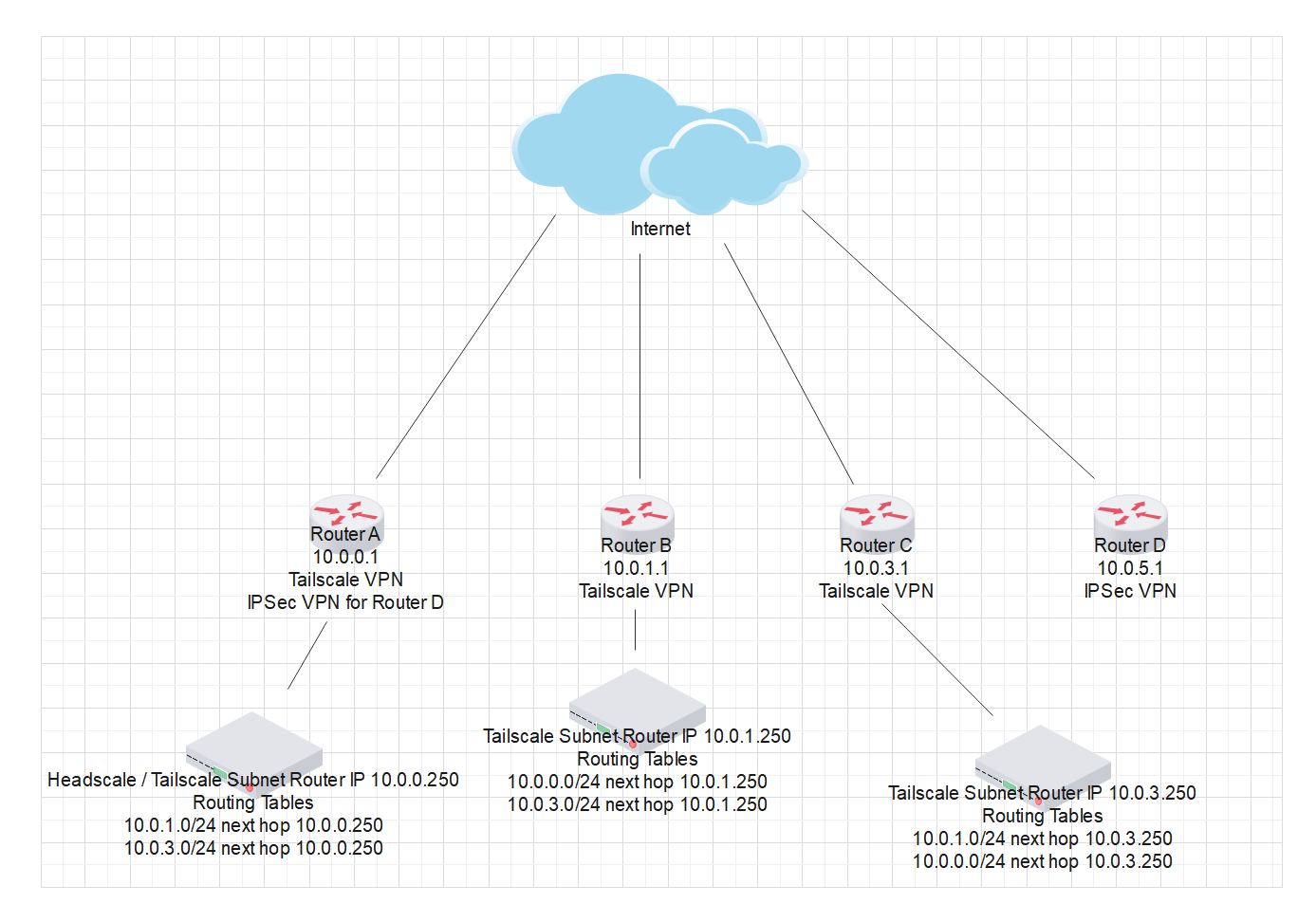
Main router is Router A, this one is the main headquarter, its where the Headscale server is which is the vpn server, Router B, C and D are on different locations, but only Router B and Router C are connected over the Tailscale network, Router D is over TP-Link IPSec VPN.


For each router i have manually created the routes so all 3 networks can communicate with each other, problem is i cant find a way to make all networks communicate with Router D network, only Router A and Router D networks can communicate because they are the ones that have the IPSec VPN between them, but Router B and C cant see Router D at all or vice versa.


I have tried to create routing tables on Router A which is the common ground for all my networks, but cant ping any device from Router B or C to Router D, so any ideas or suggestions i could try would love to hear them because i have run out of things to try


This is the IPSec VPN Status on Router A

And this one is for Router D

 

  0      
  0      
#1
Options
1 Accepted Solution
Re:ER7206 VPN Routes-Solution
6 hours ago - last edited 6 hours ago

  @Javito 


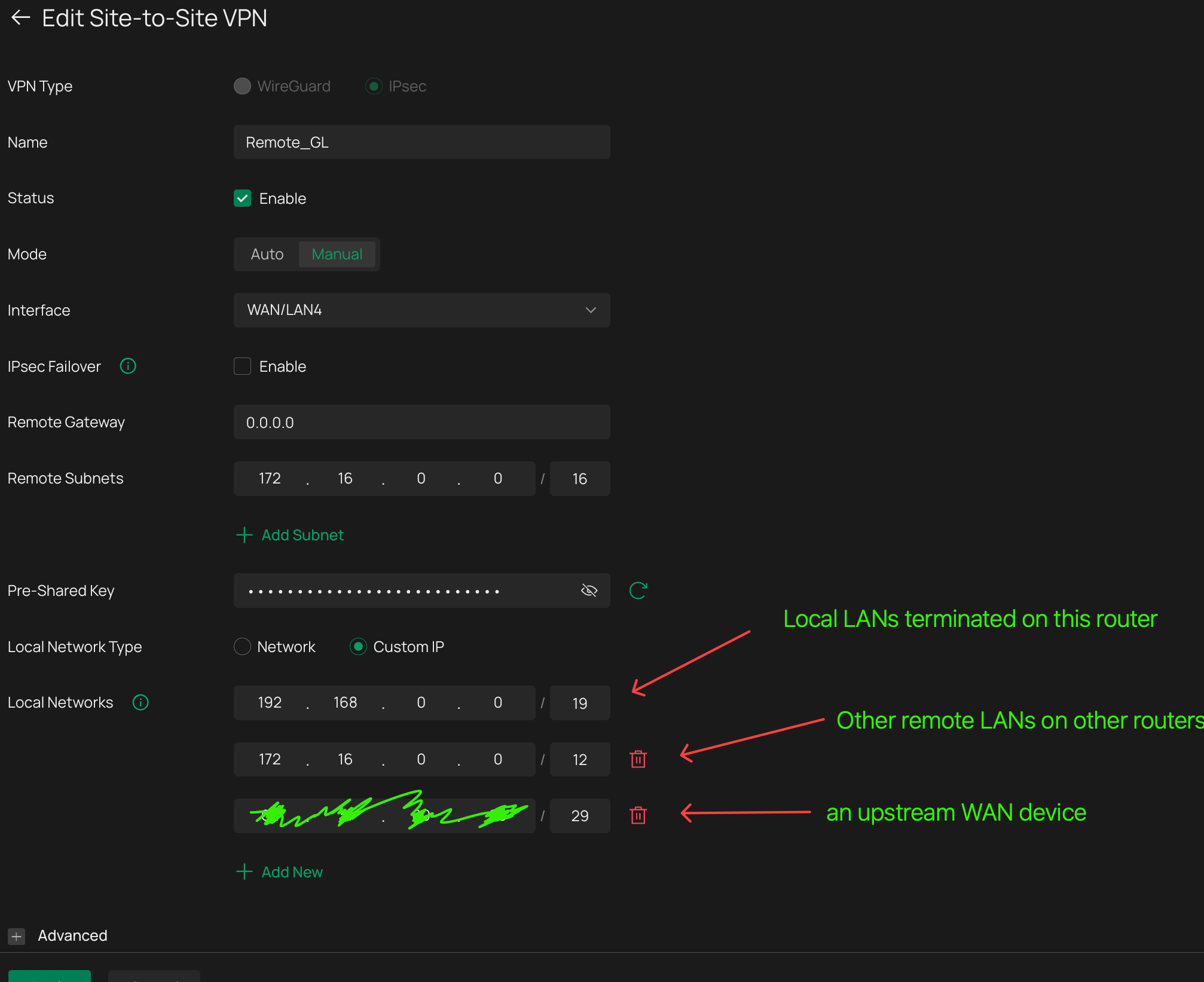
Its not about routing rules, its about including the other IP ranges in the IPsec VPN tunnels


Since router A is the "hub" location for all VPN tunnels, as long as it can see all the IP ranges from teh other routers, you need to add those IP ranges to the "Local Networks" list in the vpn tunnel, and then, on router D, add the same IP ranges to the "Remote Networks" list


You will need to use custom IP ranges rather than the default settings of "Networks"


As long as the host router can see an IP, they can be added to VPN tunnels.  This is a screenshot from my VPN hub router, connecting other LANs on other incoming VPNs to another site-to-site, at the other end of which is the mirror image of this


Recommended Solution
  0  
  0  
#4
Options
3 Reply
Re:ER7206 VPN Routes
2026-01-30 09:40:24

Hi  @Javito 

Thanks for posting in our business forum.

May I ask if your Router B and C are both configured as VPN clients connecting to the VPN server, Router A?

You may try to setup IPsec VPN between Router B, C and D as well to establish the connection and access.

Best Regards! >> Omada EAP Firmware Trial Available Here << >> Get the Latest Omada SDN Controller Releases Here << *Try filtering posts on each forum by Label of [Early Access]*
  0  
  0  
#2
Options
Re:ER7206 VPN Routes
2026-01-30 22:02:31

  @Hank21 No they are not, as i said they use Tailscale VPN, thats why i had to manually assign routes for each router, yeah i guess i could set them up to connect to IPSec as well to Router A but id definetly prefer not to, cause i already have a link with Router A and D, i should be able to create routes like iv done with the other routers, but for some reason i cant with like this.


Long time ago, i use to setup l2tp vpn's among all 3 sites using the tplink interface, i also had to manually create routes for all 4 sites to be able to see each other, but i decided to upgrade to IPSec, are u trying to tell me that with IPSec this is not possible?

  0  
  0  
#3
Options
Re:ER7206 VPN Routes-Solution
6 hours ago - last edited 6 hours ago

  @Javito 


Its not about routing rules, its about including the other IP ranges in the IPsec VPN tunnels


Since router A is the "hub" location for all VPN tunnels, as long as it can see all the IP ranges from teh other routers, you need to add those IP ranges to the "Local Networks" list in the vpn tunnel, and then, on router D, add the same IP ranges to the "Remote Networks" list


You will need to use custom IP ranges rather than the default settings of "Networks"


As long as the host router can see an IP, they can be added to VPN tunnels.  This is a screenshot from my VPN hub router, connecting other LANs on other incoming VPNs to another site-to-site, at the other end of which is the mirror image of this


Recommended Solution
  0  
  0  
#4
Options