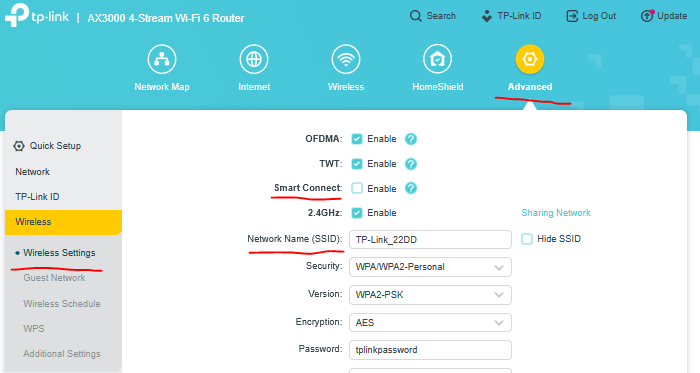
How to rename SSID of my Archer AX55?

How to rename SSID of my Archer AX55?
Tags:
#Network Connectivity
I am sitting with my PC and video calling device in between my SP router and the connected (AP mode) TP Link AX55.
I am experiencing connectivity issues and the SP technician is telling me I should rename the network (SSID) of my TP Link to make sure I am connecting to the latter instead of to the SP modem. Now, connection is switching from SP model to TP Link and vice versa (hesitating), while the connection health is much better via the TP Link AX55. Both SSID's curently have the same name, so I am not getting the option to choose between both.
Can you tell me how I can rename the SSID of my TP Link?
And can you confirm that I will then be able to enforce connection via the latter?