
ER8411 not routing response traffic to wireguard clients

ER8411 not routing response traffic to wireguard clients

ER8411 not routing response traffic to wireguard clients
a week ago - last edited a week ago
Model: ER8411  
Hardware Version: V1
Firmware Version: 1.3.6 Build 20251028 Rel.12399

I have wireguard configured on the gateway acting as a VPN server. The "Local IP Address" on the gateway's wireguard config (10.16.16.1) is set to a subnet unused by any of the existing VLANs. There is a single peer configured currently (I deleted all other configured wireguard peers), with the "Allow Address" set to 10.16.16.13/32.


It seems like the gateway is setting up the wireguard connection properly, but is not forwarding traffic back to the wireguard clients.
 

The wireguard handshake between the client and the gateway is successful. I see the Handshake and response in my tcpdump/wireshark. But I am unable to get a ICMP reply on my client's interface when pinging the router. 

I can ping a computer on the local LAN (i.e. 10.16.1.200) from the wireguard client (10.16.16.13). On 10.16.1.200's interface, I can see both the ping from 10.16.16.13 and the reply from 10.16.1.200. But that never reaches 10.16.16.13.

Looking at the gateway's routing tables in the omada UI, I see a route to 10.16.16.13 (I assume the /32 is implied) with a "Next Hop" of 0.0.0.0, "Interface" of 829089647, and "Metric" of 9999.

My gateway is managed by an omada controller so I can't ssh into the gateway or access its local management UI. I think I'm at the limit of how much I can diagnose.

  0      
  0      
#1
Options
1 Accepted Solution
Re:ER8411 not routing response traffic to wireguard clients-Solution
a week ago - last edited a week ago

  @baodrate 


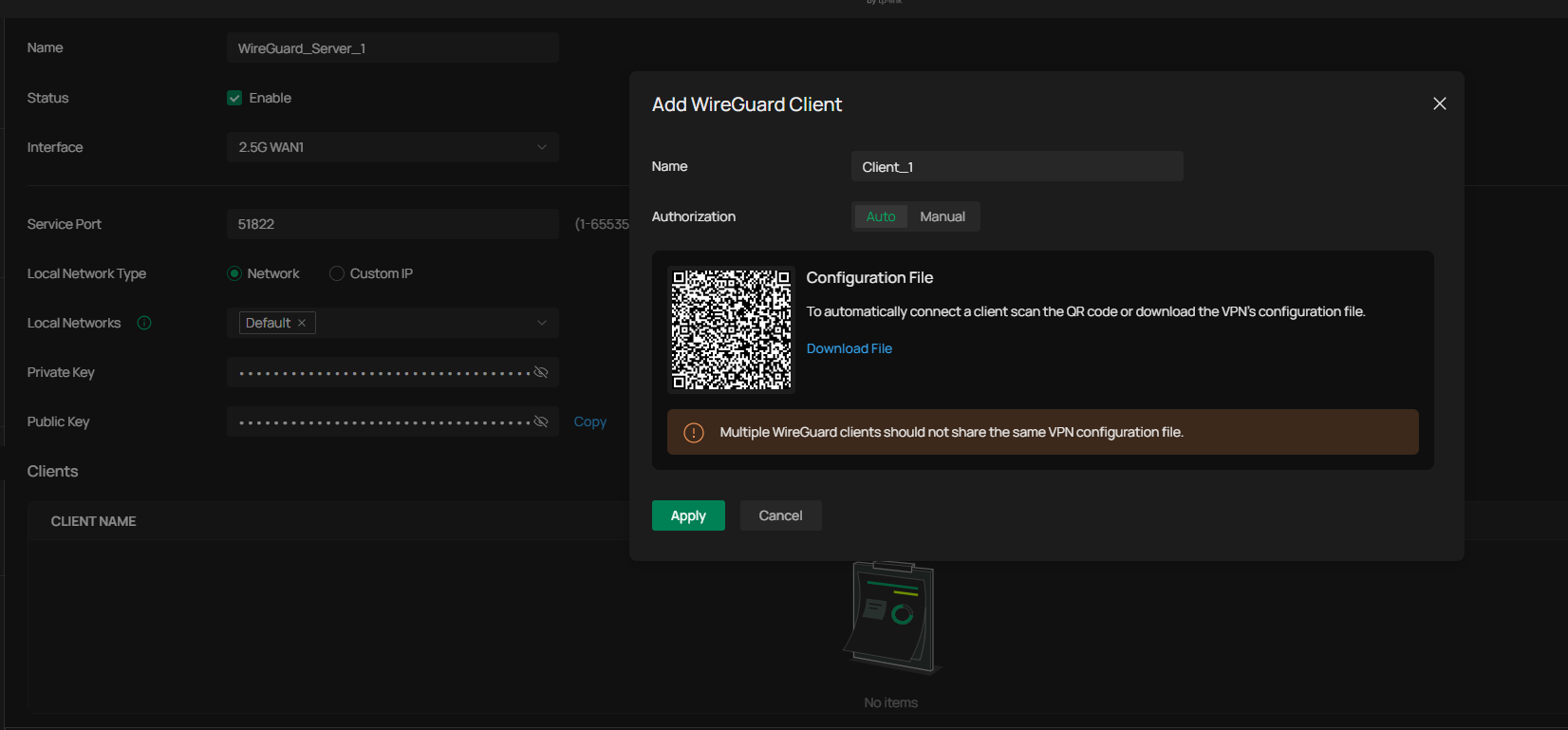
There are big changes to the Wireguard server and client, so if you are a little patient, hopefully there will be upgraded firmware for the ER8411, I have the beta version on the ER707-M2 so I have tested a bit and it looks very good. Here is a screenshot of the wireguard server configuration in the new controller.


The configuration is very dynamic with many options, there is also client file download.


If you want to use ER8411 as a wireguard client, you can also import the client file, so all the manual configuration is no longer needed.


so there are big improvements.

I was hoping for firmware for ER8411 this week but it seems to be a bit late.


Recommended Solution
  0  
  0  
#4
Options
7 Reply
Re:ER8411 not routing response traffic to wireguard clients
a week ago

Hi  @baodrate 

To help assist and streamline the identification of the behavior, we recommend sending an email to forumsupport.usa@tp-link.com with the following information:

Subject: [Forum Escalation][ID 858528] 
Forum Nickname: 
Thread URL:  https://community.tp-link.com/en/business/forum/topic/858528
Model&Version: 
Description: 
Any Other Relevant Information (Logs, Config Files, Images, etc.): 

Once sent, a ticket will be created in our support system, and a member of the team will follow up to gather more information or troubleshoot a cause.

Best Regards! >> Omada EAP Firmware Trial Available Here << >> Get the Latest Omada SDN Controller Releases Here << *Try filtering posts on each forum by Label of [Early Access]*
  1  
  1  
#2
Options
Re:ER8411 not routing response traffic to wireguard clients
a week ago

  @Hank21 I sent the email ~30 hours ago. I haven't received a response, manual or automated. Could you confirm that a ticket has been created? 

  0  
  0  
#3
Options
Re:ER8411 not routing response traffic to wireguard clients-Solution
a week ago - last edited a week ago

  @baodrate 


There are big changes to the Wireguard server and client, so if you are a little patient, hopefully there will be upgraded firmware for the ER8411, I have the beta version on the ER707-M2 so I have tested a bit and it looks very good. Here is a screenshot of the wireguard server configuration in the new controller.


The configuration is very dynamic with many options, there is also client file download.


If you want to use ER8411 as a wireguard client, you can also import the client file, so all the manual configuration is no longer needed.


so there are big improvements.

I was hoping for firmware for ER8411 this week but it seems to be a bit late.


Recommended Solution
  0  
  0  
#4
Options
Re:ER8411 not routing response traffic to wireguard clients
a week ago
That's good to know! I hope it includes networking revamp and not just UI updates. Thanks for clueing me in on it
  0  
  0  
#5
Options
Re:ER8411 not routing response traffic to wireguard clients
Friday

  @baodrate 


I have the same problem with the ER7406 gateway (with the latest v6.2 firmware).  After upgrading the controller to the latest v6.2 pre-release firmware, the existing WireGuard configuration showed up on the Site-to-Site VPN page and everything works OK.  As I only have a single laptop for remote access, I tried to set up a new server on the VPN Server page and simply can not get it to work.  After adding the laptop as a client and exporting the config file to the laptop, the laptop can not establish a tunnel and the laptop's log is showing that the handshake does not complete.  I have verified that all the keys are correct and I don't know what else to check.  It appears as though the gateway is simply not responding.  I am open to any ideas...


1x ER7406 1x OC300 4x SG2008 1x EAP610 3x EAP650-Desktop 1x EAP772-Outdoor
  0  
  0  
#6
Options
Re:ER8411 not routing response traffic to wireguard clients
Friday

  @jra11500 unfortunately our issues are a bit different because my handshakes are completing. I'm even getting traffic in one direction. I'm just not seeing the responses routed back out.


I'll keep this thread updated with anything I figure out that might give you a clue.

  0  
  0  
#7
Options
Re:ER8411 not routing response traffic to wireguard clients
Friday

  @baodrate 


Thank-you for responding.  I just found the problem after parsing through a number of threads.  In the client configuration window, there is an option for enabling an Allowed Address which was unchecked by default.  After enabling the option and adding the gateway address, everything started to work.


1x ER7406 1x OC300 4x SG2008 1x EAP610 3x EAP650-Desktop 1x EAP772-Outdoor
  0  
  0  
#8
Options