
How do I delete my account?

- Copy Link
- Subscribe
- Bookmark
- Report Inappropriate Content


Hi @Enter_the_scree ,
Welcome to our community.
Do you want to delete your TP-Link ID? Before proceeding, it's important to understand the consequences of deleting your TP-Link cloud account. When you delete your account (which includes Tether, Deco, Kasa, Tapo, tpCamera, tplinkcloud.com, Forum ID, etc.), you will permanently lose all metadata associated with your cloud resources. You won't be able to revert this action or restore any cloud-specific metadata, even if you re-register with the same credentials later.
If you no longer own a TP-Link device and are certain you want to completely delete your TP-Link cloud account, please follow the instructions in this FAQ and submit your account deletion request: How can I delete my TP-Link cloud account?
Important Notes:
1. Once you click the 'Permanently Delete Account' button on the website, your account will immediately become unusable for any app or cloud services, even if you haven't received a confirmation email yet.
2. The deletion process cannot be undone. If you accidentally delete your account, you can only re-register once the process is complete.
3. The entire deletion process may take up to 72 hours. If you wish to register the same email address for a new TP-Link ID, please wait 72 hours before attempting to register again.
If you still see the message 'this account already exists,' please contact the local support team for further assistance.
- Copy Link
- Report Inappropriate Content
@Joseph-TP
Oh, was hoping to just delete the forum/community.tp-link account, but I'm guessing it is tied into the other services as well?
- Copy Link
- Report Inappropriate Content
Could you please tell me why you want to delete your community account? Once deleted, all posts and account data in the community will be lost and cannot be recovered.
If the email address you registered with in the community is currently linked to your TP-Link ID, and that account is used to control your TP-Link devices (such as Deco and Kasa devices) and log in to applications on your phone (such as the Deco App and Kasa App), we still recommend that you keep your community account.
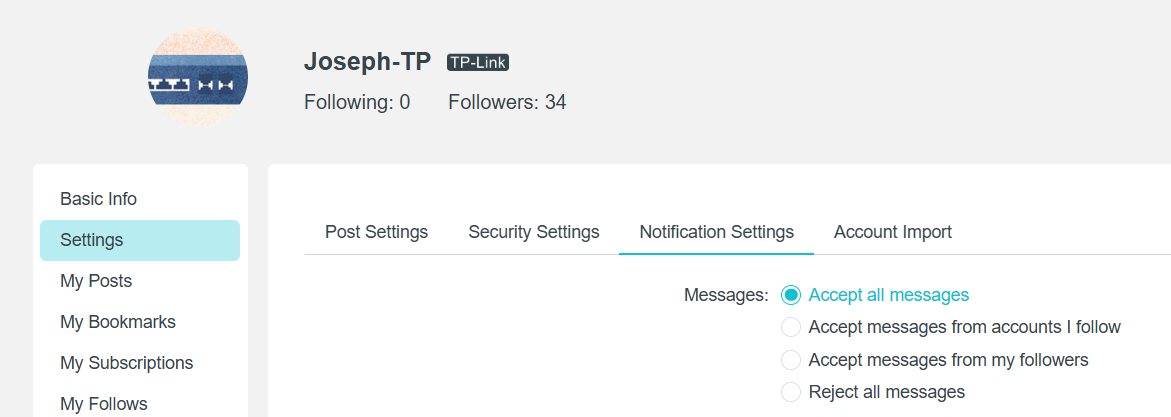
If you want to reduce notifications, you can go to your personal account's Notification Settings and modify them as needed.
- Copy Link
- Report Inappropriate Content
Information
Helpful: 0
Views: 100
Replies: 3
Voters 0
No one has voted for it yet.