
How to Find the Firmware Region of Your TP-Link Device

How to Find the Firmware Region of Your TP-Link Device

How to Find the Firmware Region of Your TP-Link Device
2026-03-21 15:20:43 - last edited 2026-03-21 15:27:11

I am bringing this topic up, because the FAQ document (How to Find the Hardware Version on Your TP-Link Device) has been updated on 06.03.2026.

The old version included a description how a user can determine its TP-Link device FW region:
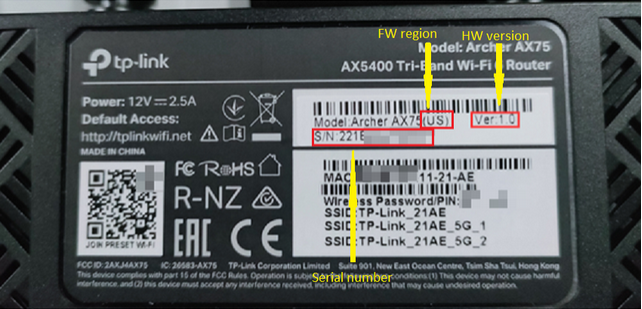


In the new updated version I see that this information is missing.

So far, I couldn't find any other official FAQ document describing that matter.

It would be beneficial to users, if you update the document with this information as well.

If this was helpful click on the arrow pointing upward to make it blue. If this solves your issue, click the star to make it blue as a "Recommended Solution". BTC:149wubkkfoLmNDjDbiTxx4ZU8mpcMA5CJt

1
1
#1
1 Reply
Re:How to Find the Firmware Region of Your TP-Link Device
a week ago

  @terziyski ,

Thank you for your suggestions and feedback. I have submitted these optimization suggestions to the relevant departments, and I hope to improve the FAQ in the future.

Welcome to Community! Get the latest posts: △New Firmware for Archer GE550/GE650 V1 Introduces AI-QoS, EasyMesh IoT Expansion, and More! △New Firmware Releases for Archer BE805 V1/BE450 V1 to Support VPN Merge, New ECO Mode, and More! More posts, please see: △ Get the Ongoing Pre-release Firmware for Wi-Fi Routers Here— Subscribe for Updates! Urgent problems with your Wi-Fi Router, Range Extender, or DSL Modem? Please reach out via private Messages or @Joesph-TP in your new thread directly. Click Or ☆Recommended Solution if the post/answer helps.
0
0
#2