

Help with SG2218P

Help with SG2218P

Help with SG2218P
Help with SG2218P
3 weeks ago - last edited 2 weeks ago
Model: SG2218P  
Hardware Version: V2
Firmware Version: not sure

Hello,


I’ve been using un-managed switches for almost 20 years and at some point, I started thinking about getting some vlans to isolate them etc.
So, at first I bought an TL-SG108E but I wasn’t able to use it! I didn’t understand the terms “tagged” and “untagged”. I thought that SG108E would “generate” vlans and isolate them. Stupid of me I know.


With a lot of googling and chat-GPTing, I somehow managed to finally partly understood the meaning of terms tagged/untagged. I then purchased an ES208G omada and made them carry 2 DHCP servers on them (starlink + a deco) spreading internet to my house.


So, my house is now running with a Starlink (not in bypass mode) generating 192.168.1.**, and a deco generating 192.168.68.**.
ES208G is closer to my WAN router
Deco is getting internet from ES208G and generating 192.168.68.** for wifi IOT and getting back into a ES208G port for sending it to my office with a tagged port.
My office is running the TL-SG108E, working on 192.168.1.**, I some times plug it to a 192.168.68.** port to manage the IOT. Another port from my office is going to my warehouse to an unmanaged for other devices.


This is (about) what I have now:
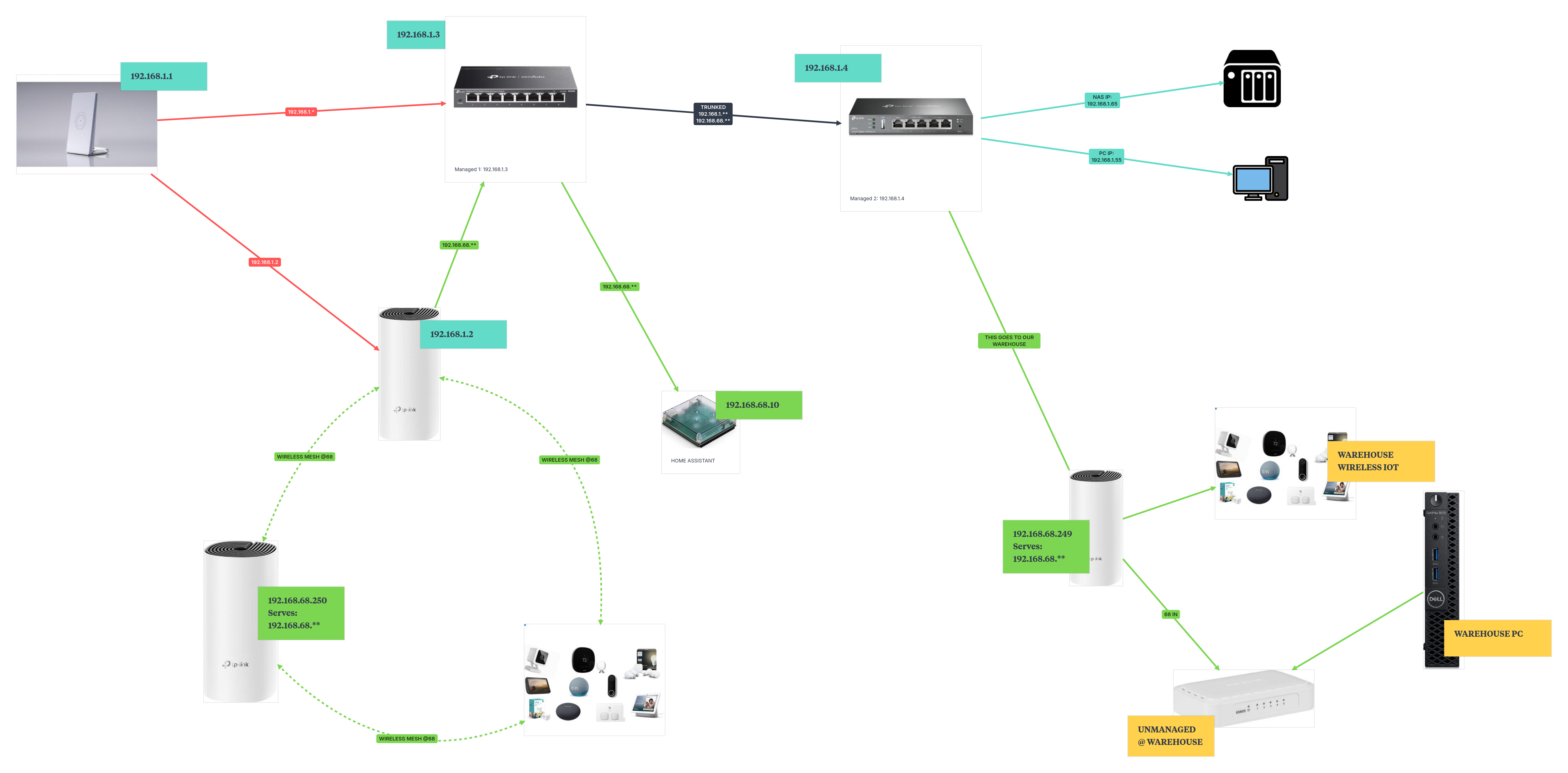
 

If there are minor errors in the image regarding IP's please ignore them. The was is made by hand.


People say that double NAT is not a good thing. So, also because I was excited to finally understand tagged/untagged and make a small network working I got a SG2218P.


My goal was to:

  • Deactivate starlink DHCP server
  • Deactivate Deco DHCP server and let it run as an access point only for wireless IOT
  • Have the switch generate networks such as 192.168.10.**, .20.**, .50.** etc and isolate a few of them.


This is my goal (or something like that) visually presented: (Each color is another network)
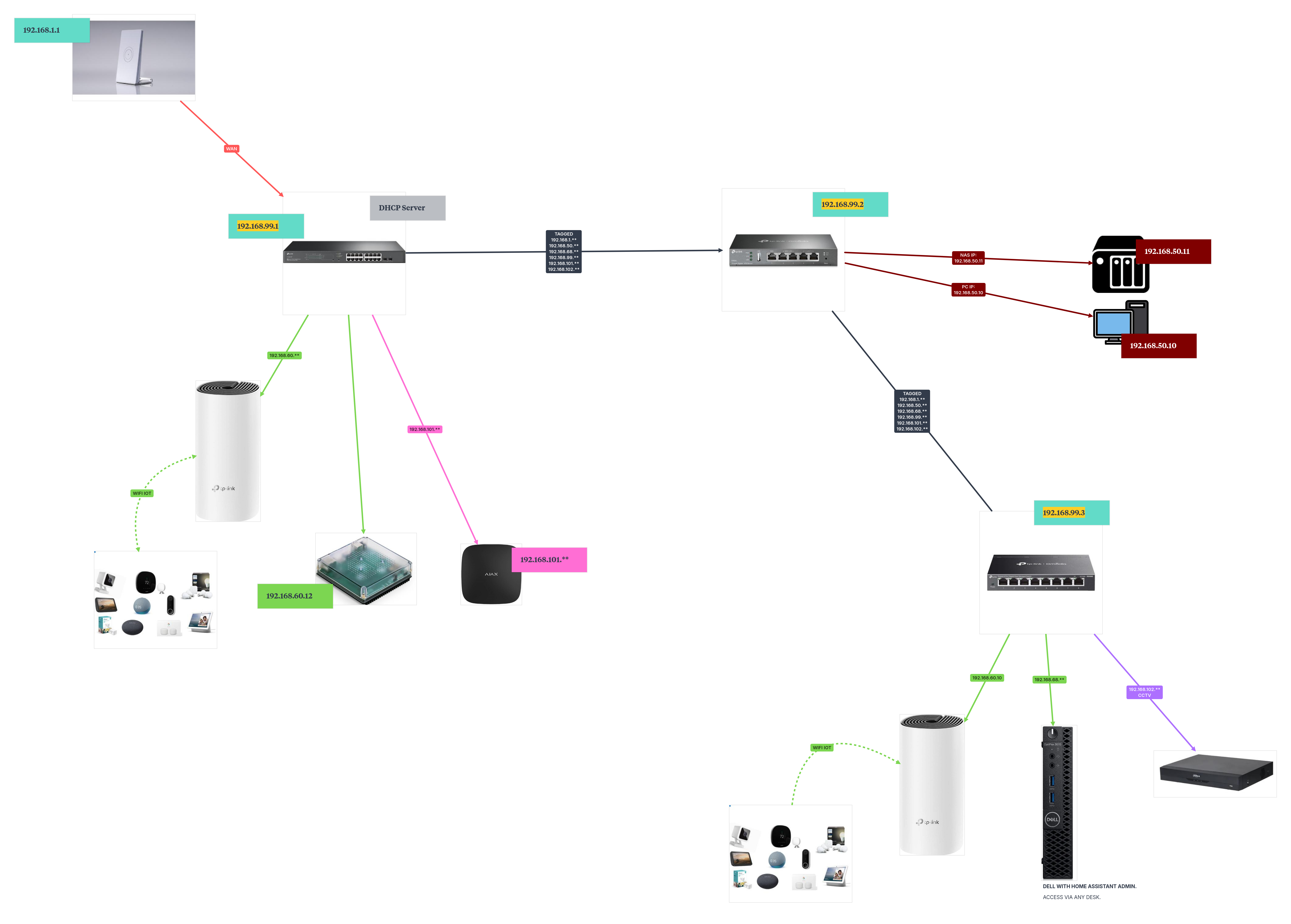
 

If there are minor errors in the image regarding IP's please ignore them. The was is made by hand.


For some reason it wasn’t working. Ports did not have internet (while it served IPS when plugging in).


Again, googling and ChatGPTing touched me (and please forum inform me on that), that I need a router with the ability to manage multiple VLANS with his NAT.


ChatGPT said that: Starlink router have 1 NAT for 1 SUBNET. But I need multiple subnets so get a router like this: TP-LINK ER605 so I can "NAT" multiple networks/subnets via SG2218P.


So… am I on the right track or not?


Should I have gone with a higher-level switch with intergraded NAT? I paid 200 Euros for TL-SG108E and that was actually about my budget.


That was suppose to be a post about isolation but since I wasn't able to make it work, it's a post about how to make it work. Thanks for reading this post.

  0      
  0      
#1
Options
1 Accepted Solution
Re:Help with SG2218P-Solution
3 weeks ago - last edited 2 weeks ago

Hi  @BDKs 


Thanks for posting here.


TP-LINK ER605 so I can "NAT" multiple networks/subnets via SG2218P.

>>>Yes, everything will be easy if you add an ER605 omada gateway.


With ER605 and the switch SG2218P, you can configure multi-vlan and isolate them easily.

Below is the guide:

How to configure Multi-Networks & Multi-SSIDs on Omada SDN Controller


Deco devices don't support multi-VLAN, so it won't work for your wireless clients. 

If you also need it apply to wireless networks, you may replace the Deco units as Omada EAP.

Below is a product list:

https://www.omadanetworks.com/us/business-networking/omada/wifi/

Recommended Solution
  0  
  0  
#2
Options
3 Reply
Re:Help with SG2218P-Solution
3 weeks ago - last edited 2 weeks ago

Hi  @BDKs 


Thanks for posting here.


TP-LINK ER605 so I can "NAT" multiple networks/subnets via SG2218P.

>>>Yes, everything will be easy if you add an ER605 omada gateway.


With ER605 and the switch SG2218P, you can configure multi-vlan and isolate them easily.

Below is the guide:

How to configure Multi-Networks & Multi-SSIDs on Omada SDN Controller


Deco devices don't support multi-VLAN, so it won't work for your wireless clients. 

If you also need it apply to wireless networks, you may replace the Deco units as Omada EAP.

Below is a product list:

https://www.omadanetworks.com/us/business-networking/omada/wifi/

Recommended Solution
  0  
  0  
#2
Options
Re:Help with SG2218P
2 weeks ago

  @Vincent-TP Thanks for the info.


I have just ordered ER605V2.2.


What I don't udnerstand is the reason SG2218P can create multiple vlans in its interface. Since it can't itself manage NAT for multiple vlans.


Is it an off-line case scenario where you don't need internet on your vlans? Or is it something else? What Am I missing?

  0  
  0  
#3
Options
Re:Help with SG2218P
2 weeks ago

Hi  @BDKs 


  • The main purpose of creating multiple VLAN interfaces (SVIs) is to: Enable the switch’s Layer 3 routing function to achieve high-speed internal communication between VLANs.
  • This is completely unrelated to whether the device supports NAT , as NAT is a function required by firewalls/routers when connecting different networks (e.g., internal network and the Internet).
  • The “offline scenario” you mentioned is precisely one of its primary use cases—efficiently routing and isolating traffic within a closed internal network.

    BDKs wrote

      @Vincent-TP Thanks for the info.


    I have just ordered ER605V2.2.


    What I don't udnerstand is the reason SG2218P can create multiple vlans in its interface. Since it can't itself manage NAT for multiple vlans.


    Is it an off-line case scenario where you don't need internet on your vlans? Or is it something else? What Am I missing?


  0  
  0  
#4
Options