Bug: Client flapping between VLANs when device has multiple IPs (same MAC)

Bug: Client flapping between VLANs when device has multiple IPs (same MAC)

Bug: Client flapping between VLANs when device has multiple IPs (same MAC)
a week ago
Hardware Version:
Firmware Version: 6.2.10.15

Hi all,

I’m observing a reproducible issue with client detection in Omada SDN when a single device (in my case a NAS) is configured with multiple IP addresses across different VLANs.


Setup:

  • Omada SDN Controller
  • 3 VLANs:
    • VLAN 0 (Default): 192.168.0.0/24
    • VLAN 10(X) : 192.168.10.0/24
    • VLAN 20(Y) : 192.168.20.0/24
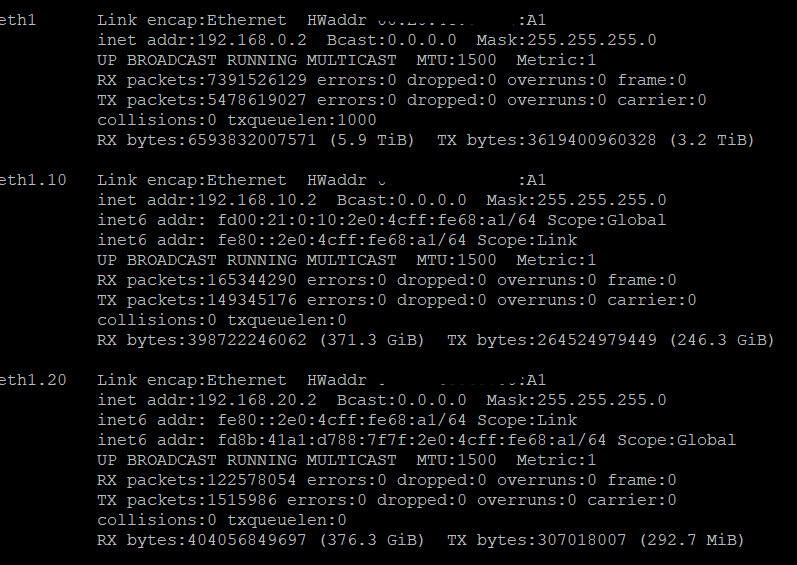
  • NAS with interfaces/IPs in all three networks:
    • 192.168.0.2
    • 192.168.10.2
    • 192.168.20.2
  • NAS connected via trunk port (tagged VLAN 10/20, untagged default / Native=Default


Observed behavior:
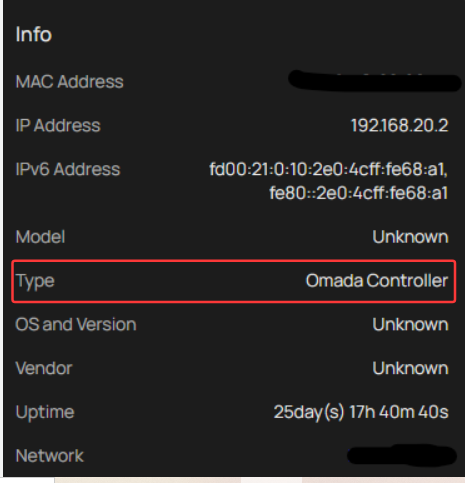
In the Omada Controller, the NAS is constantly “reconnecting” and switching between networks:

Example log pattern:

  • Connected to Default (192.168.0.2)
  • Connected to X (192.168.20.2)
  • Connected to Y (192.168.10.2)
    → repeating every few minutes

This creates:

  • Continuous “connect/disconnect” events
  • Incorrect or unstable network assignment in the UI


Important:

  • Network connectivity itself is stable
  • No packet loss or real disconnects
  • No STP events or MAC flapping on switch ports
  • Same MAC address is used across VLAN interfaces (expected behavior for this device)


Expected behavior:

  • Either:
    • The client should be shown once with multiple IPs across VLANs, or
    • Separate logical entries per VLAN/IP should be stable
  • No continuous reconnect events if the physical link is stable


Actual behavior:

  • Controller seems to reassign the same MAC to different VLANs repeatedly
  • Appears as frequent reconnects (“flapping”), although no real link change occurs


Log
04-26-2026 09:25:24.887 INFO [client-inform-work-group-1] [] c.t.s.o.c.d.m.h.k(): Need override old client history for client 00-E0-4C-68-00-A1 with lastSeen 1777188295217
04-26-2026 09:24:54.897 INFO [client-inform-work-group-0] [] c.t.s.o.c.d.m.h.k(): Need override old client history for client 00-E0-4C-68-00-A1 with lastSeen 1777188265197
04-26-2026 09:27:54.968 INFO [client-inform-work-group-0] [] c.t.s.o.c.d.m.h.k(): Need override old client history for client 00-E0-4C-68-00-A1 with lastSeen 1777188445277
04-26-2026 09:28:24.986 INFO [client-inform-work-group-1] [] c.t.s.o.c.d.m.h.k(): Need override old client history for client 00-E0-4C-68-00-A1 with lastSeen 1777188475297

0
0
#1
7 Reply
Re:Bug: Client flapping between VLANs when device has multiple IPs (same MAC)
a week ago

Hi  @pustekuchen 


Thanks for posting here.

Could you share why you manually configured three IP addresses for this NAS? Typically, different VLAN interfaces can access each other by default, so a single IP address is sufficient in most cases. Could you please provide details about your specific scenario? We’d like to understand the full context.


In addition, to better understand the situation, please give us the following info:

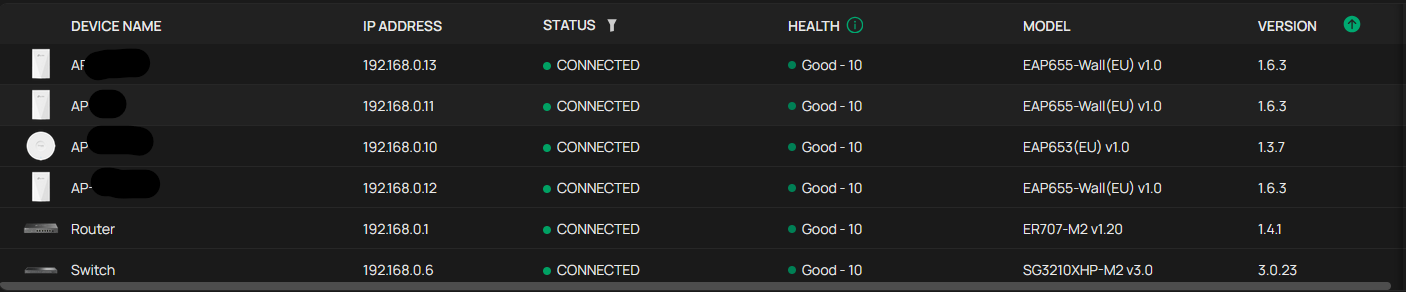
1. A screenshot of the Device page so we could know the SDN devices and their firmware version;

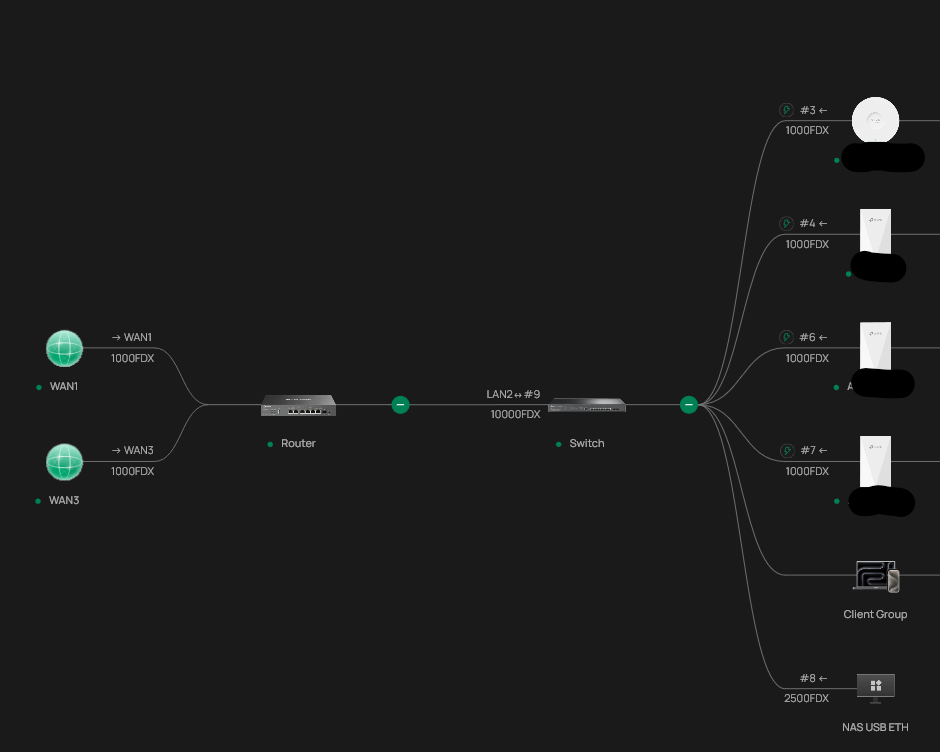
2. The screenshot of the network, please include the gateway, the controller, and the NAS, and show how/which device the NAS is plugged into the network.

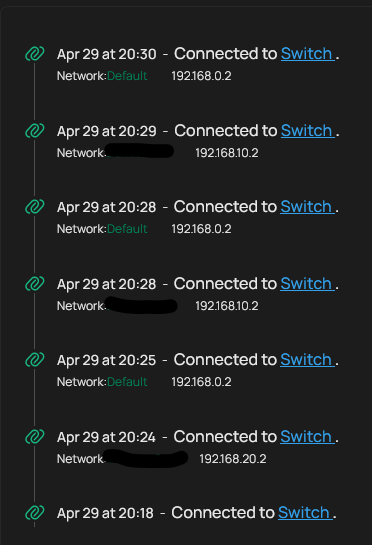
3. Some screenshots of the mentioned logs;

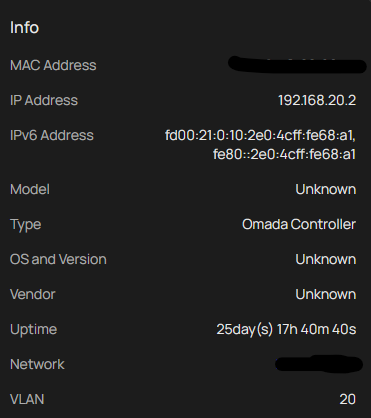
4. A screenshot of the NAS IP settings.

0
0
#2
Re:Bug: Client flapping between VLANs when device has multiple IPs (same MAC)
Wednesday - last edited Wednesday

  @Vincent-TP The reason that i want an own IP adress in each vlan is to fully make use of protocols which use Multicast/Broadcast like SSDP.


1) 


2) 

3) 


4)  
these ips are switching continuesly


0
0
#3
Re:Bug: Client flapping between VLANs when device has multiple IPs (same MAC)
Wednesday

0
0
#4
Re:Bug: Client flapping between VLANs when device has multiple IPs (same MAC)
Thursday

Hi  @pustekuchen 

Thanks for the information.

So the Omada controller is installed on the NAS, right?


I suspect this is the cause of the situation.

Is the NAS the only client encountering this situation? To confirm this, please test like below:

Plug another client into the switch port 8, and check if the same logs appear or not.


In the meantime, I will confirm this internally. 


0
0
#5
Re:Bug: Client flapping between VLANs when device has multiple IPs (same MAC)
Thursday

  @Vincent-TP yes you are right. I'm running the controller via docker. (latest release 6.2.10.17)


This behavior happens only with the nas. Before configuring the multiple ips, it was OK. 

0
0
#6
Re:Bug: Client flapping between VLANs when device has multiple IPs (same MAC)
Thursday

  @pustekuchen 


If you are trying to utilise UDP which doesn't reliably cross vlan boundary your Method will work but it will cause this - the controller will see that its all on one single mac and will (correctly) identify it as a single device on whatever vlan that device was creating traffic on when it did the client scan.  I would expect that behavior


If you set up virtual MACs for the IP interfaces it wouldn't happen - i have a PC with 4 virtual interfaces, different MACs, one connection, no issue

0
0
#7
Re:Bug: Client flapping between VLANs when device has multiple IPs (same MAC)
Friday

  @GRL Thanks for the hint. I changed the MAC Adress for each interface. I got three devices in omada now. That should work.

0
0
#8