
Extender IP Allocation issues

Hi Everyone, we recently upgraded to a Fibre Line that included a Mikrotik hAP ax S enterprise router. We initially had issues having the Main Router and our office printer communicate with each other, ISP advised they would lower the IP Range or set the IP to static so there would be no issues, thus far its seems to have worked.
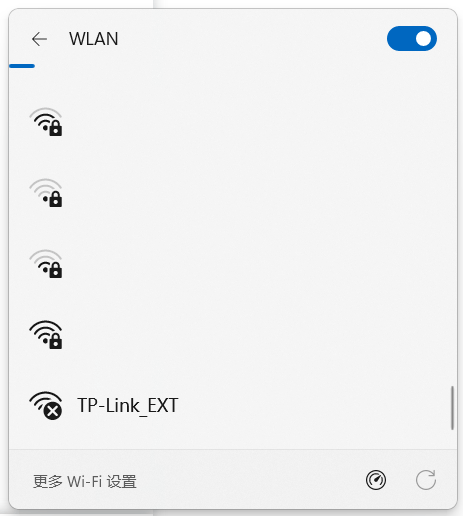
The new issue arose after we purchased the WA855RE Wifi Extender. Set up was done correctly as I am able to connect to the extender with my phone but all 5 of the laptops in our office cannot connect to the extender network. The extender network is displayed when checking for available networks but has a circled cross icon next to it.
Ive set DHCP to off, however it is still set to retrieve an IP address automatically, should this be set to the static IP our ISP assigned to the main router?
Any help would be appreciated.
- Copy Link
- Subscribe
- Bookmark
- Report Inappropriate Content

Hi,
If you are seeing the Wi-Fi symbol shown in the picture below, then the problem should not be related to IP allocation. In my experience this is usually a sign of issues with the Wi-Fi security protocol.
Can you please connect a laptop to the Mikrotik's Wi-Fi, lookup the IP address of the TL-WA855RE in the client list of the Mikrotik and then open the admin website of the TL-WA855RE by entering its IP address in a web browser's address bar?
Alternatively, connect your phone to the Wi-Fi and then log into the TL-WA855RE via the "Tether" app.
I am interested in the "Security" setting of the "Extended Network". (ideally it should say "WPA2/WPA3-Personal")
- Copy Link
- Report Inappropriate Content
Hi,
If you are seeing the Wi-Fi symbol shown in the picture below, then the problem should not be related to IP allocation. In my experience this is usually a sign of issues with the Wi-Fi security protocol.
Can you please connect a laptop to the Mikrotik's Wi-Fi, lookup the IP address of the TL-WA855RE in the client list of the Mikrotik and then open the admin website of the TL-WA855RE by entering its IP address in a web browser's address bar?
Alternatively, connect your phone to the Wi-Fi and then log into the TL-WA855RE via the "Tether" app.
I am interested in the "Security" setting of the "Extended Network". (ideally it should say "WPA2/WPA3-Personal")
- Copy Link
- Report Inappropriate Content
Hi Woozle,
After playing around with the settings, seems like the WPA3 Passkey Protection was the issue, changed it to WPA2 and all seemed to be fine and working.
The following day, WIFI network showed to be connected and secured but any web page I opened up refused to load. Even trying to log back in to the Webconfig was an issue.
Ive been factory resetting the router almost every day now, worse case scenario would be to buy a 30m ethernet cable to plug the extender directly in to the router.
If youve got any other recommendations to try, it would be most helpful.
Just as a side note, ive attempted setting the IP to static with details provided from the ISP but to no avail.
- Copy Link
- Report Inappropriate Content
"... to buy a 30m ethernet cable to plug the extender directly in to the router."
If you would need a 30 m long cable to connect the TL-WA855RE to the router tells me that the two must be quite some distance away from each other.
Propagation of Wi-Fi signals inside buildings is quite limited. Of course, it depends on the structure of the building, but generally I would say that anything over 15 m is pushing it.
I would move the TL-WA855RE nearer to the router and see if that helps.
- Copy Link
- Report Inappropriate Content
Apologies for the mistype as well as the lack of clarity on my part.
Actually meant a 20m cable. The extender is about 4 to 5 linear meters away from the main router but taking in to account running the cable along the 90 degree bends, up and around the door frame etc, the estimated cable needed would be about 16 to 17 meters. There is only one wall between the main router and extender for reference so signal coverage shouldnt be an issue (I get full wifi signal bars off the extender when sitting in my office)
The extender seems to act up whether im bordering the edge of where the extended wifi signal ends or whether im right next to it.
Not sure how else to phrase this besides in laymans terms but could the Extender just not be smart enough to communicate with the Enterprise Router?
- Copy Link
- Report Inappropriate Content
If it's only 5 meters, then the distance should be no problem. You can always check the signal strength of the connection between the TL-WA855RE and the Mikrotik router in the TL-WA855RE's admin webpage. (in the "Status" or "Network Map" screen click on the "Router" icon)
Just because the Mikrotik router is called enterprise router doesn't automatically rule out using a range extender. It would only become a problem if certain enterprise features are used that conflict with the workings of these simple range extenders.
- Copy Link
- Report Inappropriate Content
Information
Helpful: 0
Views: 115
Replies: 5
Voters 0
No one has voted for it yet.