TX50UH WiFi6 Dongle Won't Connect to Sky Max Pod @ 5ghz (only 2.4ghz)

TX50UH WiFi6 Dongle Won't Connect to Sky Max Pod @ 5ghz (only 2.4ghz)

TX50UH WiFi6 Dongle Won't Connect to Sky Max Pod @ 5ghz (only 2.4ghz)
Saturday
Model: Archer TX50UH  
Hardware Version:
Firmware Version:

Hi All


I have a Sky Gigafast connection and wired to this (by Ethernet) is a Sky Max Pod - this addition increased upstairs peed to my Laptop from 130Mbps to 600Mbps (the Laptio connects to the Max Pod @ 5ghz to achieve this nice increase).


So that’s all good, but to try and get a little more speed, I purchased the TX50UH Dongle, hoping that an external Adapter will be a bit stronger.


Problem Statement:  When I plug the TX50UH into the Laptop (and disable the internal Adapter) it will only connect to the Max Pod at 2.4ghz which gives a capped speed of the 130Mpbs.


When I disable the 2.4ghz option on the TX50UH (to try and force a 5ghz connection), it connects directly to the Sky Router, bypassing the Max Pod, and speed is again capped to 130Mpbs.


Equipment breakdown is:


Sky SR213 Wifi 6 Router ---->[Ethernet]---->Sky Max Pod (Tri-Band)------WiFi----->Laptop With 160Mhz Internal Wifi 6 Adapter on Windows 11  / ( Or Laptop With TX50UH Plugged In)


I have tried:


  • Using different USB Ports for the TX50UH
  • Plugging the TX50UH directly into USB Port and avoiding the Cradle
  • Changing the Preffered Band Options in Device Manager
  • Forgetting the WiFi Network and then re-adding 


Is there anything else I can try or should I accept that using my Laptop internal Adapter is as good as it gets?


Thanks,

Russ

0
0
#1
4 Reply
Re:TX50UH WiFi6 Dongle Won't Connect to Sky Max Pod @ 5ghz (only 2.4ghz)
Saturday

  @Raiden_C43 


Hi,


Please connect to the Sky Max Pod with the internal Wi-Fi card of your laptop and then get us the "Security type" and "Network channel" from the "Properties" screen of that Wi-Fi connection. (make sure the laptop is indeed connected to the 5 GHz of the Sky Max Pod, and not the Sky Router)


0
0
#2
Re:TX50UH WiFi6 Dongle Won't Connect to Sky Max Pod @ 5ghz (only 2.4ghz)
Sunday

  @Raiden_C43 


Hi


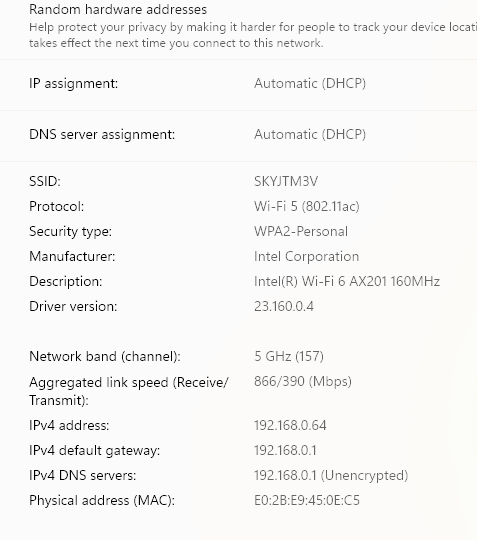
Pictured below is how it looks when my Laptop is connected to the Sky Max Pod with my Internal Adapter:


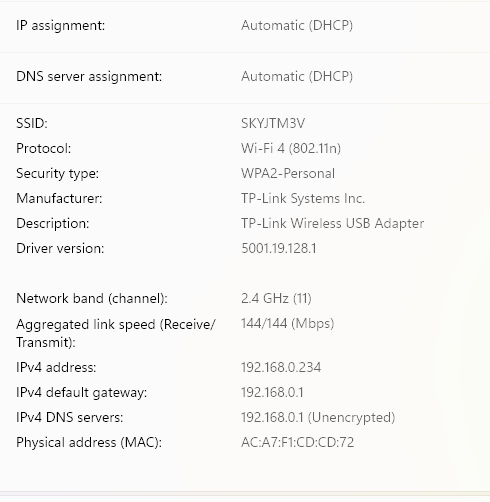
And below is how it looks connected to the Sky Max Pod using the TX50UH:


I note with the TX50UH it's connecting with WiFi 4?


0
0
#3
Re:TX50UH WiFi6 Dongle Won't Connect to Sky Max Pod @ 5ghz (only 2.4ghz)
Yesterday - last edited Yesterday

  @Raiden_C43 


From the first picture we can tell that the laptop has connected to the Sky Max Pod via channel 157.


TP-Link's USB Wi-Fi adapters based on Realtek chips that are specifically made for the "EU" regulations and will block the use of channels 149 and above.


Please look for a white serial number sticker on your TX50UH (if there is none, then you need to get the retail box the product came in and look at its serial number sticker) and see if it states something like "EU/1.0".
If it indeed were to state "EU" (and not something like "US" or perhaps "UK"), then that would explain the behavior.
 

By the way, the 5 GHz band that comprises channel 157 can only provide a channel width of 80 MHz. Given that limitation, the "600 Mbps" you get with the internal Wi-Fi card of your laptop is quite good. If you wanted to get significantly more speed (either with the internal Intel AX201 or the TX50UH), then you would need to utilize another 5 GHz band that allows a channel width of 160 MHz, provided that the Sky Max Pod actually supports 160 MHz channel width. (I couldn't find detailed specs for the Sky Max Pod)

0
0
#4
Re:TX50UH WiFi6 Dongle Won't Connect to Sky Max Pod @ 5ghz (only 2.4ghz)
Yesterday

  @woozle 


The sticker says EU1.0.


Guess I'll just box it up and return it then.

0
0
#5