
WiFi Explorer

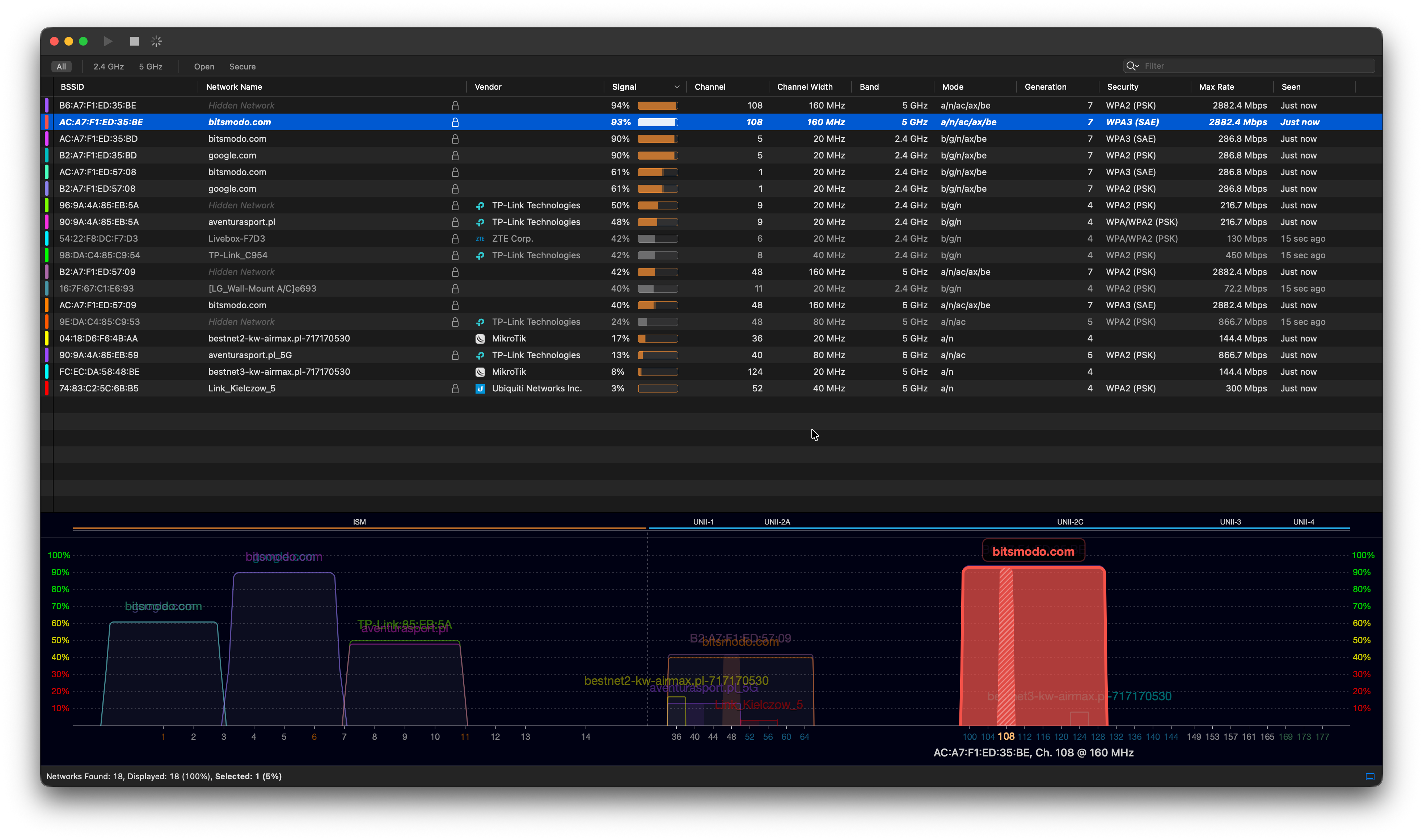
The ability to explore the radio environment and display all nearby networks around the AP (including their frequencies/channels, signal strength, etc.) would help in understanding the ambient RF conditions. There are applications like WiFi Explorer, but I am wondering if such an exploration feature could be built directly into the Omada Controller interface.
- Copy Link
- Subscribe
- Bookmark
- Report Inappropriate Content

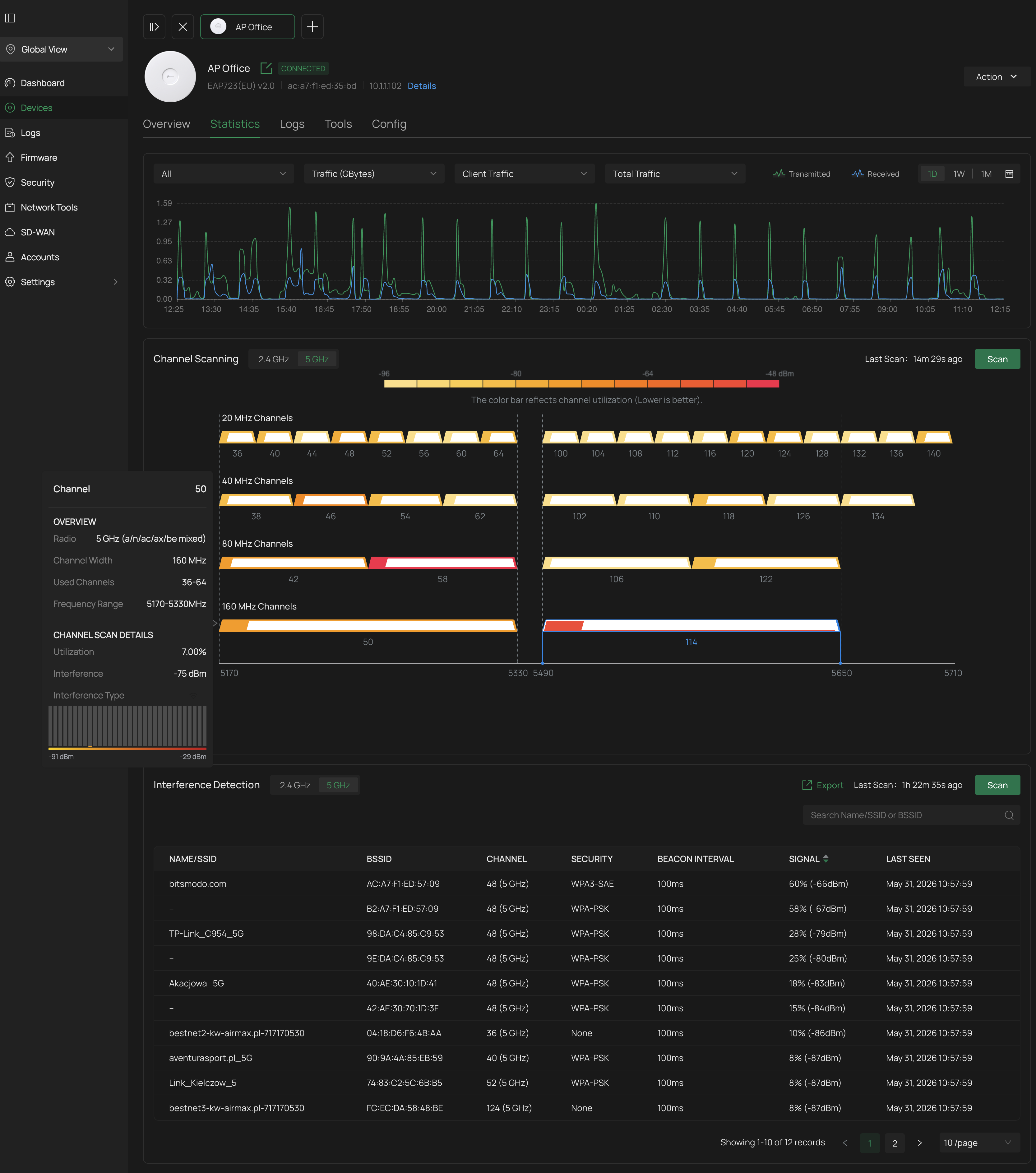
There are some exploration features already available in the controller interface. Interference detection capabilities are found by navigating to Devices, selecting the device and clicking Manage Device, then clicking the Statistics tab. The Interference Detection section is at the bottom of the window. Clicking the Scan button will produce a list of all nearby Wi-Fi signals and their signal levels. My newest Wi-Fi 7 EAP also displays a spectrum graph and has a Channel Scanning feature which returns a graph of channel utilization.
Update: The Interference Detection section can also be accessed by navigating to Site, Network Tools, and selecting the Interference Detection tab. Clicking the Interference Detection button will open a window where you can select more than one access point for a scan.
- Copy Link
- Report Inappropriate Content
There are some exploration features already available in the controller interface. Interference detection capabilities are found by navigating to Devices, selecting the device and clicking Manage Device, then clicking the Statistics tab. The Interference Detection section is at the bottom of the window. Clicking the Scan button will produce a list of all nearby Wi-Fi signals and their signal levels. My newest Wi-Fi 7 EAP also displays a spectrum graph and has a Channel Scanning feature which returns a graph of channel utilization.
Update: The Interference Detection section can also be accessed by navigating to Site, Network Tools, and selecting the Interference Detection tab. Clicking the Interference Detection button will open a window where you can select more than one access point for a scan.
- Copy Link
- Report Inappropriate Content
@jra11500 Thanks for your navigation. Hmm... Looks like that, but still it's not a real-time representation like WiFi Explorer provides (I need to wait ~7 mins for capture). Btw, I couldn't find it in Organisation > Network Tools - just under {Site} > Devices > {AP} > Manage Device > Statistics. But anyway, better that than nothing.
- Copy Link
- Report Inappropriate Content
It's true that the existing tools don't provide a real time display like other apps such as WiFi Explorer, Wifi Analyzer, etc. However they do provide the RF environment around the different access points and not just from one location where the PC is located. Combined with a third.party app, the information displayed can be quite helpful.
On a side note, I found this article yesterday,
- Copy Link
- Report Inappropriate Content


Hi @KrispPL
Since this feature already exists, I will move this post to the regular discussion section.
- Copy Link
- Report Inappropriate Content
Information
Helpful: 0
Views: 266
Replies: 4
Voters 0
No one has voted for it yet.