
slow speeds on tx20u nano

i've recently purchased tx20u nano and im only getting about 250mbps of bandwith while expecting near 1gbps.
- Copy Link
- Subscribe
- Bookmark
- Report Inappropriate Content

Hi,
One possible reason for a 250 Mbps limit could be that the TX20U Nano is running in USB 2.0 mode.
Can you please open the "Properties" of the installed driver in the Device Manager and check whether it has the "USB switch mode" option shown in the first picture in the following post? https://community.tp-link.com/en/home/forum/topic/825108
- Copy Link
- Report Inappropriate Content
@woozle 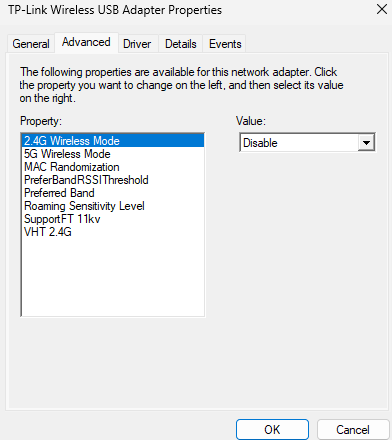 no it doesnt have
- Copy Link
- Report Inappropriate Content
OK, I see. Then first you need to find out if the USB Mode issue is still the limiting factor here.
You can use free software like "USB Device Tree Viewer" or "SIV System Information Viewer" to see if the TX20U Nano is using USB 2 mode or USB 3 mode.
- Copy Link
- Report Inappropriate Content


Hello @tetoVerse ,
Welcome to our community.
For wireless adapters, here are a few things to check:
1. Check your link speed first: Download speed is typically 30–50% of the link speed between your adapter and router. It's worth checking your current link speed to determine whether 250 Mbps is within the expected range. You can use this guide to check: What Is Wi-Fi Link Speed and How to Check It on Windows, Mac, and Android
2. Switch to 5GHz: 2.4GHz speeds are generally slower than 5GHz. If both your router and the TX20U Nano support 5GHz, try connecting to the 5GHz Wi-Fi band to see if speeds improve.
3. Test with another device: Run a speed test on another device at the same location. If that device is also slow, the issue may be with your router or ISP — you'd want to contact your router's support team in that case.
4. Update your driver: Install the latest driver from the TP-Link download center: https://www.tp-link.com/support/download/
- Copy Link
- Report Inappropriate Content
- Copy Link
- Report Inappropriate Content
Hello Joseph,
Thanks.
This is an interesting information that I didn't know.
It also means that the download speed measured by @tetoVerse is appropriate for an Archer TX20U Nano.
- Copy Link
- Report Inappropriate Content
Information
Helpful: 0
Views: 274
Replies: 6
Voters 0
No one has voted for it yet.