
Setting up event notification schedules

In the VIGI app settings, when I turn on event notifications, I can't create multiple custom notification schedules. Is there a good solution? I want to receive notifications all day on weekends, but only at specific times from Monday to Friday.
- Copy Link
- Subscribe
- Bookmark
- Report Inappropriate Content


Hi, @hirata
Thank you for posting on our business forum.
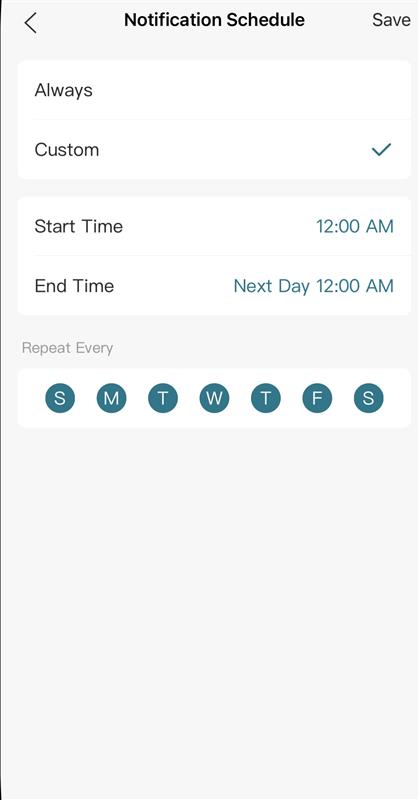
The VIGI app supports custom Notification Schedule functionality. Please follow the steps below to adjust your settings:
Go to the path VIGI APP > Devices > Click on your camera > Settings > Notifications > Notification Schedule, change the mode to Custom, set your preferred time periods when you wish to receive notifications, and click Save to confirm your changes.
- Copy Link
- Report Inappropriate Content
Hi, @hirata
Thank you for posting on our business forum.
The VIGI app supports custom Notification Schedule functionality. Please follow the steps below to adjust your settings:
Go to the path VIGI APP > Devices > Click on your camera > Settings > Notifications > Notification Schedule, change the mode to Custom, set your preferred time periods when you wish to receive notifications, and click Save to confirm your changes.
- Copy Link
- Report Inappropriate Content
Thank you for your reply.
Unfortunately, what I'm looking for is multiple notification settings.
For example, I want to receive notifications all day on Saturdays and Sundays, but from Monday to Friday, I want to receive notifications at specific times.
Nathan-TP wrote
Hi, @hirata
Thank you for posting on our business forum.
The VIGI app supports custom Notification Schedule functionality. Please follow the steps below to adjust your settings:
Go to the path VIGI APP > Devices > Click on your camera > Settings > Notifications > Notification Schedule, change the mode to Custom, set your preferred time periods when you wish to receive notifications, and click Save to confirm your changes.
- Copy Link
- Report Inappropriate Content
Hi, @hirata
Thank you for bringing this to our attention.
We regret to inform you that this feature is currently not supported by the VIGI app. We will forward your valuable feedback to the relevant team for evaluation.
Thank you again for your input; your feedback helps us continuously optimize our products and improve user experience.
- Copy Link
- Report Inappropriate Content
Information
Helpful: 0
Views: 174
Replies: 3
Voters 0
No one has voted for it yet.