
5Ghz clients can't connect to some EAPs after either switch or router upgrade

SUMMARY: after upgrading either ER8411 router or SX3832 switch using software controller v6.x, no clients could connect anymore to the 5GHz band on either all or a few EAPs, and rebooting or force provisionning those EAPs would not fix the problem.
----
Hi,
I picked the wireless forum because that's where ultimately the problem manifested itself, but it could be a controller or firmware issue, I don't know. Also, so far I always found a way to make it work in the end, so this is more of a "witness" report that I wanted to publish for reference rather than a formal bug report.
I run a software controller on Linux, currently v6.2.10.17. The issues I'm about to describe arose *only* after upgrading the controller from v5.15.24.19 to v6.x, so that's why I think this might be a controller issue, but it may also be just a coincidence, I don't know.
Here is my toplogy:
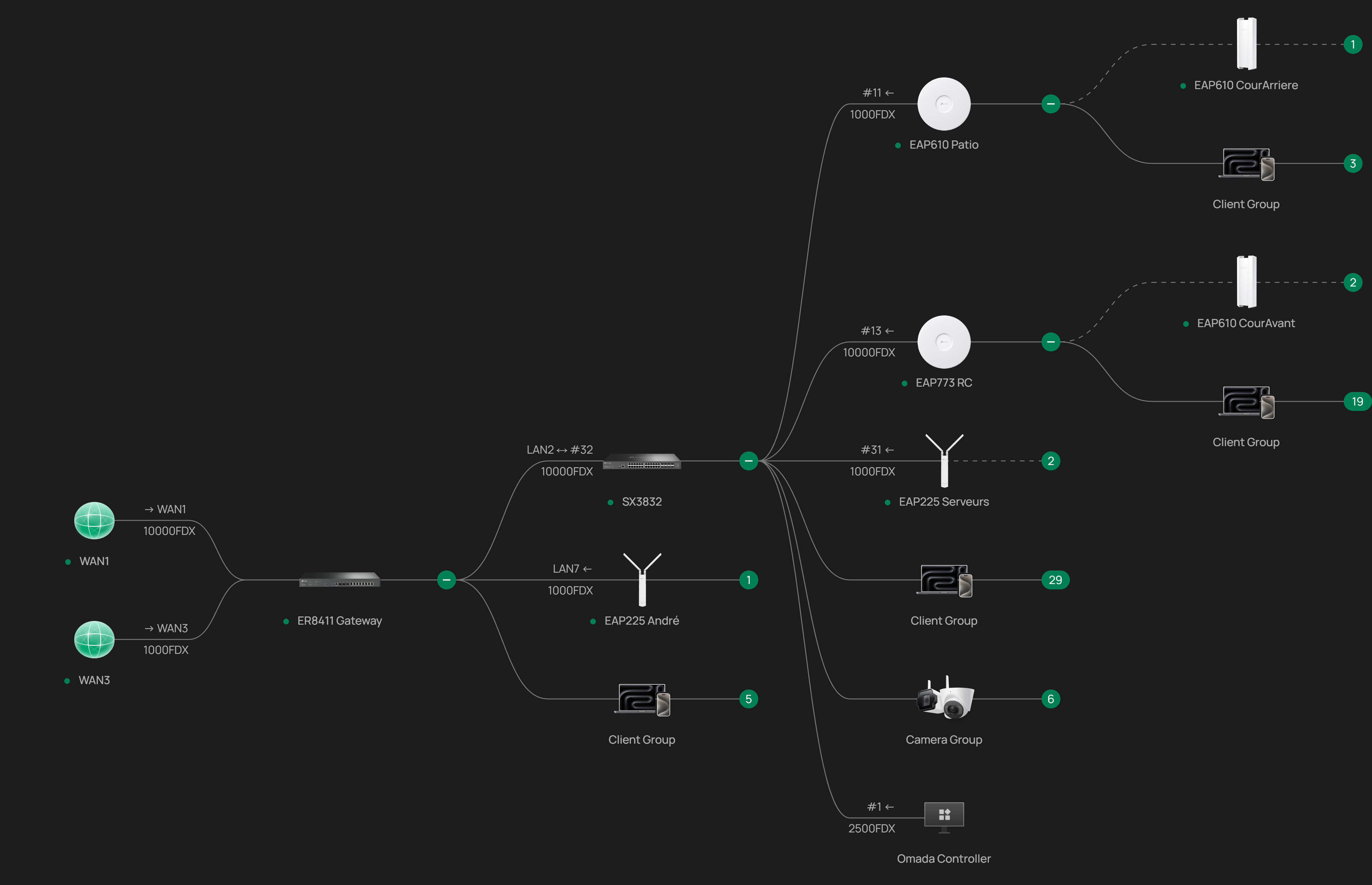
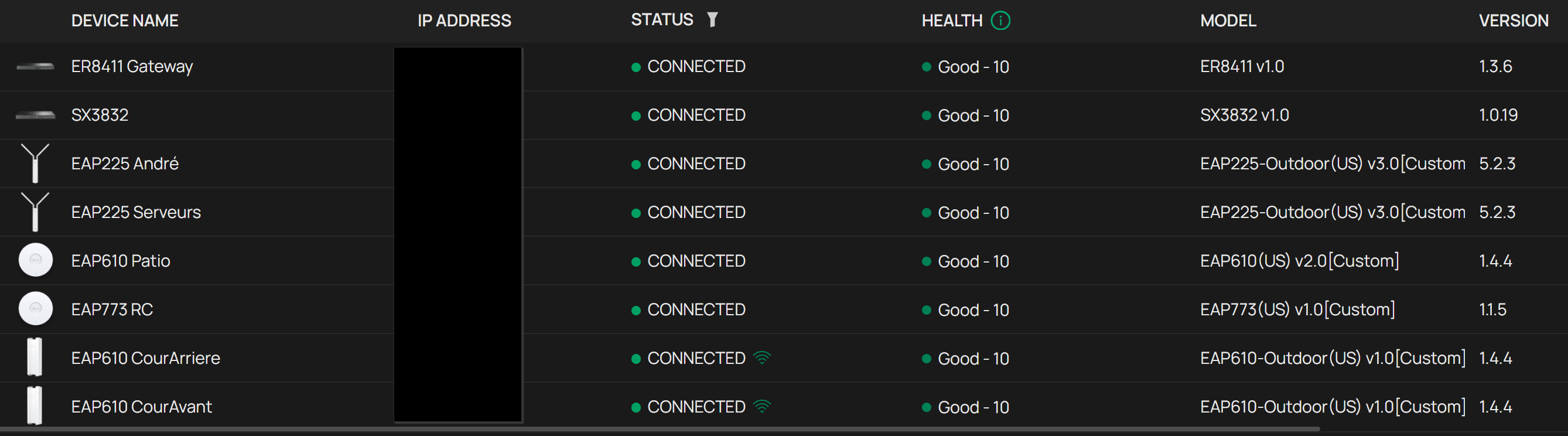
Here are the devices and firmware details:
Here are the SSIDs:
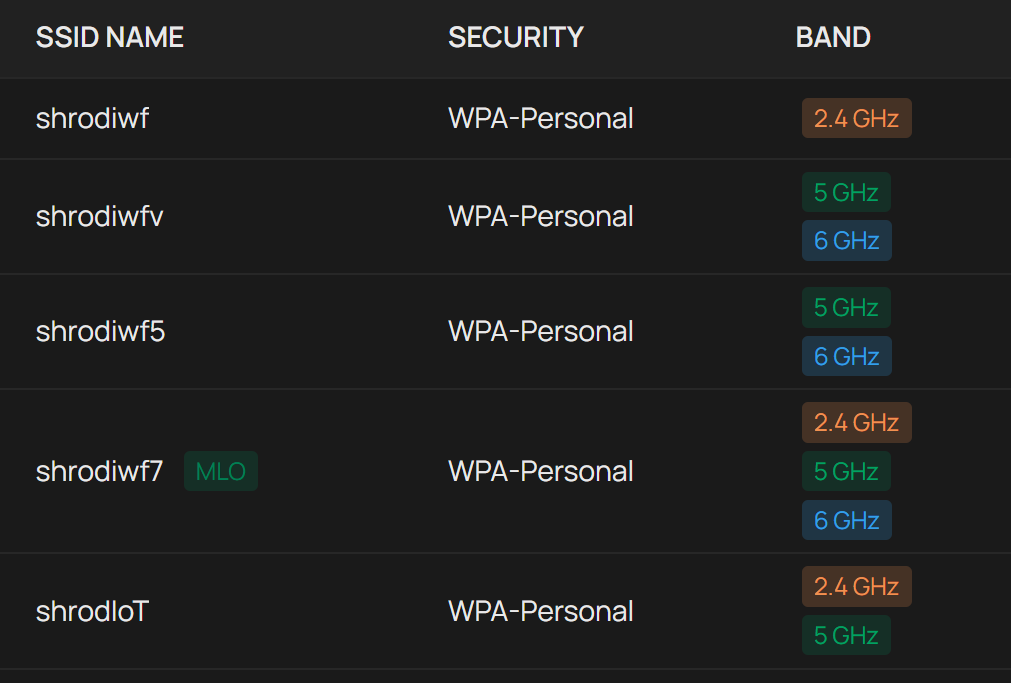
Note that shrodiwf is only on the 2.4GHz band, while shrodiwfv and shrodiwf5 are only on the 5/6GHz bands.
I have a few VLANs; the default (native) VLAN for WLAN is 100 (and therefore untagged). shrodIoT is the only SSID not on the default VLAN, and therefore tagged, but that is not really important here.
Now here is the problem: a while after upgrading the controller to v6.x, there was a new firmware version available for the ER8411, so I did the update. At this time, I didn't have the SX3832 yet: this is a more recent acquisition (this is important because what convinced me to write the current report is a recent update on the SX3832 that triggered the same problem), so all my EAPs were connected to the ER8411. Note that I did such updates on the ER8411 with controller v5.x in the past and there were no issues. After updating the ER8411, I noticed that no client could connect to shrodiwf5 nor shrodiwfv anymore (but shrodiwf was fine): *all* the EAPs (I didn't have the EAP773 at the time, though) would reject any connection attempt to those two SSIDs (the clients prompting to renter the password after trying). So the SSIDs were visible, the clients would try to connect, but could not. I tried rebooting and force provisionning all the EAPs, but to no avail. Finally, desperately trying anything that could come to my mind, I changed the native VLAN on the ER8411 ports for the EAPs to the gateway default (1) and then switch it back to 100. Magic! Everything started working again! And this happened twice, each time after an update of the ER8411 using controller v6.x, before I got the SX3832.
After I got the SX3832, I moved most EAPs on it, and I added the EAP773 (see toplogy above) and added the SSID shrodiwf7. Recently there was a firmware update for the SX3832, so I installed it. I noticed nothing immediately after the reboot, because the EAP773 was working fine and it's the most central EAP, but 1 or 2 days after I realized that roaming would not work on shrodiwf5 or shrodiwfv when going in the "EAP610 Patio" and the "EAP610 CourArriere" areas, even losing signal altogether when going too far into those areas. I confirmed that those two EAPs would not accept 5GHz connections anymore, the exact same way as described previously. But the EAP773, "EAP225 André" and "EAP610 CourAvant" were all right (did not test "EAP225 Serveurs", because I only need 2.4GHz on this one). Besides the fact that not all the EAPs were rejecting connections on the 5GHz band, it looked a lot like the problem I had with the ER8411 updates, so I changed the native VLAN on the appropriate SX3832 ports to 1 and then back to 100, *but this time nothing changed*: the problem was *not* fixed. Rebooting and force provisionning didn't work either. So I was back to trying random stuff. What finally worked (and something I had never tried before) was linking "EAP610 CourArriere" to the EAP773 instead of "EAP Patio": suddenly, both "EAP610 Patio" and "EAP610 CourArriere" started accepting 5Ghz connections again. When I linked back "EAP610 CourArriere" to "EAP Patio", everything stayed fine, and still is.
So really I don't understand what's going on here. Maybe the two problems are not even related, I don't know. And why the EAP773+"EAP610 CourAvant" were not affected after the SX3832 update? All I know is that it's quite a bit frustrating.

