WAN2 always shows offline on ER707-M2 GW

WAN2 always shows offline on ER707-M2 GW

WAN2 always shows offline on ER707-M2 GW
13 hours ago
Model: ER707-M2   OC300  
Hardware Version: V1
Firmware Version: 1.4.1 Build 20260325 Rel.78146

Hi all,


Need some help here. I have an ER707-M2 v1 with 2 fiber WAN links connected to it for internet. WAN1 is a 2Gbps and WAN2 is 1Gbps. This GW is managed by an OC300. I'm having issue where WAN2 will always show as Offline, even if the actual link is up. I did not set WAN2 to be a backup link, and I wanted traffic to utilize both WAN links simultaneously. Both WANs are using PPPoe. Load balancing is currently set to 1:1. I did read around and most guides suggested me to check Online Detection Frequency, which was previously set to 1 minute. Whenever I changed it to even a smaller number, like 30 secs or 15 or 5, and hit Apply and go back to the Dashboard, WAN2 will show as online, but after a few minutes, when the dashboard is refreshed, it'll show as offline again.


Kindly assist me. TQ.

0
0
#1
2 Reply
Re:WAN2 always shows offline on ER707-M2 GW
11 hours ago - last edited 11 hours ago

Hi @Zack_Amin 

Thanks for reaching out to TP-Link Business Forums.


May I confirm if you can navigate to Site View > Network Config > Network Settings > Internet and screenshot that page to us?

And can you also take a short shot of showing the WAN 2 changes from Online to Offline after changing the detection frequency?

If you don't mind, please try connecting a WAN2 to a PC to perform a continuous ping test to see if any ping loss occurs.

Thanks for your understanding.

0
0
#2
Re:WAN2 always shows offline on ER707-M2 GW
10 hours ago - last edited 10 hours ago

  @Gabriel-TP Hi,


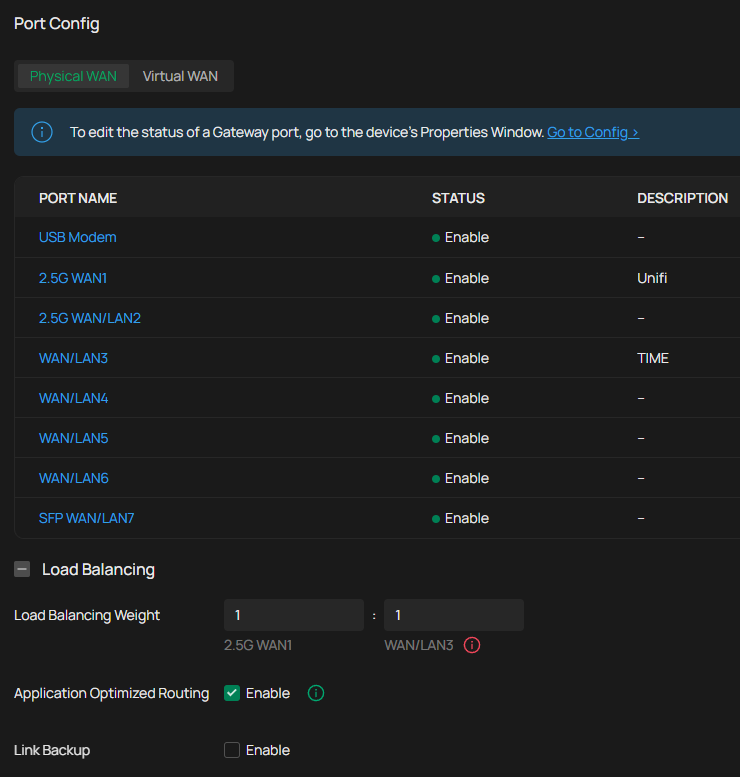
Please refer to the screenshot below as requested.


The port I'm using for WAN2 is actually WAN3 in the GW, but I refer to it as WAN2 in this post for easier understanding.


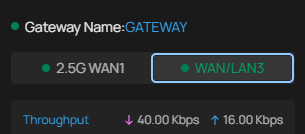
This is what the dashboard shows right after changing the Online Detection Frequency :


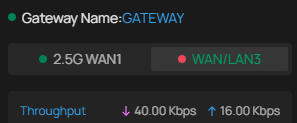
And this is what it will show after the dashboard is refreshed after a few minutes :


0
0
#3

Information

Helpful: 0

Views: 54

Replies: 2