
Latest firmware (version 1.3.1) with new features for Deco M5 is available now


Hi All,
A new firmware (version 1.3.1) for Deco M5 has been released. The new release has fixed the Wi-Fi dropout issue with the 1.2.8 version and added some new amazing features.
Notes:
1. Please update the Deco App to the latest version in order to use new features.
2. If there are other Deco models in your Deco network, you may miss some new features till other models release updates in the near future.
3. Currently the new firmware is partially released. Thus, it’s normal that not all the users will be able to receive the update. But don’t worry, it will be released publicly soon within a week.
New Features and Enhancements
1. Added smart home hub feature and supported to manage Kasa devices (lights/plugs/switches) and Philips Hue lights (hue bridge required) in Deco app.
Before you use this feature, please connect the smart devices to the Deco network at first. Then tap on the ‘+’ at the top right corner in Deco app and select the smart devices to add.

After done, you will be able to control your smart devices directly in Deco app.
For example, if you add a Kasa smart light bulb in Deco app, you will be able to turn on/off the bulb, view its energy/time usages, change its brightness and color directly in Deco app.

2. Added Shortcut and Automation features.
Shortcut: Execute an action with one tap in the app. You could create a specific action for devices connected to the Deco network, including common network devices and smart devices. Once a shortcut is created, it will show as an icon on the Shortcut page in the app. Simply tap this icon to make the shortcut take effect.
Automation: You can create a Trigger and an Action for specific devices and make it take effect in the defined time period. Once the Trigger happens, then the Action will be executed automatically without a manual tap in the Deco app.
You can refer to the following FAQs for more detailed information.
How to use Shortcut function in Deco app?
How to use Automation function in Deco app?

3. Displayed which client is connected to which deco and which Wi-Fi band.
On the dashboard of Deco app, tap one of the client devices and click the “>” icon besides the device name. Then you will enter the detailed page of the device, on which you can see which Deco and which band the device is connected to.

4. Displayed how Decos are connected to each other.
Tap Internet, then select one of the Deco units and you will be able to view its IP address, clients connected to it and how it’s connected to the front-end Deco unit.

5. Added support for IPTV Bridge mode and Custom mode.
If you enable IPTV feature, the other Ethernet port of the main Deco will be set as IPTV port and won’t provide normal internet service any more. In this case, you need to connect an IPTV device such as a TV set-top-box to this port

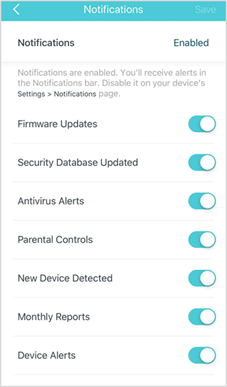
6. Added more options for notification feature.
On the dashboard page in Deco app, tap More -> Advanced -> Notification. Then you can find more notification options in the list. Just tap on each option to view its detailed explanation.
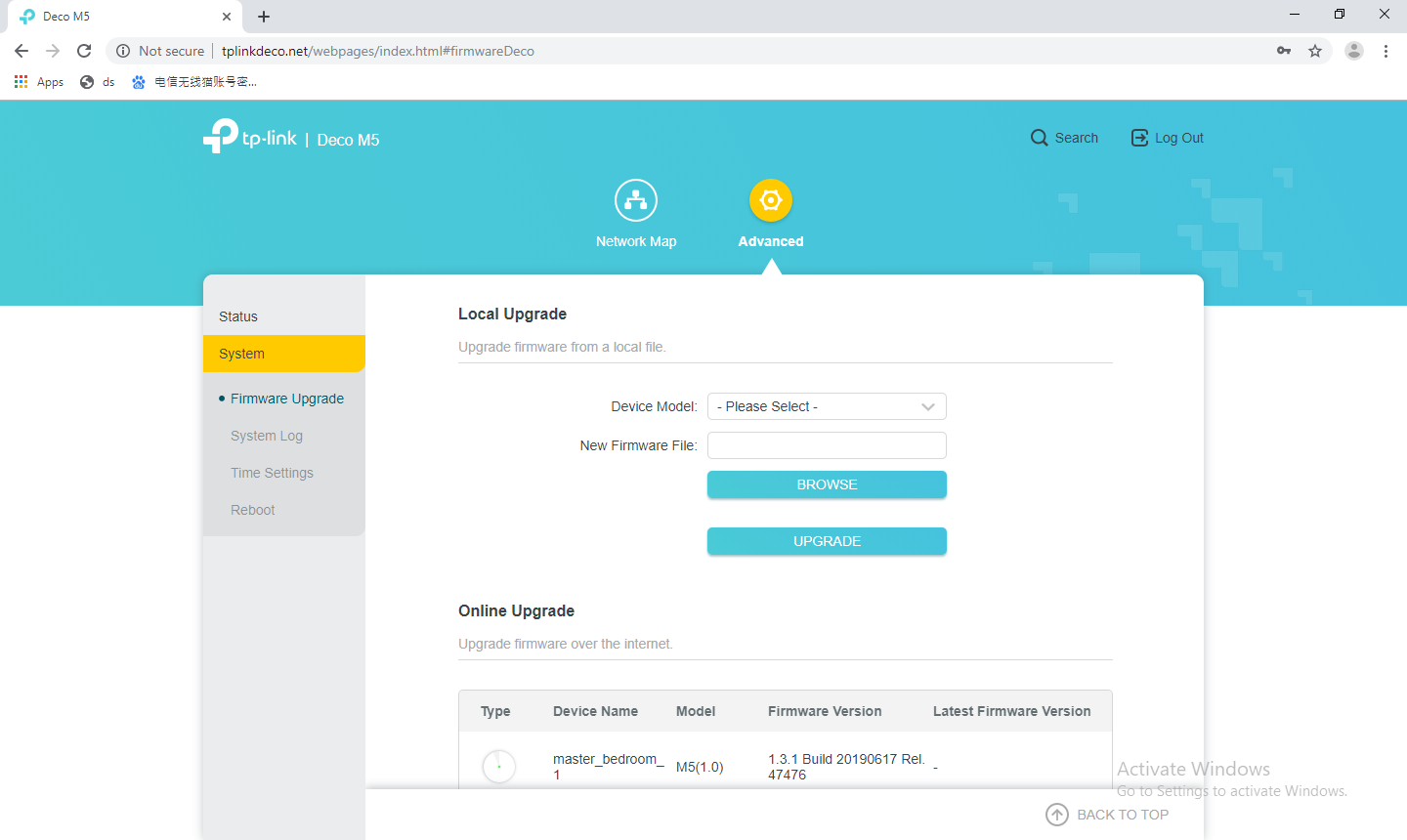
7. Added web UI, which can be visited via tplinkdeco.net in the browser.
Make sure your device is connected to Deco’s local network, then open a browser and enter tplinkdeco.net in the address bar to visit Deco’s web UI.

You could also access the webpage via Deco’s LAN IP address, which is 192.168.68.1 by default. If you have changed the LAN IP address, please use the one you changed instead.

On the web management page, you can view Deco’s network map, connected clients, Wi-Fi settings, etc.


Under the Advanced tap, you can also upgrade firmware, view system logs and change Deco’s time settings.
Note: It’s not allowed to downgrade to the previous firmware version through web UI.
8. Added IPv6 firewall rules feature.
To ensure the network security of the system, Deco has IPv6 firewall enabled by default, which will block any IPv6 connection from the external network. And the IPv6 firewall rules allow specific devices to access the specified services in the Deco network through IPv6 connection. This IPv6 firewall rules feature is similar to the port forwarding feature of IPv4.
Open Deco app, tap More -> Advanced -> IPv6 -> Firewall. Then you can add the rule you want.

9. Supported up to 64 entries each for Address Reservation and Port Forwarding.
- Copy Link
- Subscribe
- Bookmark
- Report Inappropriate Content
- Copy Link
- Report Inappropriate Content
TP-Link Deco wrote
@thefunkygibbon As described in the thread, the new firmware is partially released currenctly. But don't worry, it will soon release to public within a week.
As for ZigBee, we recommend Deco M9 Plus which has embedded ZigBee chipset.
- Copy Link
- Report Inappropriate Content
- Copy Link
- Report Inappropriate Content
What ? Are you a spam bot?
- Copy Link
- Report Inappropriate Content

just updated my deco m5 v1's about an hour ago through the android app, and now my internet does NOT work.
strangely, my google home devices and the android app can reach the internet for a speed test or to check for a firmware update, but my tablets, phones, and computers CANNOT and i am forced to post this over LTE.
i have tried reinstalling the firmware manually through the web interface; that didn't work. i tried reinstalling the old firmware; but you geniuses disabled roll backs.
what is the solution to this problem?
- Copy Link
- Report Inappropriate Content
To anyone with the EU version (bought through Amazon), we should hopefully get this soon
Does anyone know if all the new features work when in AP mode?
- Copy Link
- Report Inappropriate Content

Glynned
emailed tech as you recommended got a reply with the info and bin file all done , but the app for macs will not work tried on all of my macs nada
scronged a del laptop from next door and got the job done
yes I have responded to the email from tech and informed them of the none running app bet it's 32bit Mac OS will not run 32 bit software
stuart
- Copy Link
- Report Inappropriate Content
- Copy Link
- Report Inappropriate Content

Do you mean that some devices still works fine after firmware upgrading, while others failed to get internet?
Do they still connect to the Deco but no internet access or they lose the wireless connection at all?
What is the current led status of the Deco M5?
With your computer connected to the Deco by wired cable, can you access internet?
Is there any error message on the Deco app? Try to power cycle the modem/Deco/clients.
Any updates, please let us know.
- Copy Link
- Report Inappropriate Content
My google home IoT devices are connected to the internet, while my computers, tablets, and phones do not have internet access via wifi.
They still connect to the deco, but have no internet access.
Current LED status is solid green.
No internet access via ethernet.
No error messages from the android deco app. In fact, I can run the internet speed test and check for an update within the app with no issue, but otherwise my phone has no internet connection via wifi. Using the web interface via desktop, I can also check for firmware updates, but otherwise cannot use the internet.
My M5's are version 2, according to the box, but the web interface shows this: https://i.imgur.com/csaJOva.png
I would like to repeat that I updated the firmware using the Android Deco app, and afterwards lost internet connection to move of my devices. After that, I updated the firmware using the web interface.
- Copy Link
- Report Inappropriate Content
Information
Helpful: 3
Views: 45521
Replies: 58
Voters 3

