Problems with coverage

This thread has been locked for further replies. You can start a new thread to share your ideas or ask questions.

Problems with coverage

This thread has been locked for further replies. You can start a new thread to share your ideas or ask questions.

Problems with coverage
2020-04-14 09:39:47
Model: RE200  
Hardware Version: V1
Firmware Version: v1.1

Over the last couple of years we have purchased 3 RE200 however, we have struggled since day 1 to get coverage in the garden (extender placed in summerhouse, Shed or conservatory)  I assume we are doing something wrong!  When the RE200 is in the house, we have 5 green lights, when elsewhere we generally get 2 or 3 green lights and a red one.  Can someone help please?  Does the firmware need updating? how do i do it?  Thankyou in advance

  0      
  0      
#1
Options
1 Reply
Re:Problems with coverage
2020-04-21 11:49:21

@Nicky321 

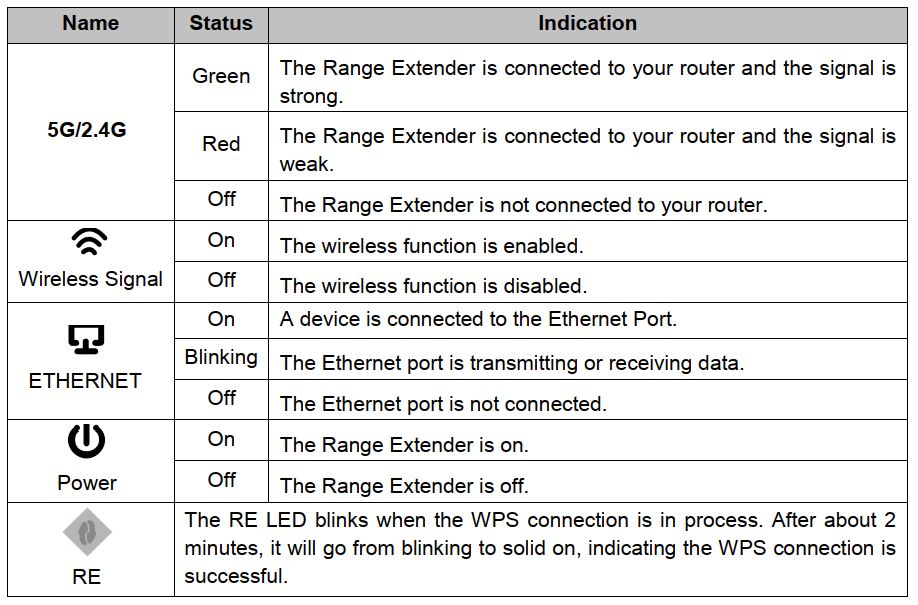
When the RE200 is in the house, we have 5 green lights, when elsewhere we generally get 2 or 3 green lights and a red one. 

--》 RE200 is V1 version, right? Please check this picture to know the LED indication.

It seems that extender is too far from your router and the router wifi signal is very weak to connect to. 

Please check this for help:  How to improve my wireless speed or range?


Nice to Meet You in Our TP-Link Community. Check Out the Latest Posts: Introducing AI QoS: Elevate Your Gaming Experience on the Archer GE800 Gaming Router! Connect TP-Link Archer BE550 to Germany's DS-Lite (Dual Stack Lite) Internet via WAN Archer GE550 - BE9300 Tri-Band Wi-Fi 7 Gaming Router Archer AX90 New Firmware Added Support for EasyMesh and Ethernet Backhaul If you found a post or response helpful, please click Helpful (arrow pointing upward icon). If you are the author of a topic, remember to mark a helpful reply as the "Recommended Solution" (star icon) so that others can benefit from it.
  0  
  0  
#2
Options