
Deco m9 with m4 problem
 This thread has been locked for further replies. You can start a new thread to share your ideas or ask questions.
hello
I have 5 deco m9 units and 2 m4r. All of then with the latest firmware (1.4.2).
The main deco (m9) is backhaul conected via tplink switches to deco 2 (m9) and 3 (m9) and wireless to deco 4 (m9) 5 (m9) 6 (m4) and 7 (m4).
Until i add the m4's every thing was ok.
Now Every time i have a power outage, when the system restart i have connections problem. Mostly wifi with no internet (the decos are green and the wired network devices have internet).
On my iphone when i connect to the deco wifi i have no internet and i can't connect to the deco with the app, but on 4g i can access the deco)
To make it work i need to unplug the m4 decos, restart the main deco and after the m9 decos are sync again (takes about 15 minutes) i plug the m4 and they are sync (with a notification that a new deco m4r is plugged), and every thing working good until the next power outage....
It is very frustrating and tosay it took me 3 hours to fix the system after a very short power outage
Please help. TNX
- Copy Link
- Subscribe
- Bookmark
- Report Inappropriate Content


Hello, sorry about that, we will try to help you out, but please confirm some details first.
May I have the model number of the TP-Link switch?
Is the main Deco M9 working as a router or an Access Point? Do you mean the Deco M9 system was working fine until you add the 2 M4Rs? What if you disconnect the 2 M4Rs from the network?
When there is no internet access connecting to the Deco wireless network, are the devices still getting the correct IP address from the Deco, can you ping the gateway?
Thanks a lot~
- Copy Link
- Report Inappropriate Content
TNX
the model number of the TP-Link switch - TL-SG1008D and TL-SG1005D (every backhaul deco is connected to a switch) - i have about 20 network devices weird connected.
the main Deco M9 working as a Router
the Deco M9 system was working fine until you add the 2 M4Rs. and is working fine until a power outage
as i wrote before - after a power outage - the only thing that work is to disconnect the 2 M4Rs (unplug the power) - restart the system and after about 15 minutes replug the m4rs.
When there is no internet access connecting to the Deco wireless network, are the devices still getting the correct IP address from the Deco - Yes
can you ping the gateway - YES
TNX
- Copy Link
- Report Inappropriate Content
Correction - i have a bad ip in my wireless device connected to the wifi - 169.254.21.142
- Copy Link
- Report Inappropriate Content
Hello, thanks again for your reply.
Just to confirm, is the detailed network layout as below?
the main M9 (Router mode)----TL-SG1008D----TL-SG1005D----2nd M9
\----3rd M9
The other 2 M9 units and 2 M4Rs are connected to the network via wireless.
When there is a power outage, then the internet is back in you house, there is no internet on all clients and they get an invalid IP address from the network, while you can access the internet when connecting a PC directly to the modem, right?
Please ensure all the Deco M9 and M4R are running the latest firmware, try to leave the 2 M4R disconnected from the network, confirm if the issue disappears when there is a power outage next time, thanks a lot~
- Copy Link
- Report Inappropriate Content
this is my Architecture
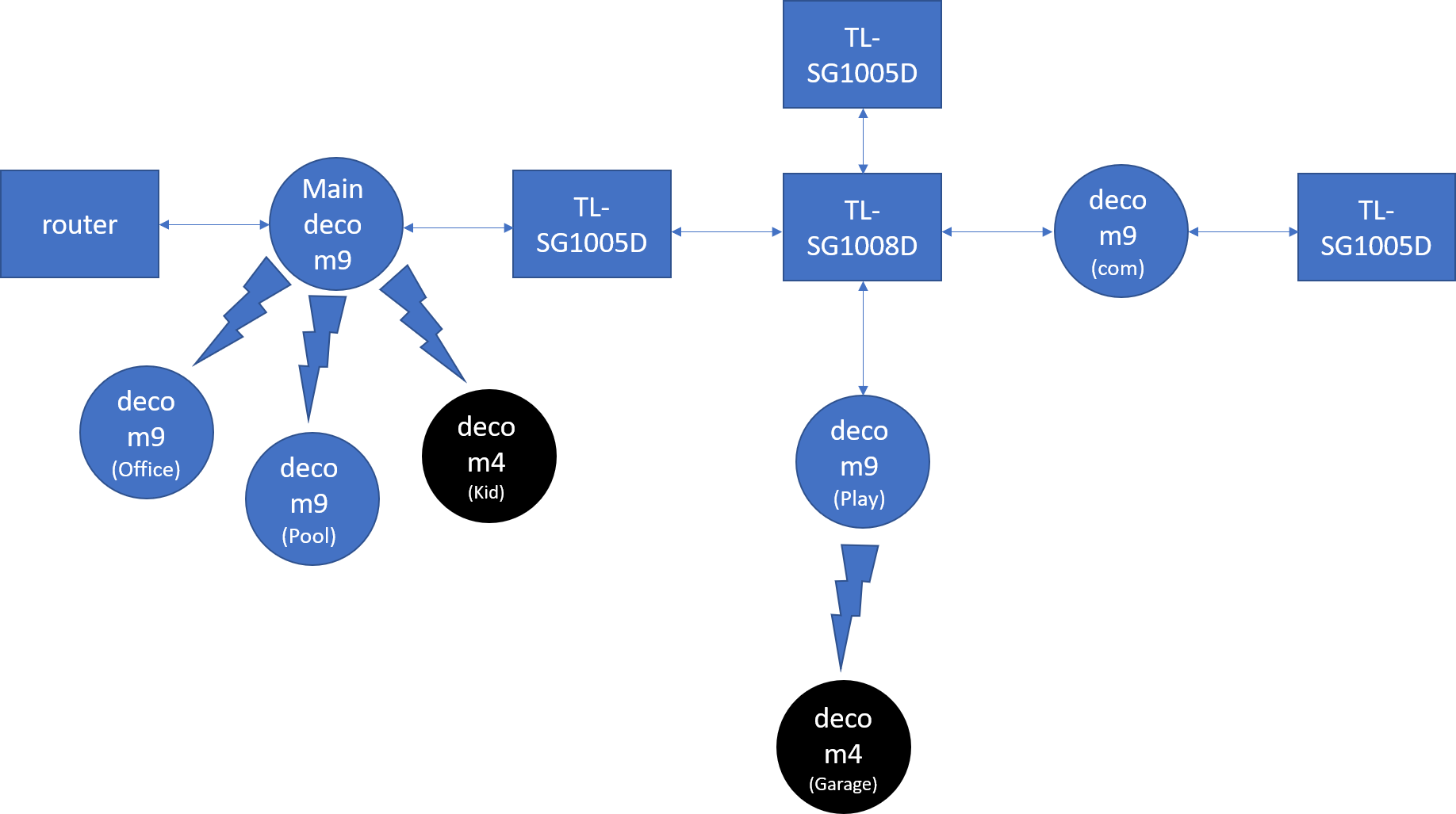
after a reset to the Deco System or a power outage the internet is back mostly on the wire clients but most of the wifi client dont work (some of them working..)
as i write you before all the decos are running the latest firmware
and as i write you before - if i lleave the M4R disconnected from the network, and i reset the system everything work ok (i reconnect the m4r after the 5 m9 are synced again)
- Copy Link
- Report Inappropriate Content
Hello, thanks again for your detailed clarification.
We have recently released new firmware for the Deco M9 Plus and Deco M4, please update to the latest firmware first, then monitor again.
BTW, as per the architecture you provided, are there two routers in the network? Do you need them both to be routers? If not, it is suggested to change the first router/modem to a bridge and only leave the main Deco as the main router to give it a go.
Just to confirm, you mentioned previously that all the Deco nodes are with solid green LEDs even when there is no internet access on some wireless clients, is it possible to verify if those clients are connected to the Deco M4 or M9 at that time with a bad IP address? On the Dashboard page of the Deco app, please click on the network device->click on one of the clients->click on the settings icon at the upper right corner, then you can see which Deco the client is connected to and which Wi-Fi band the client is using.
Thanks again~
- Copy Link
- Report Inappropriate Content
Information
Helpful: 0
Views: 1213
Replies: 6
Voters 0
No one has voted for it yet.