
Archer C6 wont put through more than 100Mbps on LAN ports. HELP.
 This thread has been locked for further replies. You can start a new thread to share your ideas or ask questions.
i have the following situation:
i have 300 Mbps internet. when i connet my laptop to modem directly then i get 300 Mbps and everything is fine (Gigabit connection with cat5e cable).
Now when i introduce Archer C6 into the picture. Modem goes into Archer. Laptop goes into Archer port 1. Laptop windows 8.1 says its a gigabit connection in lan settings. but when i try internet speed test (i use fast.com) then only i get 100Mbps internet max speed instead of 300Mbps. Cables are all cat5e. modem is not problem, laptop is not problem, archer is making something. Does anyone know how to fix this?
All tips appreciated.
- Copy Link
- Subscribe
- Bookmark
- Report Inappropriate Content


Hi, for the speed issue you encountered, please try the below suggestions and get back to the community with the details if it cannot be solved, thanks.
1. Log in to the web UI of the Archer C6 (or you have the other model) and go to the Basic-Network map page, click the Archer C6 image/icon and scroll down this page, you will see the Ethernet negotiation speed of the LAN ports, show us the screenshot:
https://www.tp-link.com/support/faq/2472/
2. Go to Advanced-system tools-system parameters to edit the duplex, change it to 1000Mbps full-duplex if you have a gigabit line, then reboot the router.
3. After that, try to test the negotiation speed on your PC again. It is strongly suggested changing another cat5e or cat6 cable.
4. It is also suggested changing another wired device with gigabit Ethernet ports to do a test.
5. What is the length of the Ethernet cable between the C6 and your ISP modem, in other words, what is the distance between them? Is it the same cable when you are testing the speed with your modem directly?
Thanks a lot.
- Copy Link
- Report Inappropriate Content
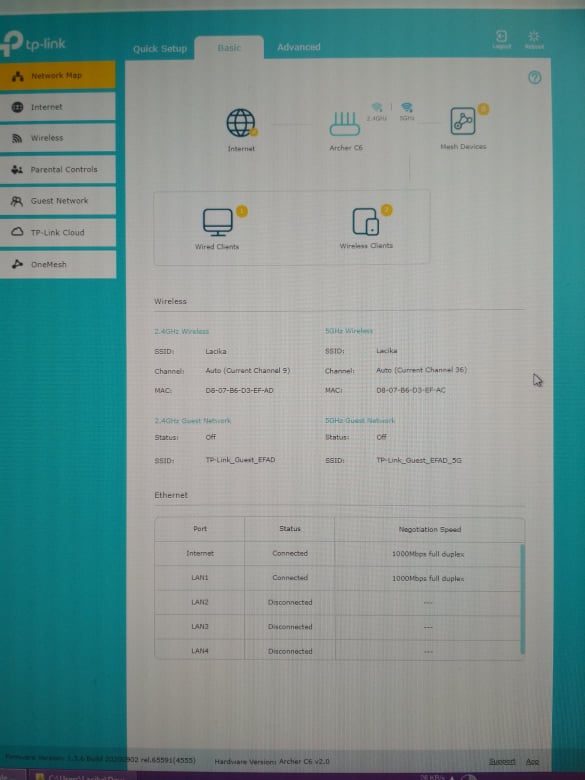
1. here is a screenshot you asked. both the internet is connected with gigabit to the router and the router is connected with gigabit to the laptop.
2.the Advanced-system tools-system parameters was already on to full duplex 1000Mbps
3. negotiation in windows says speed 1.0Gbps
4. this is not possible at the moment although i see that maybe its a rare instance that my laptop and the router dont like each other.
5. the length of the ethernet cable is quite long. around 50 meters from the modem to the router and it is the same when i test the modem speed. another posssibility i see here is to buy a new cable since this one is pretty old (probably 10 years) but cat5e.
- Copy Link
- Report Inappropriate Content
Hello, thanks for getting back quickly.
Just to confirm, do you mean the laptop can easily get ~300M when connected directly to the ISP modem with the same 50 meters cat5e cable?
Yes, please try to get a new cable and confirm again, just in case it's a cable issue, thanks a lot.
- Copy Link
- Report Inappropriate Content
@Kevin_Z correct, same cable plugged in to laptop from the modem every time can do 300mbps on fast.com. now the same cable i plug into router WAN and the LAPTOP into PORT1 i get the slow speeds. Even without cable the wifi is slower than my previous cheap wifirouter asus rtn12+ b1.
- Copy Link
- Report Inappropriate Content
I see. As you can see that there may less speed attenuation when the laptop is connected to the modem with the same 50m cable directly than that when the laptop is connected via another cable or Wi-Fi when the C6 is connected between.
Please kindly try with another cat5e or cat6 cable and check if there is any difference. Also, you may connect with a shorter cable between the modem and the C6.
- Copy Link
- Report Inappropriate Content
Information
Helpful: 0
Views: 2306
Replies: 5
Voters 0
No one has voted for it yet.