Video freeze cause by an unstable connection

This thread has been locked for further replies. You can start a new thread to share your ideas or ask questions.

Video freeze cause by an unstable connection

This thread has been locked for further replies. You can start a new thread to share your ideas or ask questions.

Video freeze cause by an unstable connection
2020-11-14 03:47:08 - last edited 2020-11-14 03:51:49
Model: Archer AX50  
Hardware Version: V1
Firmware Version: 1.0.9 Build 20200708 rel.55037(5553)

This issue getting worse when at night. The issue start to see when watching some movie with my android box that connect via LAN, the stream video become freeze like a second. Another happen to mostly all smartphone in my home for example like playing video or voice note inside whatsapp it suddenly stop and close from playing it. All i can say is even with direct LAN and WiFi connection it still happen in all device.

File:
Untitled 3_720p.mp4Download
  0      
  0      
#1
Options
3 Reply
Re:Video freeze cause by an unstable connection
2020-11-16 09:06:20

@A117 


Hello, thanks for reporting the issue to the community. To better help you, please help to confirm the following information.
1. Who is your ISP? What is the total bandwidth provided by your ISP?
2. What is the detailed network diagram/layout? What if you connect this android box to the modem directly, will you be able to watch the movie continuously?
3. Is the smartphone connected to the 2.4GHz or 5GHz network? When you mean playing video or voice note in WhatsApp just stops, does this happen on all smartphones or just on some specific phone?
4. Try to enable the Guest Network on the AX50, then connect the smartphone to the Guest Network and confirm if you can use WhatsApp properly.

Nice to Meet You in Our TP-Link Community. Check Out the Latest Posts: Introducing AI QoS: Elevate Your Gaming Experience on the Archer GE800 Gaming Router! Connect TP-Link Archer BE550 to Germany's DS-Lite (Dual Stack Lite) Internet via WAN Archer GE550 - BE9300 Tri-Band Wi-Fi 7 Gaming Router Archer AX90 New Firmware Added Support for EasyMesh and Ethernet Backhaul If you found a post or response helpful, please click Helpful (arrow pointing upward icon). If you are the author of a topic, remember to mark a helpful reply as the "Recommended Solution" (star icon) so that others can benefit from it.
  0  
  0  
#2
Options
Re:Video freeze cause by an unstable connection
2020-11-17 12:11:51

@Kevin_Z 

1. My ISP is TM Unifi with 100Mbps plan subscribe.
2. From fibre cable to the ISP's modem then connect via cable to the AX50 WAN port. I think it cannot directly connect to ISP's modem due to need of setting the internet connection type through the router IP webpages. I login my id that my ISP provide in PPPoE.
3. For the smartphones right now seems still ok with no issue i mention before, don't know what happen but glad one problem solve.

  0  
  0  
#3
Options
Re:Video freeze cause by an unstable connection
2020-11-18 07:00:40

@A117 


Hello, thanks for getting back. It's glad to know that WhatsApp is working properly now with the AX50.


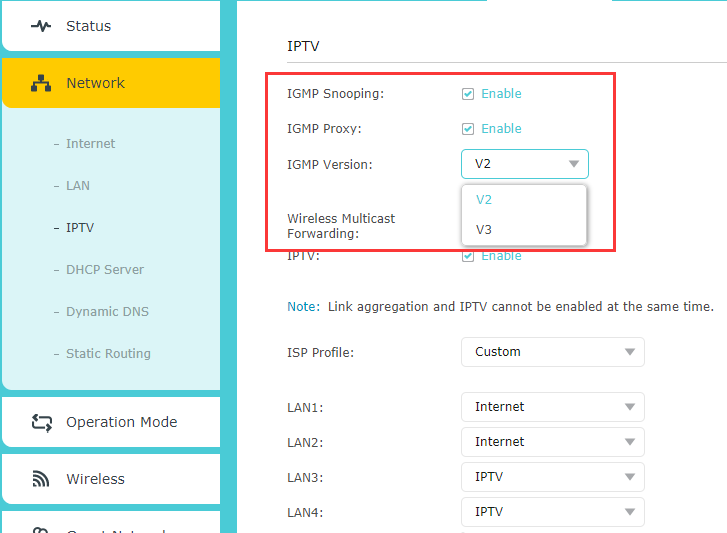
Just to confirm, are you using IPTV setting on the AX50 and is this Android box the IPTV box? Please ensure the IGMP Snooping and IGMP Proxy are both enable, you can also try the version by choosing V2 or V3:

Nice to Meet You in Our TP-Link Community. Check Out the Latest Posts: Introducing AI QoS: Elevate Your Gaming Experience on the Archer GE800 Gaming Router! Connect TP-Link Archer BE550 to Germany's DS-Lite (Dual Stack Lite) Internet via WAN Archer GE550 - BE9300 Tri-Band Wi-Fi 7 Gaming Router Archer AX90 New Firmware Added Support for EasyMesh and Ethernet Backhaul If you found a post or response helpful, please click Helpful (arrow pointing upward icon). If you are the author of a topic, remember to mark a helpful reply as the "Recommended Solution" (star icon) so that others can benefit from it.
  0  
  0  
#4
Options