Internet keeps dropping or incredibly slow on WA850RE on TP-LINK M7350(UN) router

This thread has been locked for further replies. You can start a new thread to share your ideas or ask questions.

Internet keeps dropping or incredibly slow on WA850RE on TP-LINK M7350(UN) router

This thread has been locked for further replies. You can start a new thread to share your ideas or ask questions.

Internet keeps dropping or incredibly slow on WA850RE on TP-LINK M7350(UN) router
2020-11-23 22:44:45
Model: TL-WA850RE  
Hardware Version: V7
Firmware Version: 1.0.1

hi,


I just bought a WA850RE range extender.

I can get no internet connection, or it is so slow it is next to unusable. below is my system log and a screenshot of my normal network speed.


- No problem setting it up, connects to router easily.

- All LEDs light up (as in: full network range, also tried further away with only 3 LED)

- Laptop and Mobile phone can connect to the EXT network without problem.

- All IP addresses are within range


##########################################################################
#                    TL-WA850RE  System Log
# Time = 2020-11-23 23:32:45
# H-Ver = TL-WA850RE 7.0 : S-Ver = 1.0.1 Build 200923 Rel.57191n
##########################################################################
  0days, 00:00:00, LAN:Attach mirror0 to stack.
  0days, 00:00:00, LAN:Set interface mirror0 ip=192.168.0.198 netmask 255.255.255.0.
  0days, 00:00:00, DHCPS: Dhcps start
  0days, 00:00:00, HTTPD: Http server start!
  0days, 00:00:16, DHCPS: Recv REQUEST from 4C:BB:58:37:13:E3.
  0days, 00:00:21, DHCPS: Recv REQUEST from 4C:BB:58:37:13:E3.
  0days, 00:00:21, DHCPS: Send ACK to 192.168.0.163.
  0days, 00:00:22, DHCPC: Start DHCPC
  0days, 00:00:22, DHCPC: Send DISCOVER with unicast flag 0
  0days, 00:00:22, DHCPC: Recv OFFER from server 192.168.0.1 with ip 192.168.0.198
  0days, 00:00:22, DHCPC: Send REQUEST to server 192.168.0.1 with request ip 192.168.0.198
  0days, 00:00:23, DHCPC: Recv ACK from server 192.168.0.1 with ip 192.168.0.198 lease time 7200
  0days, 00:00:23, DHCPC: Set request check flag
  0days, 00:00:23, DHCPC: LAN up: Set interface mirror0 ip=192.168.0.198 netmask=255.255.255.0 gateway=192.168.0.1 mtu=1500.
  0days, 00:00:23, DHCPC: Start ping test
  0days, 00:00:23, DHCPC: Ping test success
  0days, 00:00:25, DHCPC: Send REQUEST to server 192.168.0.1

  0days, 00:00:25, DHCPC: request checking end
  0days, 00:00:25, DHCPC: Recv ACK from server 192.168.0.1 with ip 192.168.0.198 lease time 7200
  0days, 00:00:25, DHCPS: Dhcps stop
  0days, 00:04:03, DHCPC: Stop DHCPC
  0days, 00:04:03, DHCPS: dhcps is already stopped

  0days, 00:04:03, DHCPS: Dhcps start
  0days, 00:04:05, DHCPS: Recv REQUEST from 4C:BB:58:37:13:E3.
  0days, 00:04:06, DHCPS: Recv REQUEST from 7A:24:0B:AF:CF:F8.
  0days, 00:05:36, DHCPS: Recv REQUEST from 4C:BB:58:37:13:E3.
  0days, 00:05:36, DHCPS: Send ACK to 192.168.0.163.
  0days, 00:05:37, DHCPS: Recv REQUEST from 7A:24:0B:AF:CF:F8.
  0days, 00:05:37, DHCPS: Send ACK to 192.168.0.116.
  0days, 00:07:06, DHCPS: Recv REQUEST from 4C:BB:58:37:13:E3.
  0days, 00:07:06, DHCPS: Send ACK to 192.168.0.163.
  0days, 00:07:07, DHCPS: Recv REQUEST from 7A:24:0B:AF:CF:F8.
  0days, 00:07:07, DHCPS: Send ACK to 192.168.0.116.
  0days, 00:07:41, DHCPS: Recv REQUEST from 4C:BB:58:37:13:E3.
  0days, 00:07:41, DHCPS: Send ACK to 192.168.0.163.
  0days, 00:09:10, DHCPS: Recv REQUEST from 4C:BB:58:37:13:E3.
  0days, 00:09:10, DHCPS: Send ACK to 192.168.0.163.
  0days, 00:10:41, DHCPS: Recv REQUEST from 4C:BB:58:37:13:E3.
  0days, 00:10:41, DHCPS: Send ACK to 192.168.0.163.
  0days, 00:12:12, DHCPC: Start DHCPC
  0days, 00:12:12, DHCPC: Send DISCOVER with unicast flag 0
  0days, 00:12:13, DHCPC: Recv OFFER from server 192.168.0.1 with ip 192.168.0.198
  0days, 00:12:13, DHCPC: Send REQUEST to server 192.168.0.1 with request ip 192.168.0.198
  0days, 00:12:14, DHCPC: Recv ACK from server 192.168.0.1 with ip 192.168.0.198 lease time 7200
  0days, 00:12:14, DHCPC: Set request check flag
  0days, 00:12:14, DHCPC: LAN up: Set interface mirror0 ip=192.168.0.198 netmask=255.255.255.0 gateway=192.168.0.1 mtu=1500.
  0days, 00:12:14, DHCPC: Start ping test
  0days, 00:12:14, DHCPS: Recv REQUEST from 4C:BB:58:37:13:E3.
  0days, 00:12:14, DHCPS: Send ACK to 192.168.0.163.
  0days, 00:12:15, DHCPC: Ping test success
  0days, 00:12:16, DHCPC: Send REQUEST to server 192.168.0.1

  0days, 00:12:16, DHCPC: request checking end
  0days, 00:12:16, DHCPC: Recv ACK from server 192.168.0.1 with ip 192.168.0.198 lease time 7200
  0days, 00:12:16, DHCPS: Dhcps stop
  0days, 00:21:37, DHCPC: Stop DHCPC
  0days, 00:21:37, DHCPS: dhcps is already stopped

  0days, 00:21:37, DHCPS: Dhcps start
  0days, 00:21:37, DHCPS: Recv DISCOVER from 90:97:F3:D1:B2:BA.
  0days, 00:21:38, DHCPS: Send OFFER with ip 192.168.0.100.
  0days, 00:21:38, DHCPS: Recv REQUEST from 90:97:F3:D1:B2:BA.
  0days, 00:21:38, DHCPS: Send ACK to 192.168.0.100.
  0days, 00:21:39, DHCPS: Recv INFORM from 4C:BB:58:37:13:E3.
  0days, 00:21:39, DHCPS: Recv REQUEST from 4C:BB:58:37:13:E3.
  0days, 00:21:39, DHCPS: Recv DISCOVER from 7A:24:0B:AF:CF:F8.
  0days, 00:21:40, DHCPS: Send OFFER with ip 192.168.0.101.
  0days, 00:21:40, DHCPS: Recv REQUEST from 7A:24:0B:AF:CF:F8.
  0days, 00:21:40, DHCPS: Send ACK to 192.168.0.101.
  0days, 00:21:46, DHCPS: Recv REQUEST from 90:97:F3:D1:B2:BA.
  0days, 00:21:46, DHCPS: Send ACK to 192.168.0.100.
  0days, 00:22:22, DHCPC: Start DHCPC
  0days, 00:22:22, DHCPC: Send DISCOVER with unicast flag 0
  0days, 00:22:22, DHCPC: Recv OFFER from server 192.168.0.1 with ip 192.168.0.198
  0days, 00:22:22, DHCPC: Send REQUEST to server 192.168.0.1 with request ip 192.168.0.198
  0days, 00:22:23, DHCPC: Recv ACK from server 192.168.0.1 with ip 192.168.0.198 lease time 7200
  0days, 00:22:23, DHCPC: Set request check flag
  0days, 00:22:23, DHCPC: LAN up: Set interface mirror0 ip=192.168.0.198 netmask=255.255.255.0 gateway=192.168.0.1 mtu=1500.
  0days, 00:22:23, DHCPC: Start ping test
  0days, 00:22:23, DHCPC: Ping test success
  0days, 00:22:25, DHCPC: Send REQUEST to server 192.168.0.1

  0days, 00:22:26, DHCPC: request checking end
  0days, 00:22:26, DHCPC: Recv ACK from server 192.168.0.1 with ip 192.168.0.198 lease time 7200
  0days, 00:22:26, DHCPS: Dhcps stop


Speedtest directly logged into router network


  0      
  0      
#1
Options
7 Reply
Re:Internet keeps dropping or incredibly slow on WA850RE on TP-LINK M7350(UN) router
2020-11-30 19:49:09
OK, no support here?
  0  
  0  
#2
Options
Re:Internet keeps dropping or incredibly slow on WA850RE on TP-LINK M7350(UN) router
2020-12-01 03:14:40

@AadmanZ 

Good day, Here it is.

Thanks for your patience.

Have you tried to update to the latest firmware:

TL-WA850RE(EU)_V7_200923

https://static.tp-link.com/2020/202010/20201019/850RE(v7)_200923.zip


May I know the model number of your home router?

Could you please try to help me get a picture when the 850RE got no internet completely?

And would RE and signal light still lit up?

Thank you very much!

  0  
  0  
#3
Options
Re:Internet keeps dropping or incredibly slow on WA850RE on TP-LINK M7350(UN) router
2020-12-01 19:24:24


TP-Link wrote

@AadmanZ 

Good day, Here it is.

Thanks for your patience.

Have you tried to update to the latest firmware:

TL-WA850RE(EU)_V7_200923

https://static.tp-link.com/2020/202010/20201019/850RE(v7)_200923.zip


May I know the model number of your home router?

Could you please try to help me get a picture when the 850RE got no internet completely?

And would RE and signal light still lit up?

Thank you very much!


@TP-Link 

Hi, thanks.


This is the router:

Model: M7350(UN)
Firmware Version: 1.1.1 Build 150204 Rel.1023n
Hardware Version: M7350(UN) v1.0
 
This is the extender:
Hardware Version :
TL-WA850RE 7.0
Firmware Version :
1.0.1 Build 200923 Rel.57191n (6985)
 
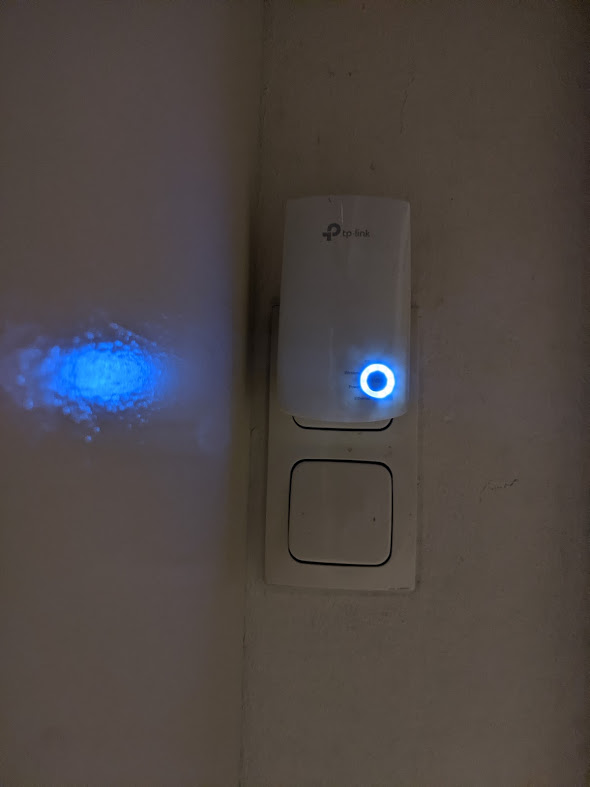
Picture doesn't come out well with the LED's, but basically there are all lit, except the Ethernet one.
 
And a bit much maybe, but here is the network status..


  0  
  0  
#4
Options
Re:Internet keeps dropping or incredibly slow on WA850RE on TP-LINK M7350(UN) router
2020-12-03 19:16:17

@AadmanZ have the same problem and dont think it is on our end. My tplink 850RE does the same thing and have two of them.  Neither work with up to date firmware and have TP link AC2300 router that gets 180-200mbs down across the house and extender drops that to 6-10 with full bars and shows in strong location on map.  Think these extenders are junk and wish you the best; as customer service seems to be pretty slow with replies:/.  I have even changed the network names, reset the extenders, etc and nothing works so its the extenders no doubt.  

Lang

  0  
  0  
#5
Options
Re:Internet keeps dropping or incredibly slow on WA850RE on TP-LINK M7350(UN) router
2020-12-04 06:36:59

@langn 

Hi, Good day,

Thanks for your patience.

Have you tried to change the wireless channel on the Archer C1200 to have a look:

https://www.tp-link.com/support/faq/2292/


As for the TL-WA850RE, it is 2.4ghz only and the maximum wireless link speed is 300m/s.

Due to half-duplex over-the-air modulation techniques, receive” and “send” cannot be carried out simultaneously. Even though the wireless associated speed shows 300Mbps on the PC,

its maximum is 150Mbps at one direction because half of the time PC needs to wait for WA850RE to receive data from the router and WA850RE cannot send data to PC at that moment.

Moreover considering the Wi-Fi interference and communication loss, the final internet speed would be around 50% of the 150m/s, almost 75M/s.

Since the total internet bandwidth you have is almost 180-200mbs, TL-WA850RE might not be the suitable device for you.

Maybe you could the dual band range extender with high-speed mode, such as RE300 and RE305.

  0  
  0  
#6
Options
Re:Internet keeps dropping or incredibly slow on WA850RE on TP-LINK M7350(UN) router
2020-12-04 06:51:28

@AadmanZ 

Good day,

Sorry for the delay.

As for the combination of  M7350+TL-WA850RE V1,

Please refer to the following suggestion to have a look

1. change the wireless channel on the M7350 to be channel 11 for 2.4ghz;

 After that, we could like to follow up on your case by email later, and could you please help me check the following information:

1. How far away from the M7350 to 850RE, on the same floor or different?

2. Would M7350 have a stable connection?

3. if you connect a device via Ethernet cable to 850RE, would it drop the connection as well?

4. would there be any error message when the internet kept dropping?


By the way, is there any chance that you could put the SIM card on the M7350 into the smartphone and enabled the mobile hotspot, then set up the 850RE with the mobile hotspot to see if the issue still existed?


Thank you very much for your cooperation and support.

  0  
  0  
#7
Options
Re:Internet keeps dropping or incredibly slow on WA850RE on TP-LINK M7350(UN) router
2020-12-04 10:38:25


TP-Link wrote

@AadmanZ 

Good day,

Sorry for the delay.

As for the combination of  M7350+TL-WA850RE V1,

Please refer to the following suggestion to have a look

1. change the wireless channel on the M7350 to be channel 11 for 2.4ghz;

 After that, we could like to follow up on your case by email later, and could you please help me check the following information:

1. How far away from the M7350 to 850RE, on the same floor or different?

2. Would M7350 have a stable connection?

3. if you connect a device via Ethernet cable to 850RE, would it drop the connection as well?

4. would there be any error message when the internet kept dropping?


By the way, is there any chance that you could put the SIM card on the M7350 into the smartphone and enabled the mobile hotspot, then set up the 850RE with the mobile hotspot to see if the issue still existed?


Thank you very much for your cooperation and support.

@TP-Link 


I have tried the channel at 11 and the problem appeared to be the same, but I will try again. 


1. I have tried the extender in the same room, on the same floor and on a different floor. It is hard to measure, but it almost looks like the problem is worse if the extender is very close to the router M7350.

2. The M7350 is not 100% stable, but speeds are acceptable and the connection only drops maybe once per day.

3. I have to try the ethernet cable, need to find one. 

4. no error message, webpages stop loading and pings are completely lost.


I will try the simcard in a phone and see if it is better.

  0  
  0  
#8
Options