
Prental control
 This thread has been locked for further replies. You can start a new thread to share your ideas or ask questions.
After update, i could not log in to parental control and some times the icon disappear
- Copy Link
- Subscribe
- Bookmark
- Report Inappropriate Content


Hi, sorry for the delay.
Could you please help me check the following information:
1. Did you log into the APP via owner account?
2. Did the Deco M5 work on the router mode?
3. please update the Deco APP to be the latest version as well;
4. when the parental control icon disappear, How about other features under Homecare and would they be the same?
5. how would you recover this option when it is gone?
Thank you very much.
- Copy Link
- Report Inappropriate Content
1. Did you log into the APP via owner account? YES
2. Did the Deco M5 work on the router mode? As i know i connected tio main fiber router
3. please update the Deco APP to be the latest version as well; Done
4. when the parental control icon disappears, How about other features under Homecare and would they be the same?
The icon disappears and sometimes appear with empty profiles
5. how would you recover this option when it is gone?
and some icons disappear from setting as pic
Keep waiting and sometimes nothing appear 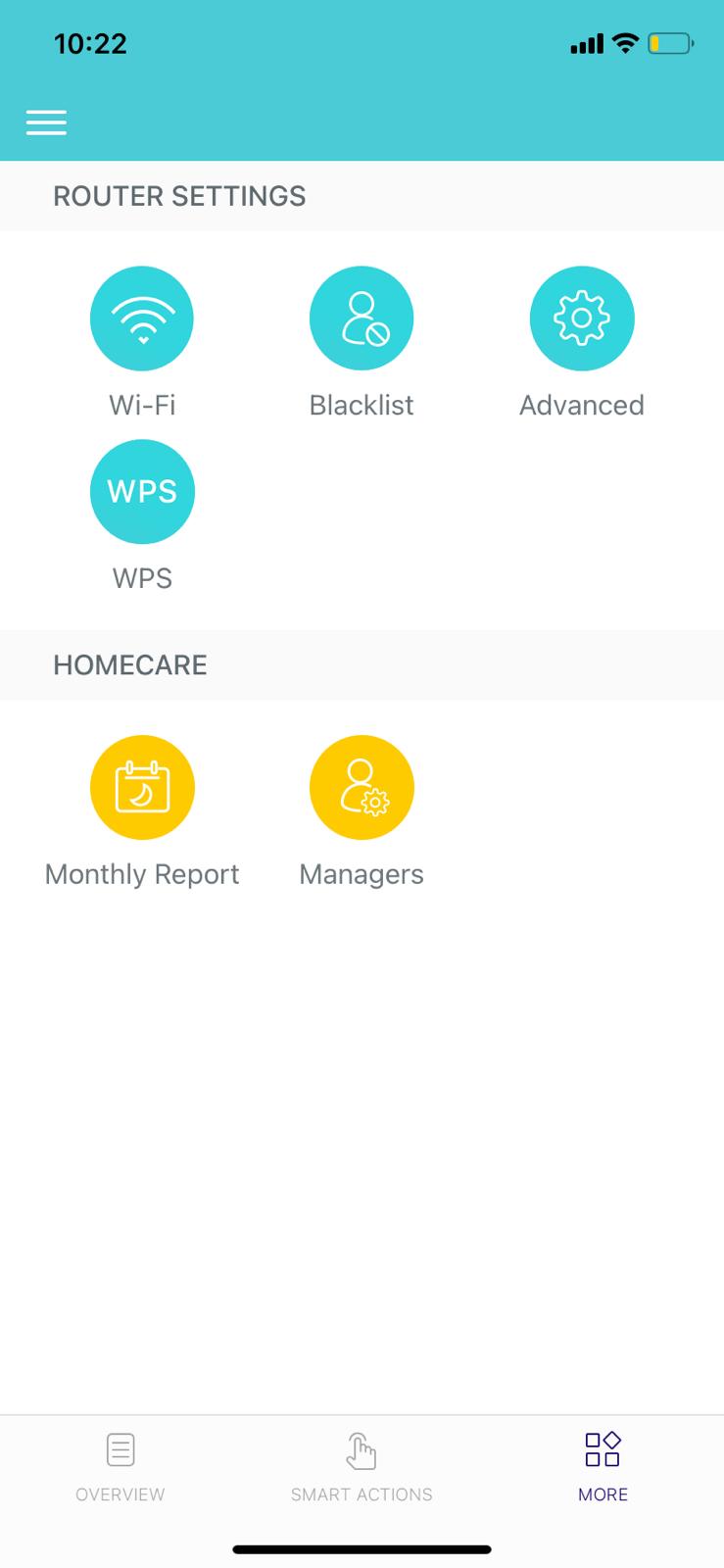
- Copy Link
- Report Inappropriate Content
Hi, thank you very much for your patience.
Have you tried to factory reset the Deco after the firmware update?
And if possible, please also try to use another Deco as the main Deco, then delete the Deco App and install it again for further check;
Thanks a lot and wait for your reply.
- Copy Link
- Report Inappropriate Content
Information
Helpful: 0
Views: 457
Replies: 3
Voters 0
No one has voted for it yet.