Peer to Peer OpenVPN

This thread has been locked for further replies. You can start a new thread to share your ideas or ask questions.

Peer to Peer OpenVPN

This thread has been locked for further replies. You can start a new thread to share your ideas or ask questions.

Peer to Peer OpenVPN
2021-03-18 20:02:43 - last edited 2021-03-18 20:23:39
Model: Archer AX11000  
Hardware Version: V1
Firmware Version: 1.1.1 Build 20200716 rel.84595(4555)

Hello,


I have a local network 192.168.1.0/24 with the Archer as router (192.168.1.1). In this local network the Archer should act also VPN Server. Open VPN is set up by the following options:

- Service Type: UDP

- Service Port: 1194

- VPN Subnet 10.8.0.0

- Networkmask: 255.255.255.0

- Client Access: home network only


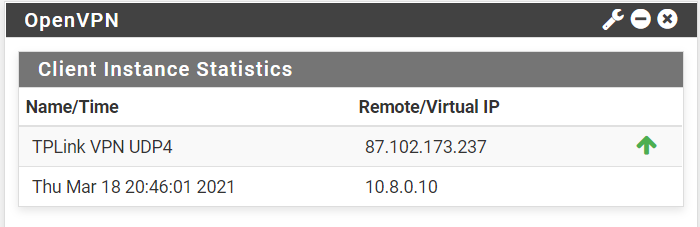
On the remote network 192.168.2.0/24 I have a Linux machine with PFSense (192.168.2.1) installed acting as OpenVPN client. The VPN is set up correctly and connections section showns me the correct Remote IP and 10.8.0.10 as assigned IP. 


Pinging 10.8.0.10 from local is working.


The routes are:

  Network Destination Subnet Mask Gateway Interface
 

10.8.0.0

255.255.255.0

10.8.0.2

TUN0


10.8.0.2

255.255.255.255

0.0.0.0

TUN0


But with this setup I cannot ping any machines from the other network. 


With my old Asus router this setup was working properly, I had some other options that I do not have in Archer. Especially I could define the remote network on the local router for the client. So I guess this is what is missign here, but I do not know where I can add the remote network.

I'm also able to connect with my Cell phone over VPN and ping machines in local network.


I also tried to set up the VPN Server with 192.168.2.0 as VPN subnet, but this also did not work.


I hope someone can help me here to give me the hint to make this work, as its very important to me and thank you already in advance.

kind regards

Roger


  0      
  0      
#1
Options
3 Reply
Re:Peer to Peer OpenVPN
2021-03-19 08:08:46

@Roger_G 


Just to confirm, how did you do the ping test, from the client side to the server, or on the contrary? Try to disable the firewall settings on the machines in the AX11000 local network.

Nice to Meet You in Our TP-Link Community. Check Out the Latest Posts: Introducing AI QoS: Elevate Your Gaming Experience on the Archer GE800 Gaming Router! Connect TP-Link Archer BE550 to Germany's DS-Lite (Dual Stack Lite) Internet via WAN Archer GE550 - BE9300 Tri-Band Wi-Fi 7 Gaming Router Archer AX90 New Firmware Added Support for EasyMesh and Ethernet Backhaul If you found a post or response helpful, please click Helpful (arrow pointing upward icon). If you are the author of a topic, remember to mark a helpful reply as the "Recommended Solution" (star icon) so that others can benefit from it.
  0  
  0  
#2
Options
Re:Peer to Peer OpenVPN
2021-03-19 15:59:26

@Kevin_Z 


I did the following (ping) test:

Ping from notebook on my local network to the remote network 10.8.0.10 (this is the virtual IP PFsense shows to me connected). I can also successfully call pfsense web interface over that IP from my local network.

Ping from my Android cell phone connected over openVPN to local network works successfully. There is no firewall/setting blocking the ping.


But if I try to ping from local network to remote 192.168.2.1 (the IP of pfsense in remote network) fails.

Also any pings from remote network (machine with IP 192.168.2.11) to any one in 192.168.1.0 network fails, including the one I could ping from android phone.


The only successful ping from remote network I get is to 10.8.0.10. 

  0  
  0  
#3
Options
Re:Peer to Peer OpenVPN
2021-03-22 07:50:51

@Roger_G 


To locate this issue and try to fix it, we would like to follow up on your case via email. Please check your inbox and provide the information that we need.

Nice to Meet You in Our TP-Link Community. Check Out the Latest Posts: Introducing AI QoS: Elevate Your Gaming Experience on the Archer GE800 Gaming Router! Connect TP-Link Archer BE550 to Germany's DS-Lite (Dual Stack Lite) Internet via WAN Archer GE550 - BE9300 Tri-Band Wi-Fi 7 Gaming Router Archer AX90 New Firmware Added Support for EasyMesh and Ethernet Backhaul If you found a post or response helpful, please click Helpful (arrow pointing upward icon). If you are the author of a topic, remember to mark a helpful reply as the "Recommended Solution" (star icon) so that others can benefit from it.
  0  
  0  
#4
Options