AX1900/Archer C80 wired LAN upload speed shocking

This thread has been locked for further replies. You can start a new thread to share your ideas or ask questions.

AX1900/Archer C80 wired LAN upload speed shocking

This thread has been locked for further replies. You can start a new thread to share your ideas or ask questions.

AX1900/Archer C80 wired LAN upload speed shocking
2021-08-10 15:27:08
Model: Archer C80  
Hardware Version: V1
Firmware Version: latest

Hi folks.


For a change it seems, not a wi-fi speed related issue.


I'm on fibre to the home, BT Fibre 900.


The C80 arrived today, bought primarily because the supplied BT smarthub 2 has known port forwarding issues and file server issues.


I was also interested to see if it's range and WiFi speed were better. I do use wi-fi for smart phones and tablets, but I am hard wired to several rooms where the big downloads happen (console games and updates and streaming TV services and Sky).


Using the BT Hub on the normal speedtest sites I get on average 870 download and 140 upload wired into the router.


Wireless isn't bad either at over 300, in some rooms this drops to 80 without a WiFi repeater.


So the C80 arrives and I surely set it up PPoE the required user and pass.


Set up the port forwards I need. Normal DHCP IP range etc. Reboot.


By trade I'm a field services engineer so I'm not IT shy, and while I do basic networking both wired and WiFi our government routers and switches do come preconfigured.


Everything connects up all peachy and I can see my devices in the router browser set up.


Speedtest.


870 down. 0.37up.


0.37!


Wired directly into router, flickers on the test between 0.37 and 0.38.


Reboots, resets, reconfigs, nothing changes that.


Use wi-fi, no issue, speeds as I would expect.


I've checked all the settings multiple times, turned NAT and enhanced NAT or whatever TPlink call it off and on and just NAT on.


Cables are fine and tried another as I couldn't believe how poor the upload was.


Out the BT router back on, boom, normal speeds.


Any thoughts appreciated. Apart from using the BT router : )


My plan is to hopefully use the C80 for WAN and DHCP, then the BT router hard wired upstairs as a WAP.


Thank you

  0      
  0      
#1
Options
5 Reply
Re:AX1900/Archer C80 wired LAN upload speed shocking
2021-08-12 08:40:03

@WD40 


Are all wired devices behaving the same or only one PC? Please check if you have enabled QoS for any devices in the network, try to disable it, then confirm.

Nice to Meet You in Our TP-Link Community. Check Out the Latest Posts: Introducing AI QoS: Elevate Your Gaming Experience on the Archer GE800 Gaming Router! Connect TP-Link Archer BE550 to Germany's DS-Lite (Dual Stack Lite) Internet via WAN Archer GE550 - BE9300 Tri-Band Wi-Fi 7 Gaming Router Archer AX90 New Firmware Added Support for EasyMesh and Ethernet Backhaul If you found a post or response helpful, please click Helpful (arrow pointing upward icon). If you are the author of a topic, remember to mark a helpful reply as the "Recommended Solution" (star icon) so that others can benefit from it.
  0  
  0  
#2
Options
Re:AX1900/Archer C80 wired LAN upload speed shocking
2021-08-12 15:45:53 - last edited 2021-08-12 15:46:20

@Kevin_Z thanks for the reply.


Every device hard wired. Media server which granted is only powerful enough to DL about 150Mbps limited by processor, but two i7 laptops (work and home).


QoS is off.


Nothing else has changed on the network bar the router and sticking the old router back on returns service to normal. Annoyingly.


All cabling is cat6.

  0  
  0  
#3
Options
Re:AX1900/Archer C80 wired LAN upload speed shocking
2021-08-13 07:03:22

@WD40 


Please check and update the C80 to the latest firmware, which can be detected on the router web GUI of Tether app. Or you can download it from the TP-Link official website below:

Archer C80(EU)_V1_210308


After upgrading the new firmware, please restore the C80 to factory defaults, set up the internet connection only, no more additional settings, then monitor and test the speed again.

Nice to Meet You in Our TP-Link Community. Check Out the Latest Posts: Introducing AI QoS: Elevate Your Gaming Experience on the Archer GE800 Gaming Router! Connect TP-Link Archer BE550 to Germany's DS-Lite (Dual Stack Lite) Internet via WAN Archer GE550 - BE9300 Tri-Band Wi-Fi 7 Gaming Router Archer AX90 New Firmware Added Support for EasyMesh and Ethernet Backhaul If you found a post or response helpful, please click Helpful (arrow pointing upward icon). If you are the author of a topic, remember to mark a helpful reply as the "Recommended Solution" (star icon) so that others can benefit from it.
  0  
  0  
#4
Options
Re:AX1900/Archer C80 wired LAN upload speed shocking
2021-08-14 09:22:00 - last edited 2021-08-14 09:22:52

@Kevin_Z 

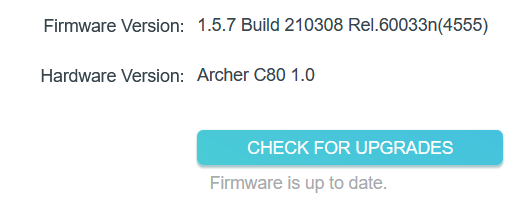
Firmware is up to date and I have factory reset the device:


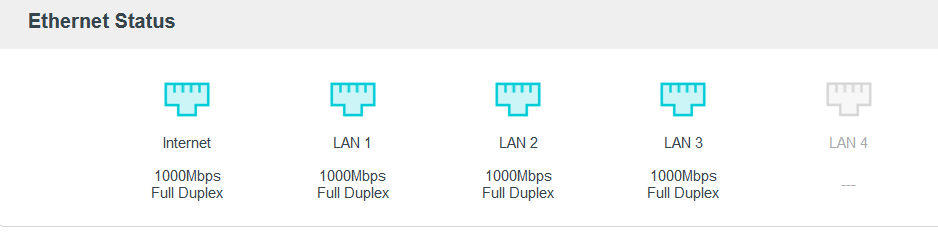
Ports showing OK:


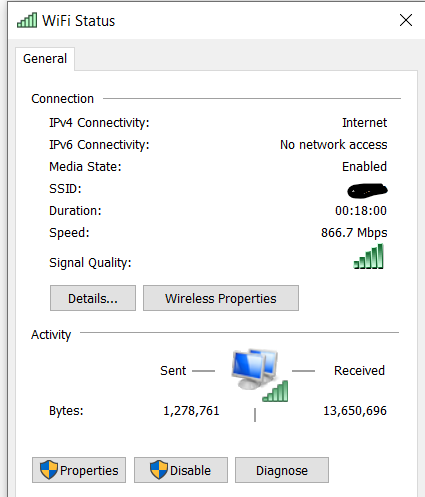
Wifi adaptors:


LAN adaptor is Gigabit, also tried (just in case) a USB C to Ethernet dongle.


This is the speedtest using the AX1900 on a wired connection directly into router, all ports tried, same result (or lower, down to 0.36). Also tried with WiFi radio turned off in router.


This is the speedtest using the AX1900 on a wireless/wifi connection:


This is the speedtest when AX1900 is NOT used and BY Smarthub 2 is used.


I have also spoofed the BT Hubs MAC address and reset to see if that made a difference - it didn't.


The only other thing I can add is that when I initially ran the speedtest for the first time out of the box, though I thought it initially unimportant as I thought maybe the connection hadn't changed from the wifi to LAN as I'd just swapped between them. The initial speedtest showed over 150 upload on the AX1900 but for that one test only.


Today after factory resetting it did the same, which is what made me remember, making me think that it was fixed, however but each and every test since, including rebooting router and laptop and PC and work laptop, all yield the terrible low upload speed.


I fully appreciate the help you have offered but if there is nothing else to attempt and the fact that this is clearly the TPLink router that is the issue, I guess, very reluctantly and having seem the literally thousands of posts about the various TPLink routers having similar issues be it upload or download, then it needs to go back.

  0  
  0  
#5
Options
Re:AX1900/Archer C80 wired LAN upload speed shocking
2021-08-16 03:53:18

@WD40 


This sounds quite weird. The tech team was made aware of your issue, they will likely reach out to you via email to continue to troubleshoot your issue.

Nice to Meet You in Our TP-Link Community. Check Out the Latest Posts: Introducing AI QoS: Elevate Your Gaming Experience on the Archer GE800 Gaming Router! Connect TP-Link Archer BE550 to Germany's DS-Lite (Dual Stack Lite) Internet via WAN Archer GE550 - BE9300 Tri-Band Wi-Fi 7 Gaming Router Archer AX90 New Firmware Added Support for EasyMesh and Ethernet Backhaul If you found a post or response helpful, please click Helpful (arrow pointing upward icon). If you are the author of a topic, remember to mark a helpful reply as the "Recommended Solution" (star icon) so that others can benefit from it.
  0  
  0  
#6
Options