
TPLINK AX10 extremely slow when using 2.45 GHz
 This thread has been locked for further replies. You can start a new thread to share your ideas or ask questions.
I using Digi Home Fiber 50Mbps download and upload 20Mbps. Digi provides me ZTE wireless Modem (Wifi 5 Modem) and I staying in Three storey house my Modem is situated on middle floor. While using my ZTE modem in 2.45GHz wifi the connection in the middle floor is 50 Mbps while the ground and the highest floor is average 15 Mbps. so, I decide to upgrade to TPLink AX10 after configuration on the wireless using not Smart Connect and not using Smart Connect, Transmit Power:High and the result is extremely disappointing. Middle floor is near modem is 50Mbps while the Ground and highest floor average of 5 Mbps for download and I always try speed tests never get above 10Mbps. When I watch Video streaming it always lags.
- Copy Link
- Subscribe
- Bookmark
- Report Inappropriate Content


How about the signal strength when the phones or laptops connecting to the 2.4GHz network of the AX10? It's quite possible that the 2.4 GHz band around you is highly congested. You can check that by installing an app like Wi-Fi Analyzer on your phone or laptop and test, try to set a channel with less congestion according to the test results.
Check this troubleshooting article for more suggestions:
https://www.tp-link.com/support/faq/2170/
- Copy Link
- Report Inappropriate Content
The bar is 80% to 100% on phone and laptop.
Signal Analyzer power strength is -62dBm.
I will try to change the Channel for 2.45Ghz and will update you after i try for few hours on this.
Thanks
- Copy Link
- Report Inappropriate Content
The internet connection become worst... :(
I need to fallback to my old router.
I had try everything i not sure what else to do... Keep lag while watching video. While i use back my ZTE wifi router provide by DiGi is smooth.
Any idea what issue.?
- Copy Link
- Report Inappropriate Content
What is the devices you are testing with the 2.4G network, how about the link speed on those devices when sitting on the third floor or ground floor? Click here to find out the link speed on a computer.
Just to confirm, how about the 5G connectivity, is the 5G speed normal or as good as expected?
- Copy Link
- Report Inappropriate Content
the link speed is 150Mbps and I using Laptop Window 7.
the 5G connection in Middle floor is ok while the first floor and highest floor signal bar are weak. The speed is below 10Mbps and my Digi plan is 50Mbps.
Attached below is my speed test result:
I put my router on the 2nd floor (Middle Floor) and I test it on the 3rd floor (One floor above). The router I put in the hallway and I test it in my room with the door open.
The distance between the router to this PC is around 6 meters because it is just one floor above.
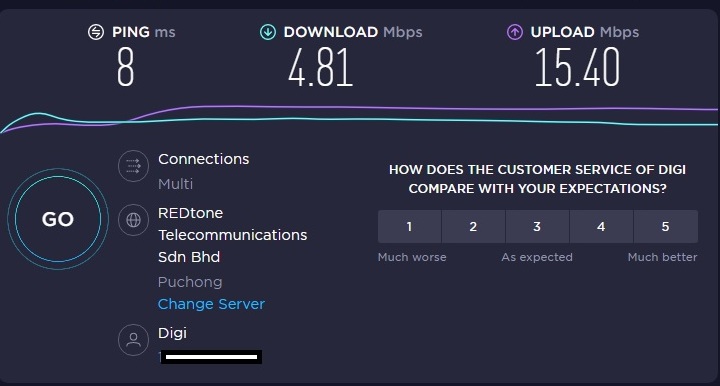
During the setting I follow these steps:
https://ahwee321.blogspot.com/2021/07/tp-link-ax6600-digi-home-fibre-setup.html
i not sure these steps are correct or not but it works and now the only problem is the internet speed slow as the figure above.
- Copy Link
- Report Inappropriate Content
Update: I had tried Access point mode. This means I use my ZTE wifi router first and from this ZTE wifi router use the LAN1 port to connect to WAN Port at TPLink router. I set this to AP mode in TPLink AX10 wifi router.
QoS I also tried Off and On. Both are also the same issue.
I Speedtest ZTE modem I get around 25Mbps while TPlink below 10Mbps.
I subscribe Digi Home Fiber in Mid July means my ZTE Wifi router is new and I brought this TPLink AX10 router 2 days ago.
the reason I upgrade Wifi5 router to Wifi6 is hopefully I get good internet connection but it did not works and the speed is extremely disappointing
- Copy Link
- Report Inappropriate Content
Information
Helpful: 0
Views: 1087
Replies: 6
Voters 0
No one has voted for it yet.