
Archer AX6000 Vodafone Station CGA Bandbreite nur 50%
 This thread has been locked for further replies. You can start a new thread to share your ideas or ask questions.
Archer AX6000 Vodafone Station CGA Bandbreite nur 50%
This thread has been locked for further replies. You can start a new thread to share your ideas or ask questions.
An meinem AX6000 bekomme ich nur ca 500Mbit Downloadgeschwindigkeit herein. An den LAN Buchsen der Vodafone Station CGA liegen die vollen 1Gbit meines Anschlusses an. Modemeinstellungen, wie Bridge Mode, und LAN Kabeltausch bringen keine Besserung. Der Upload (volle 50Mbit) und der Ping (9-25ms) sind gut.
Was könnte die Ursache sein? Kanalbeschränkungen seitens Vodafone, bzw. dem AX6000?
- Copy Link
- Subscribe
- Bookmark
- Report Inappropriate Content


What's the download speed you can get when connecting the computer directly to the LAN socket of the Vodafone Station CGA? Will you be able to get the full 1Gbps?
If the LAN port of the Vodafone Station CGA allows a real 1Gbps connection, please try with a different cat 5e/6 cable between the CGA and the AX6000 WAN, connect a computer to one of the LAN ports of the AX6000, check again if you can get a 1Gbps negotiation speed.
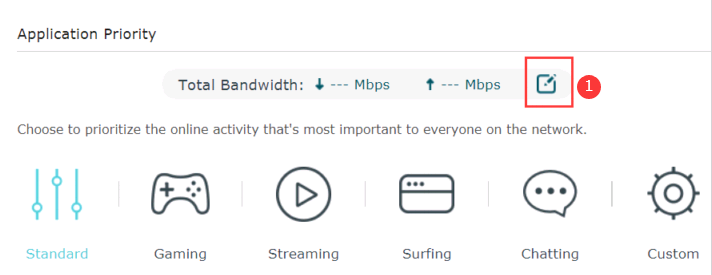
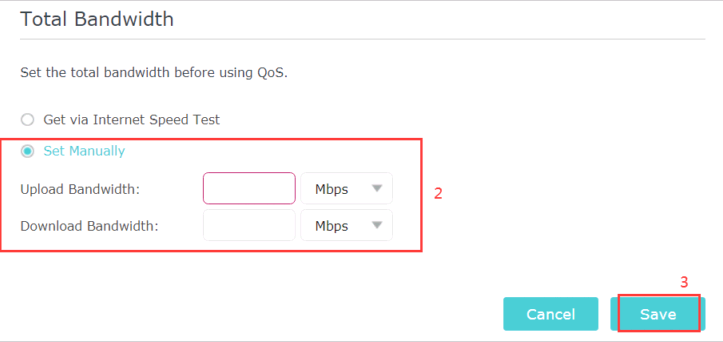
Additionally, please review the QoS settings on the AX6000 web GUI, ensure that have been configured correctly as per the below guide:
- Copy Link
- Report Inappropriate Content
The LAN Ports at the VF Station are fully delivering 1Gbps (950 Mbps) when directly connected with a proper PC. The yellow controller LED is in this case operating.
When I connect the AX6000 v1 to the VF Station only the green controller LED is operating. This stands for the 100Mbps Mode.
Upload 50Mbps and Ping between 9 and 25 ms are ok.
I tried several CAT6/7/8 cables with no success.
I also forced the AX6000 to the fullduplex 1000mbps Mode and the VF Station to Bridge Mode. No effect.
I tried different QoS Settings, for the latest one see pictures.

- Copy Link
- Report Inappropriate Content
- Copy Link
- Report Inappropriate Content
As per the pictures you attached, it seems the download bandwidth is only 570.6Mbps, can you please confirm again?
- Copy Link
- Report Inappropriate Content
Yes, the Bandwidth is between 490 and 580 Mbps.
The VF Station can not detect the AX6000 v1 as a Gbps Client. The yellow LED on the LAN Port shows no status, it's off.
- Copy Link
- Report Inappropriate Content
- Copy Link
- Report Inappropriate Content
I have manually increased the Bandwidth and rebooted both items. No success.
- Copy Link
- Report Inappropriate Content
- Copy Link
- Report Inappropriate Content
QoS Standard, Bandwidth manually set Upload 55mbps and Download 2000mbps, all priorities removed, setting saved, device rebooted.
No positive effect.
- Copy Link
- Report Inappropriate Content
Should I try a factory reset?
- Copy Link
- Report Inappropriate Content
Information
Helpful: 0
Views: 1580
Replies: 18
Voters 0
No one has voted for it yet.