
AX90 + 2pcs M9 Plus
 This thread has been locked for further replies. You can start a new thread to share your ideas or ask questions.
AX90 + 2pcs M9 Plus
This thread has been locked for further replies. You can start a new thread to share your ideas or ask questions.
Hi,
I just bought a AX90 as a main router and also have connected one Cat 6 to my second floor. From the Lan cable i connect the Deco M9+, so can I add the M9+ as a access point and using same SSID with the AX90?
- Copy Link
- Subscribe
- Bookmark
- Report Inappropriate Content

- Copy Link
- Report Inappropriate Content
- Copy Link
- Report Inappropriate Content
No, you can't use one SSID like OneMesh. See the difference here.
You can refer to OneMesh FAQ - Q9/A9 as well.
- Copy Link
- Report Inappropriate Content
@terziyski
Currently i set up AX90 as a main router, run one Cat 6 to my lvl2 to connect the Archer C6, I also try connect the M9Plus on lvl2 as well, but i found out the C6 more stable than M9plus. Do you face this issue before?
- Copy Link
- Report Inappropriate Content
I thought you're building Deco Mesh. Using AX90 with C6 in AP mode won't give you a mesh network.
M9+ is quite more powerful device that C6. One reason for instability could be a strong wireless interference arround you.
You can check that with this software - https://www.metageek.com/products/inssider/
I would set the AX90 with the two M9+ as I posted in my first post.
If the two M9+ cover your premises you can even disable the AX90 wireless radio to minimize the wireless interference.
- Copy Link
- Report Inappropriate Content
But i tot AX90 is more powerful than the M9Plus. If i off the AX90 wifi radio, can i get full speed on m9+?
- Copy Link
- Report Inappropriate Content
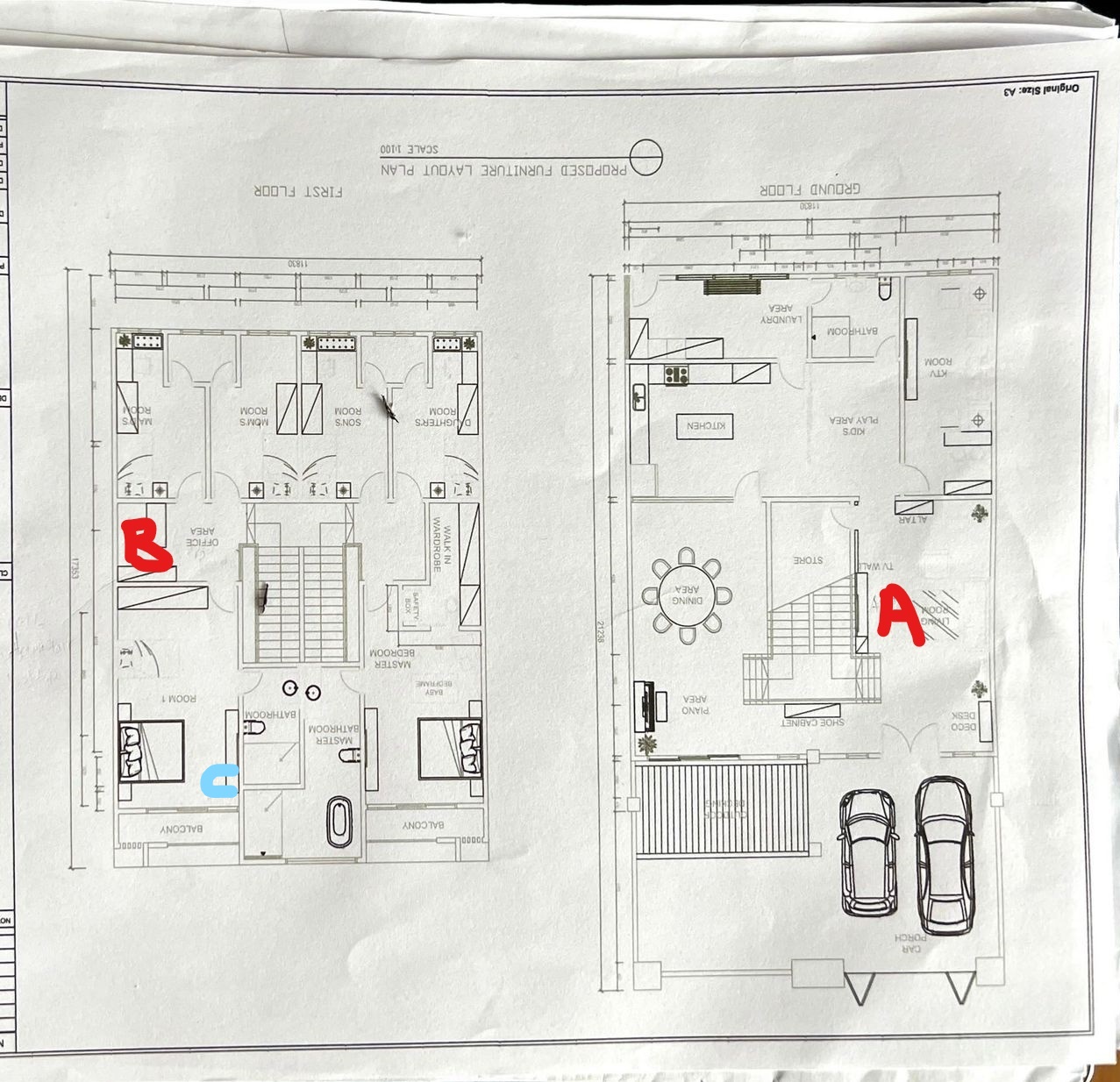
Currently, my house is (18x60) 2 unit refer to the picture. AX90 i put at point A lvl 1, I also have run one cat 6 to point B and connect to the network switch, split one LAN to CCTV, another one to the router. I had try Archer C6 and M9+ at point B. But seem like the M9+ is not stable. My PC I put at the Room 1 (Point C), when I using M9+ on point B, the speed test some time 1++ to 2++, some time will drop till less than 10mbps or my PC cant even disconnect from the m9+.
So I change to the Archer C6, the speed will maintain 150-250mbps, and never drop till 10mbps. But I know the M9+ spec is higher than C6, but don't know why is so unstable. My current unifi plan is 500mbps.
another question is if I turn off the AX90 wifi radio and use M9+, I think the coverage is not enough to cover my 2 unit house.
- Copy Link
- Report Inappropriate Content
OK. Let me explain the possible options you have if you want to build a mesh network with your existing hardware.
1. If you have two M9+ (like you posted) - these can be used in router mode to build a mesh network using Deco ethernet backhaul (you already have the cabling in place).
In this scenario you probably won't need AX90 - one M9+ at point A and the other at point B will probably cover your premises.
2. If you want to keep AX90 and use the two M9+ then follow the scenario I posted earlier - Deco in AP mode.
In this scenario you can disable AX90 wireless radio if it's not needed and minimize wireless interference - one M9+ at point A and the other at point B will probably cover your premises.
3. Use AX90 to build OneMesh using compatible range extenders - you'll have to buy an additional hardware (REs).
Finally you can use AX90 in router mode (point A) and Archer C6 in AP mode (case 1) (point B) to extend the wireless coverage in your premises.
In this scenario you won't have a mesh network but if that suit your needs then you should be fine.
- Copy Link
- Report Inappropriate Content
I try to use the M9+ as a main router before, but the speed can't reach 500mbps. I also try using ethernet backhaul for the M9+ on point B but the speed is also no really fantasic.
So I just bought the AX90 to replace the C6.
- Copy Link
- Report Inappropriate Content


terziyski's previous reply is very specific and his suggestions are good and professional.
If I may ask, I want to confirm what are the LEDs' status on the 2 Deco M9 units, are they both flashing red when it gets disconnected from the network? If the LEDs change to flash red when the disconnect happens, I advise you to send an email to support.forum@tp-link.com to ask for further suggestions.
- Copy Link
- Report Inappropriate Content
Information
Helpful: 0
Views: 2056
Replies: 11
Voters 0
No one has voted for it yet.