The port transfer of No. 20 is not possible.Archer AX20.

This thread has been locked for further replies. You can start a new thread to share your ideas or ask questions.

The port transfer of No. 20 is not possible.Archer AX20.

This thread has been locked for further replies. You can start a new thread to share your ideas or ask questions.

The port transfer of No. 20 is not possible.Archer AX20.
2022-07-20 19:24:24

Nice to meet you.
I contacted the support center in Japan, but it didn't solve it, so I posted it here.
I built a Web server and an FTP server at home.
First of all, I will describe my home network environment and settings.


A. The line is an optical cable.
B. Home Gateway is NTT PR-500KI. Only the ONU function is used.
C. The router is TP-Link Archer AX20.
 C-1. The connection to the Internet is PPPoE.
 C-2. DDNS is NO-IP.
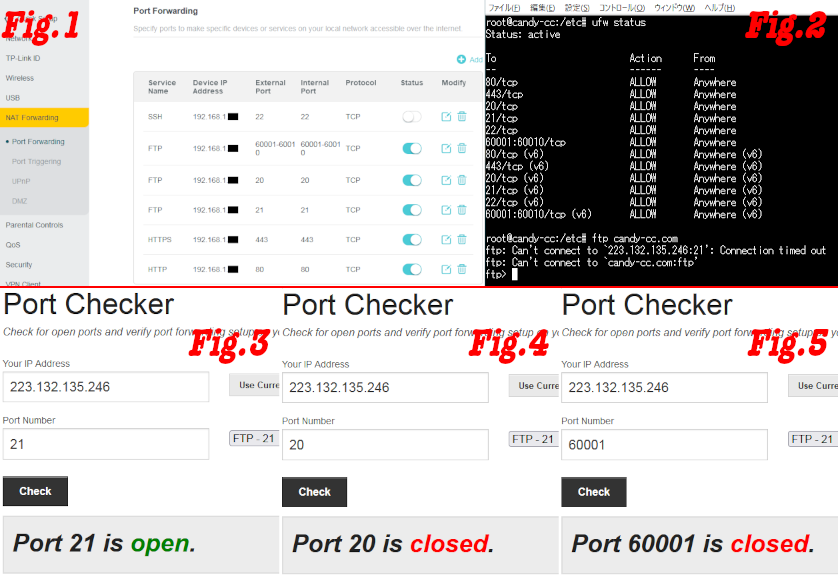
 C-3. Port forwarding is set as shown in Fig.1.
D. Server OS is Ubuntu 22.04, FTP is vsftpd, and Web Server is Apache2.
 D-1. In the Firewall, as shown in Fig.2, the port is released.


Confirmed normal operation.
- When I specified the local IP address from within the LAN, I was able to connect both ftp and http.
- When I specified the domain name from within the LAN, http was able to connect.
- In Fig.1, the port of No.22 is not forwarded. However, when I forwarded it, I was able to connect ssh by specifying the domain name.
- As shown in Fig.3, the port of No.21 is open.


Confirmed abnormal operation.
- If I specify a domain name from within the LAN, ftp could not be connected. I can't connect as shown in Fig.2. However, since the global IP address was found from the domain name, there is no problem with DNS.
- As shown in Fig.4, the port of No.20 is closed.
- As shown in Fig.5, the port of No.60001 is closed.


I guessed from the above results.
Since I was able to connect with the local IP address, so there is no problem with the server settings.
From the results of Fig.4 and Fig.5, the port forwarding of the router is invalid.
So is it a router problem?
Could you please reply?

  0      
  0      
#1
Options
7 Reply
Re:The port transfer of No. 20 is not possible.Archer AX20.
2022-07-20 20:09:11

  @CandyBass 


Hi,


If you are using passive ftp mode, have you also limited the ports vsftpd uses by adding the parameters "pasv_min_port=60001" and "pasv_max_port=60010" ?


  0  
  0  
#2
Options
Re:The port transfer of No. 20 is not possible.Archer AX20.
2022-07-20 20:30:24 - last edited 2022-07-20 20:36:05

  @CandyBass 


Here's a full installatoin guide for VSFTPD - https://adamtheautomator<dot>com/vsftpd/

Go through this guide and double check your VSFTPD configuration.

Port 20 TCP is the data port when using active mode. Port 990 TCP should be opened as well.

Ports 60001-60010 TCP in your case is the data port range when using passive mode.


If this was helpful click on the arrow pointing upward to make it blue. If this solves your issue, click the star to make it blue and mark the post as a "Recommended Solution".
  0  
  0  
#3
Options
Re:The port transfer of No. 20 is not possible.Archer AX20.
2022-07-20 23:53:28

  @woozle 

Hi!

Thank you for your reply to my question.

yes. I wrote in the vsftpd config file:


pasv_enable=YES
pasv_promiscuous=NO
pasv_min_port=60001
pasv_max_port=60010


It is strange that it still does not work properly.

  0  
  0  
#4
Options
Re:The port transfer of No. 20 is not possible.Archer AX20.
2022-07-21 00:17:47

  @terziyski 


Hi! Thank you for your reply to my question.

I saw the linked page.

However, I wrote all the contents described there.

Also, since I didn't open the port of No.990, so I opened the port of No.990 of the firewall and set the port forwarding of the router.

I tried an FTP connection, but couldn't.

  0  
  0  
#5
Options
Re:The port transfer of No. 20 is not possible.Archer AX20.
2022-07-21 05:00:39 - last edited 2022-07-21 12:42:47

  @CandyBass 


Have you tried to access the FTP server from an external network (not your LAN) ?

Check how it behaves if you try the access from an Internet.

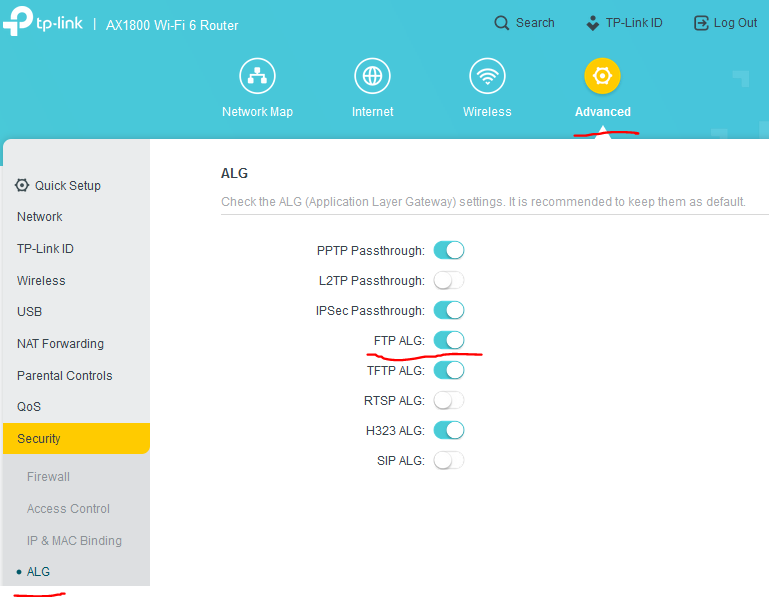
Also make sure that you have enabled FTP ALG:


If after that it still doesn't work, you may contact your local support for further assistance.

If this was helpful click on the arrow pointing upward to make it blue. If this solves your issue, click the star to make it blue and mark the post as a "Recommended Solution".
  0  
  0  
#6
Options
Re:The port transfer of No. 20 is not possible.Archer AX20.
2022-07-21 06:21:58

  @terziyski 


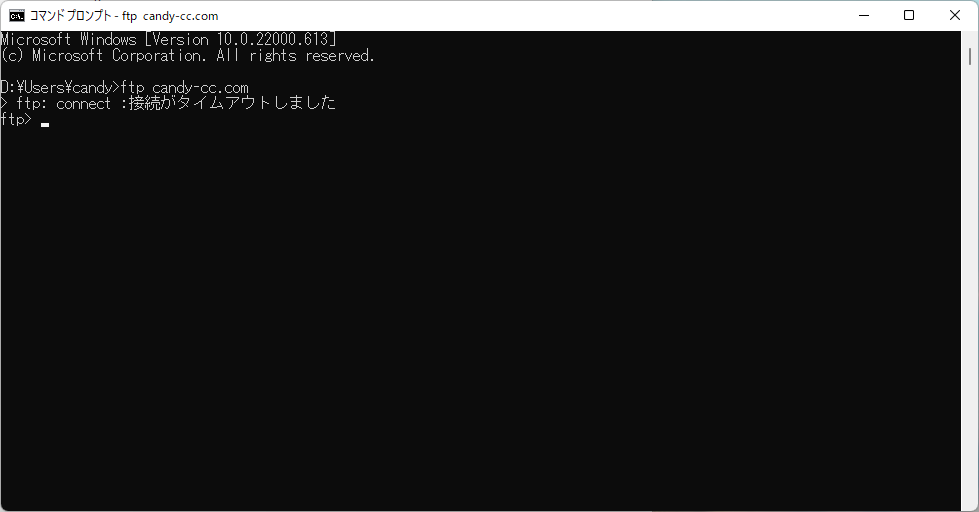
Yes.

I made an FTP connection at the command prompt.

Here is a screenshot when I tried it.

The message is in Japanese.

The message that is being output wrote "The connection has timed out.".


  0  
  0  
#7
Options
Re:The port transfer of No. 20 is not possible.Archer AX20.
2022-07-22 12:24:51

  @terziyski 


Hi!


When I connected by tethering, I was able to connect normally.

I caused a lot of trouble.

sorry. And thank you to all the people who responded.

  0  
  0  
#8
Options