5Ghz download speed seems to be capped for some reason, but upload speed is fine

This thread has been locked for further replies. You can start a new thread to share your ideas or ask questions.

5Ghz download speed seems to be capped for some reason, but upload speed is fine

This thread has been locked for further replies. You can start a new thread to share your ideas or ask questions.

5Ghz download speed seems to be capped for some reason, but upload speed is fine
2022-08-29 05:07:49
Model: Archer C80  
Hardware Version:
Firmware Version: 1.11.0 Build 220425 Rel.43193n(4555)

Hi everyone,


I noticed that on all my Wi-Fi connected devices, I can only reach around 200-220 Mbps.

I have a 500 Mbps fiber connection, and on devices connected via LAN cable I reach the max speed provided - around 500-550 Mbps.

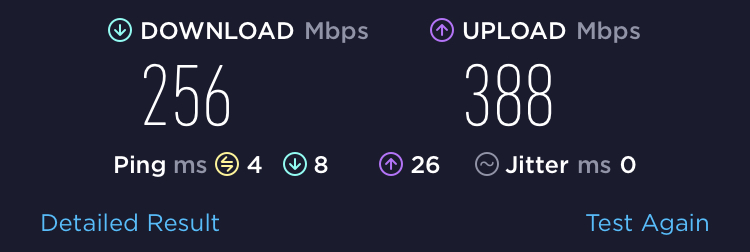
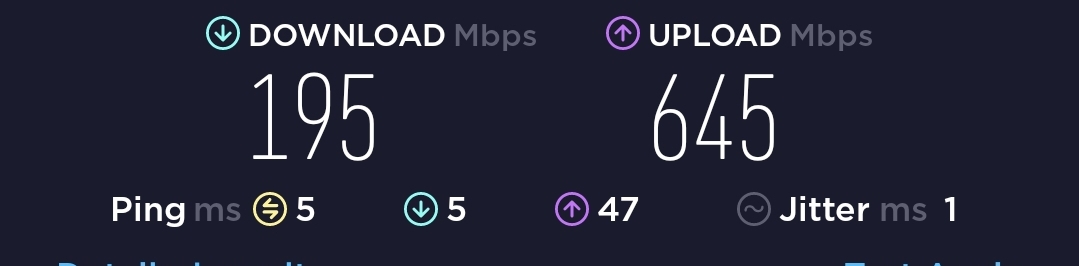
Also, on Wi-Fi, upload speed reaches over 500 Mbps easily. However, only the download speed, only on Wi-Fi, doesn't want to go any higher than around 200-220 Mbps.


I tried changing channel / channel width settings but nothing fixes this. What could be the reason? Can you think of anything I can try to fix it?


Thanks

  0      
  0      
#1
Options
4 Reply
Re:5Ghz download speed seems to be capped for some reason, but upload speed is fine
2022-08-30 04:37:59

Update:

I did a factory reset on the router, and it made no difference to the WiFi download speeds.

Here are some tests I did on various devices I have at home:


Desktop PC Wired:


Laptop Wired:


Laptop WiFi:


iPhone WiFi:


Samsung Phone WiFi:


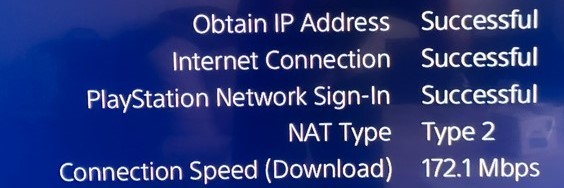
Playstation 4 WiFi:


We can clearly see that only the download speeds are consistently lower.


I have QoS disabled, however I tried enabling it and it made no difference.

I saw a few other posts with similar or exactly the same problems and they are all unsolved.

What's going on?

  0  
  0  
#2
Options
Re:5Ghz download speed seems to be capped for some reason, but upload speed is fine
2022-08-30 05:58:40

@Gworan 


Are you saying even though you have reset the C80 to factory defaults and reconfigured it from scratch, the wireless download speed is still slow? When you reconfigure the C80, have you changed any advanced settings? I would suggest just connecting the C80 to the internet but don't modify any other settings to monitor the speed first, then you can configure the required settings one at a time to determine which one affects the download speed.


BTW, is there newer firmware for the Archer C80 if you click on "Check for the updates" on its web GUI? If yes, please update and install the latest firmware, then test and monitor the speed again.

Nice to Meet You in Our TP-Link Community. Check Out the Latest Posts: Introducing AI QoS: Elevate Your Gaming Experience on the Archer GE800 Gaming Router! Connect TP-Link Archer BE550 to Germany's DS-Lite (Dual Stack Lite) Internet via WAN Archer GE550 - BE9300 Tri-Band Wi-Fi 7 Gaming Router Archer AX90 New Firmware Added Support for EasyMesh and Ethernet Backhaul If you found a post or response helpful, please click Helpful (arrow pointing upward icon). If you are the author of a topic, remember to mark a helpful reply as the "Recommended Solution" (star icon) so that others can benefit from it.
  0  
  0  
#3
Options
Re:5Ghz download speed seems to be capped for some reason, but upload speed is fine
2022-08-30 08:09:08

  @Kevin_Z 


Thanks for you reply.


After I did a factory reset, I haven't done any configuration, other than setting up a different name and password for the wireless network.


The firmware is the latest version, I checked before writing my initial post.

  0  
  0  
#4
Options
Re:5Ghz download speed seems to be capped for some reason, but upload speed is fine
2022-08-31 01:58:11

@Gworan 


Thank you very much for getting back with the detailed info.


To assist and figure it out efficiently, I've forwarded your case to the TP-Link support engineers who will contact you with your registered email address later. Please pay attention to your email box for follow-up.

Nice to Meet You in Our TP-Link Community. Check Out the Latest Posts: Introducing AI QoS: Elevate Your Gaming Experience on the Archer GE800 Gaming Router! Connect TP-Link Archer BE550 to Germany's DS-Lite (Dual Stack Lite) Internet via WAN Archer GE550 - BE9300 Tri-Band Wi-Fi 7 Gaming Router Archer AX90 New Firmware Added Support for EasyMesh and Ethernet Backhaul If you found a post or response helpful, please click Helpful (arrow pointing upward icon). If you are the author of a topic, remember to mark a helpful reply as the "Recommended Solution" (star icon) so that others can benefit from it.
  0  
  0  
#5
Options