Configuring M9Plus mesh with switches

This thread has been locked for further replies. You can start a new thread to share your ideas or ask questions.

Configuring M9Plus mesh with switches

This thread has been locked for further replies. You can start a new thread to share your ideas or ask questions.

Configuring M9Plus mesh with switches
2022-11-29 21:50:22
Tags: #Access Point Mode #networking switch
Model: Deco M9 Plus  
Hardware Version:
Firmware Version:

Hello!


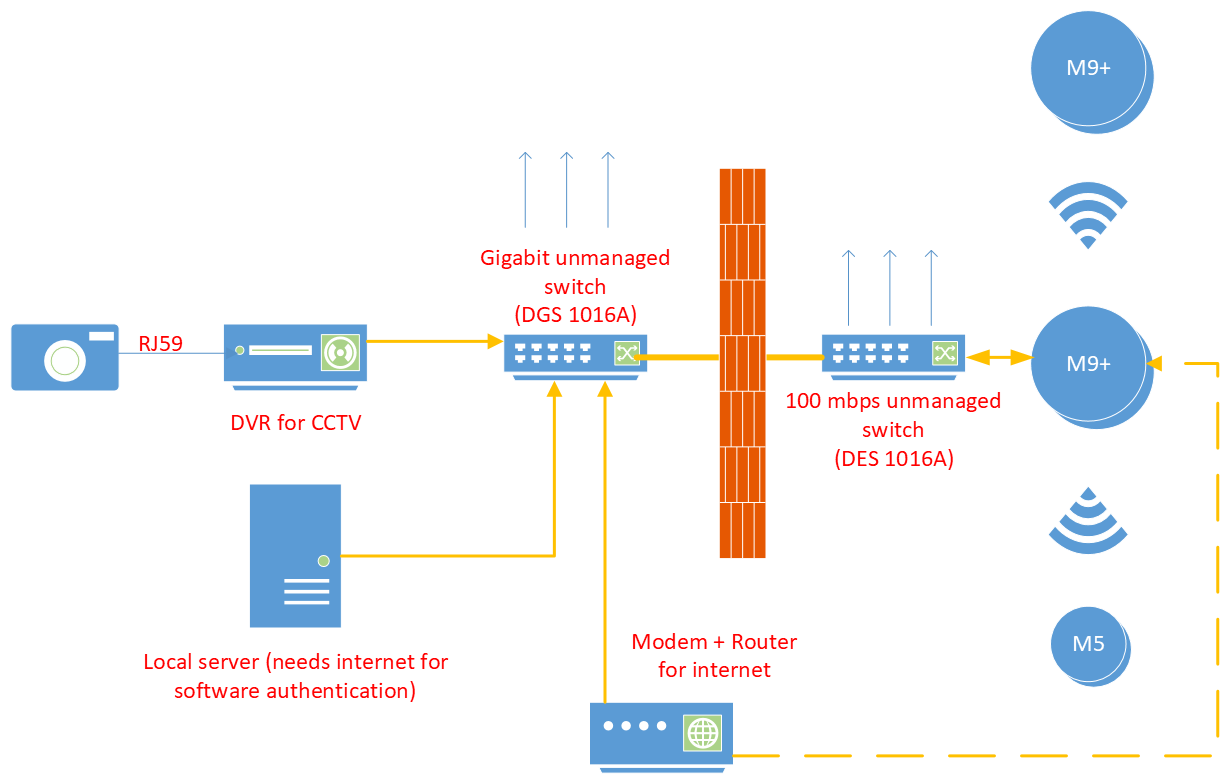
I am having trouble setting up a mesh network with M9Plus. I have attached my network layout here. I have two switches in adjacent buildings, with a local server (for a licensed software), a security cam DVR, and an internet modem + router connected to one switch. The yellow lines are ethernet cables. Both switches are also hooked to several computers in each building (blue arrows). My goal with getting the Decos is to blanket the 2nd building with a mesh Wi-Fi system so that both internet and the local server are available wirelessly.


My problem is that I cannot access the internet or the local server (which has its own local static IP 192.168.xx.xx) over the Deco WiFi in the given layout. If I directly connect the internet router to M9 plus (dashed yellow line), I get wireless internet from the Deco but the computers connected to either of the switches don't get any internet. I don't get access to the local server in this configuration too. For both configurations, I initially set the main M9 unit in router mode, and then rebooted it into access point mode. Now the unit is stuck with on a red indicator light.

Any suggestion on how to set up this network would be much appreciated! Thank you smiley

  0      
  0      
#1
Options
3 Reply
Re:Configuring M9Plus mesh with switches
2022-11-29 22:26:48

  @Decodaze 


What you want will only work with Deco mesh running in Access Point mode. I have my Deco mesh with M9 Plus and M5s running in Acess Point mode, the switch from Router mode was seamless.

Not sure why your Main Deco has red LED, so here is how I would have approached setup process, and then will discuss how to recover your M9 Plus.


Steps:


1. Start with Main Deco. If you have configured Satellite Deco already, power them off.

2. Connect Main Deco to Internet Router. Verify LED is green.

3. Switch Main Deco to Access Point mode. If LED stays red, you could as well give up on Deco, it is not compatible with your Internet Router for whatever reason. If Deco LED is green, continue.

4. Bring Main Deco to switch DGS 1016A and connect it to that switch. If LED stays red, Deco is not compatible with that switch, for whatever reason. That is unusual for such network layout, but who knows. If Deco LED is green, continue.

5. Bring Main Deco to switch DES 1016A and connect it to that switch. If LED is green, you now have Main Deco operational, in AP mode. Add to mesh (or power on) Satellite Deco.


----------------------

Recovery from current setup.


Power off Satellite Decos. Connect Main Deco directly to Internet Router. If LED stays red, you may need to delete your Deco units from Deco app and, then, factory reset them starting with Main Deco. 

After that, repeat Deco mesh initial setup, but with Main Deco only and connected directly to Internet Router. After you manage to complete Main Deco setup, configure it to run in Access Point mode. Then, add Satellite Deco to that new Deco mesh. After that, proceed with above steps 4 and 5.

Helpful TP-Link FAQ article: How can I reset or reboot my Deco Whole-Home Wi-Fi System? With Main Deco having red LED, you will have to apply both Method 1 and Method 2 under "Reset a Deco unit" section.

  0  
  0  
#2
Options
Re:Configuring M9Plus mesh with switches
2022-12-15 21:54:25

Hi  @Alexandre. 


Thanks for the detailed write-up! Much appreciated!


As per your suggestion, I tried setting up the Decos in AP mode and then found out that the ISP router restricts the number of devices that it will manage based on the internet plan that I have. So I wired an M5 between the router and the DGS1016 switch, and now everything works! I had to get another M5 to maintain coverage in the second building, but now I can manage the whole network from the Deco app, and I don't have to upgrade my internet connection with my ISP.


I am running into a different issue now where PCs with WiFi dongles don't connect to the nearest Deco but to one farther away with a weaker signal, but I guess that's an issue for a different thread.


Thanks again!


Note to anyone who has a local server on the network: I have a local linux server that broadcasts a licensed software at a static internal IP address (192.168.x.y). Initially I couldn't access the server through the Decos, but after changing the internal IP of the Deco network from the default to now be in the same range as the server, I was able to access the server through its IP address.

  0  
  0  
#3
Options
Re:Configuring M9Plus mesh with switches
2022-12-16 01:35:13

  @Decodaze 


Glad to know you have your Deco mesh working now.


For PCs with WiFi dongles not connecting to the nearest Deco, there is a solution if you run Deco mesh that only consists of Deco M5 and M9 Plus. It is documented here, in Part 2 of FAQ document: How to select a preferred signal source on the Deco App

To unlock that feature, all Deco units in the mesh must support it. For M5 and M9 Plus it means they must be on firmware 1.6. For M5, this is release firmware and your Deco M5s should have it. For M9 Plus, firmware 1.6 is still in beta and can be downloaded from here: Deco M9 Plus 1.6.0


As for Linux server, now that you have your Deco mesh running and it is in Router mode, I would recommend using Deco mesh IP address reservation. That would ensure no IP address conflicts and is good network management practice.

To use IP address reservation you will have to reconfigure Linux box to obtain dynamic IP address, then follow this document: How to configure Address Reservation with Deco

Note that after you reserved IP address for Linux with whatever IP address it were assigned dynamically by Deco, you can edit that record in Deco app with IP address that you want Linux server to have.

  0  
  0  
#4
Options