
New Release EasyMesh Range Extenders Start Supporting Building a EasyMesh Network via Ethernet Backhaul


This Article Applied to:
| RE205_V4 | 1.0.50 Build 250821 |
| RE220_V3 | 1.0.50 Build 250821 |
| RE230_V2 | 1.0.50 Build 250821 |
| RE200_V5 | 1.0.50 Build 250821 |
| RE215_V1 | 1.0.50 Build 250821 |
| RE305_V4 | 1.0.50 Build 250821 |
| RE330_V1 | 1.0.50 Build 250821 |
| RE365_V2/V3 | 1.0.50 Build 250821 |
| RE315_V1 | 1.0.30 Build 230919 or later |
| RE700X(US)_V2 | 1.2.4 Build 20250304 |
| RE705X(US)_V2 | 1.2.0 Build 20241210 |
| RE705X(TW,CA)_V2 | 1.2.6 Build 20250428 |
| RE705X(KR)_V2 | 1.2.6 Build 20250605 |
| RE700X(Non US)_V1 | 1.2.10 Build 20250627 |
| RE705X(Non US)_V1 | 1.2.10 Build 20250627 |
| RE780X(EU)_V1 | 1.2.7 Build 20250430 |
| RE780X(EU)_V2 | 1.2.0 Build 20250808 |
| RE3000X(DE)_V1 | 1.2.10 Build 20250627 |
| RE600X(UK,JP,AS)_V3 | 1.2.4 Build 20250304 |
| RE605X(UK,JP,AS)_V3 | 1.2.4 Build 20250304 |
| RE900XD_V1 | 1.0.10 Build 20240411 |
| RE6000XD(DE)_V1 | 1.0.10 Build 20240411 |
| RE715X_V2 | Supported by the factory firmware |
| RE615X(US)_V2 | |
| RE600X(US/CA) _V4 | |
| RE605X(US/CA) _V4 | |
| RE655BE_V1 | |
| RE235BE_V1 | |
| RE220BE_V1 | |
| RE405BE(EU/US)_V1 |
EDIT: Updated on October 27th.
Moderator Note:
1. The models included in this list are based on currently available official information and may not be exhaustive.
2. This list is updated on an ad-hoc basis, and the information may sometimes be delayed. It is recommended that you refer only.
3. For the most accurate and up-to-date information, please take a look at official regional announcements and firmware update notifications.
4. We welcome your input and suggestions for discussion.
------------------------------------------------------------------------------------------
What is EasyMesh with Ethernet Backhaul and Why we need it?
EasyMesh with Ethernet Backhaul refers to the Main router and the satellite device are connected via an Ethernet cable to establish an EasyMesh network. Ethernet Backhaul offers a more reliable and faster option compared to EasyMesh with Wi-Fi, ensuring a robust and efficient EasyMesh network setup.
How to create EasyMesh with Ethernet Backahul?
Pre-configuration Notice:
1.Ethernet Backhaul is supported only when both your main router and satellite extender support EasyMesh with Ethernet Backhaul.
>>Router Support List of EasyMesh with Ethernet Backhaul
2.The extender needs to be under wireles range extender mode, not Access Point.
3.Once the Ethernet backhaul is successfully established, the wireless backhaul will be automatically disconnected. Conversely, if the Ethernet backhaul connection gets interrupted, the devices will automatically reestablish the mesh network using the wireless backhaul.
Scenario 1: Change wireless backhaul to Ethernet backhaul
Scenario 2: Add a new satellite Range Extender to EasyMesh
EasyMesh with Ethernet Backhaul stars with RE315_V1, which features an Ethernet Port with a speed of up to 100 m/s. This functionality will gradually be extended to other EasyMesh-supported extenders. We encourage you to share your feedback below regarding your current models of EasyMesh extenders and routers. This feedback will help us prioritize the implementation of EasyMesh on different product models.
Updated Logs:
Oct 27,2025: Extended support to select AX models;
Mar 10,2026: Extended support to select AC models.
- Copy Link
- Subscribe
- Bookmark
- Report Inappropriate Content

Hi, please can you confirm if Gigabit LAN bakchaul for RE505X V2 UK extenders is currently supported??
If not, then please confirm when this feature will be enabled in a firmware update please?
I just assumed this would work out of the box as the RE505X V2 UK has a Gigabit LAN port!?
This is one of the main reasons I bought the RE505X UK V2 model.
Why would you, as a company, sell a device without the function!?
Thank you.
- Copy Link
- Report Inappropriate Content

any news about re505x? Is it going to get easy mesh Ethernet backhaul support? More than twenty models got the support but not ours.
should we wait or what?
Could you please give some information?
ıt s been more than four years that re505x has been on the market.
- Copy Link
- Report Inappropriate Content

Hi today I have updated my 2 RE800BE with a new firmware 1.1.0 build 20250818 rel.44654 does it support ethernet backhaul right now? Thank's
- Copy Link
- Report Inappropriate Content
Hi, the support for RE815XE has been in status "Planned" for well over a year. Is it actually happening or is a different model going to be released that supports easymesh with ethernet backhaul and has a tri-band?
- Copy Link
- Report Inappropriate Content
Hi @Joseph-TP @David-TP , wanted to check if RE605X v.2.20 would also have ethernet backhaul support and if there is a workaround that can be done for this? Thanks!
- Copy Link
- Report Inappropriate Content
- Copy Link
- Report Inappropriate Content

The newer (and more expensive) RE815XE isn't in this list. Any idea when it will be?
I have the Archer AXE75_V1 router which already supports it.
- Copy Link
- Report Inappropriate Content
@David-TP Is ethernet backhaul support planned for the RE505X? If not please could you add it to the "TO DO" list?
- Copy Link
- Report Inappropriate Content

Hello, i have extender RE705X v1 EU, with version 1.3.10. Ethernet backhaul work only till something reboot. RE705X or AXE75. I have two extenders one is connected direct to router second one from switch. They act the same.
After reboot router works just fine, but extenders dont have access to internet. Only option to get it back working is unplug ethernet cable extend with wifi. When everything start working normal can plug back ethernet cable and everythinh works again till something reboots
- Copy Link
- Report Inappropriate Content
Hi @Nplumb ,
Do you mean that you are using the Access Point Mode? To connect the RE705X to the main router via EasyMesh Ethernet Backhaul, you should set it to range extender mode.
It is recommended that you hard reset the RE705X: With the power on, use a pin to press the button for 1 second to reset the extender.
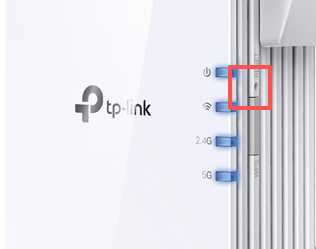
Then configure the extender as the satellite unit via Ethernet Backhaul: How to build an Ethernet Backhaul using TP-Link EasyMesh Range Extenders.
Also, what is the model and hardware version, as well as the firmware version, of your main router?
- Copy Link
- Report Inappropriate Content
Information
Helpful: 8
Views: 78712
Replies: 196
Voters 5




