
New Release EasyMesh Range Extenders Start Supporting Building a EasyMesh Network via Ethernet Backhaul


This Article Applied to:
| RE205_V4 | 1.0.50 Build 250821 |
| RE220_V3 | 1.0.50 Build 250821 |
| RE230_V2 | 1.0.50 Build 250821 |
| RE200_V5 | 1.0.50 Build 250821 |
| RE215_V1 | 1.0.50 Build 250821 |
| RE305_V4 | 1.0.50 Build 250821 |
| RE330_V1 | 1.0.50 Build 250821 |
| RE365_V2/V3 | 1.0.50 Build 250821 |
| RE315_V1 | 1.0.30 Build 230919 or later |
| RE700X(US)_V2 | 1.2.4 Build 20250304 |
| RE705X(US)_V2 | 1.2.0 Build 20241210 |
| RE705X(TW,CA)_V2 | 1.2.6 Build 20250428 |
| RE705X(KR)_V2 | 1.2.6 Build 20250605 |
| RE700X(Non US)_V1 | 1.2.10 Build 20250627 |
| RE705X(Non US)_V1 | 1.2.10 Build 20250627 |
| RE780X(EU)_V1 | 1.2.7 Build 20250430 |
| RE780X(EU)_V2 | 1.2.0 Build 20250808 |
| RE3000X(DE)_V1 | 1.2.10 Build 20250627 |
| RE600X(UK,JP,AS)_V3 | 1.2.4 Build 20250304 |
| RE605X(UK,JP,AS)_V3 | 1.2.4 Build 20250304 |
| RE900XD_V1 | 1.0.10 Build 20240411 |
| RE6000XD(DE)_V1 | 1.0.10 Build 20240411 |
| RE715X_V2 | Supported by the factory firmware |
| RE615X(US)_V2 | |
| RE600X(US/CA) _V4 | |
| RE605X(US/CA) _V4 | |
| RE655BE_V1 | |
| RE235BE_V1 | |
| RE220BE_V1 | |
| RE405BE(EU/US)_V1 |
EDIT: Updated on October 27th.
Moderator Note:
1. The models included in this list are based on currently available official information and may not be exhaustive.
2. This list is updated on an ad-hoc basis, and the information may sometimes be delayed. It is recommended that you refer only.
3. For the most accurate and up-to-date information, please take a look at official regional announcements and firmware update notifications.
4. We welcome your input and suggestions for discussion.
------------------------------------------------------------------------------------------
What is EasyMesh with Ethernet Backhaul and Why we need it?
EasyMesh with Ethernet Backhaul refers to the Main router and the satellite device are connected via an Ethernet cable to establish an EasyMesh network. Ethernet Backhaul offers a more reliable and faster option compared to EasyMesh with Wi-Fi, ensuring a robust and efficient EasyMesh network setup.
How to create EasyMesh with Ethernet Backahul?
Pre-configuration Notice:
1.Ethernet Backhaul is supported only when both your main router and satellite extender support EasyMesh with Ethernet Backhaul.
>>Router Support List of EasyMesh with Ethernet Backhaul
2.The extender needs to be under wireles range extender mode, not Access Point.
3.Once the Ethernet backhaul is successfully established, the wireless backhaul will be automatically disconnected. Conversely, if the Ethernet backhaul connection gets interrupted, the devices will automatically reestablish the mesh network using the wireless backhaul.
Scenario 1: Change wireless backhaul to Ethernet backhaul
Scenario 2: Add a new satellite Range Extender to EasyMesh
EasyMesh with Ethernet Backhaul stars with RE315_V1, which features an Ethernet Port with a speed of up to 100 m/s. This functionality will gradually be extended to other EasyMesh-supported extenders. We encourage you to share your feedback below regarding your current models of EasyMesh extenders and routers. This feedback will help us prioritize the implementation of EasyMesh on different product models.
Updated Logs:
Oct 27,2025: Extended support to select AX models;
Mar 10,2026: Extended support to select AC models.
- Copy Link
- Subscribe
- Bookmark
- Report Inappropriate Content

Oh, thanks. I'll try that too. Of these options, the only one that's useful is airtime Fairness .
- Copy Link
- Report Inappropriate Content

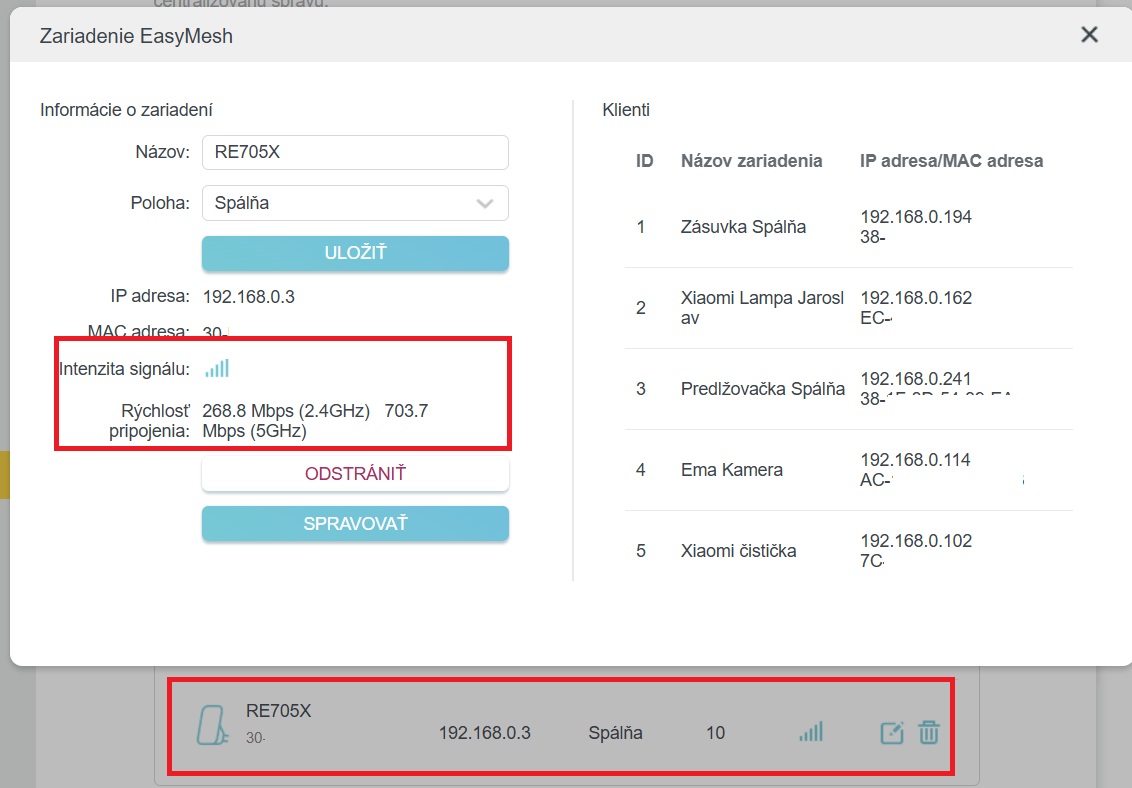
@STN Hi, today i tried disable the OFDMA, TWT and Airtime Fairness function in wifi settings of my router and after reboot the wifi looks, like everything work as should. See picture. And in Tether App also works. Can be the enabled options the problem? For now i leave it disabled.
- Copy Link
- Report Inappropriate Content
- Copy Link
- Report Inappropriate Content
- Copy Link
- Report Inappropriate Content
- Copy Link
- Report Inappropriate Content
TP-Link support didn't even respond to me on this forum. :-/
- Copy Link
- Report Inappropriate Content
@STN hi, i have the exact same issue.. my extender always shows as offline in router page even if it show correct client numbers.. In Tether app it also show as offline.
My setup:
- Main Router : Archer AX20 v3.0 fw.version 1.2.1 Build 20240809 rel.75559(4555)
- Extender : RE705X v1.0 fw. version: 1.2.10 Build 20250627 Rel. 66328
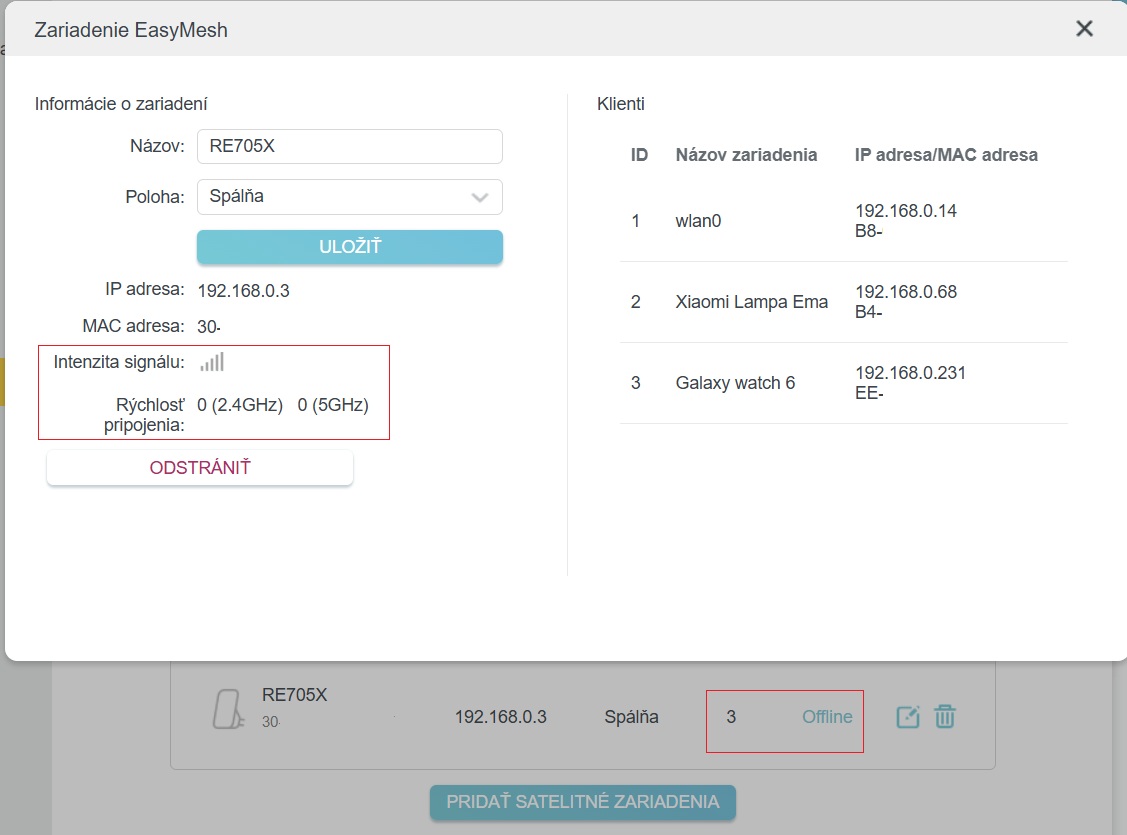
Any solution for this??
Small edit: if i connect it to main router with ethernet cable, it shows correctly as online, in tether app too. But if i use it as wireless extender (that is what should extender do, because i don´t have cable in the room) it shows wrong - as offline in the image and in the tether app too as offline.
- Copy Link
- Report Inappropriate Content
Hello @Zywel_181F01 ,
It appears that you are unable to access the internet when connected to your TP-Link Range Extender. If there is any discrepancy, please describe it in English.
For more details, please refer to What if the Range Extender keeps losing connection?
- Copy Link
- Report Inappropriate Content

- Copy Link
- Report Inappropriate Content

@Juan11 brilliant thanks for reply hopefully not too long for the fix and we can enjoy this quality of life feature
- Copy Link
- Report Inappropriate Content
Information
Helpful: 8
Views: 78775
Replies: 196
Voters 5




