WiFi devices cannot connect through Deco & Router to lan devices
 This thread has been locked for further replies. You can start a new thread to share your ideas or ask questions.
Non techie here and the problem is a bit hard to explain.
Setup.
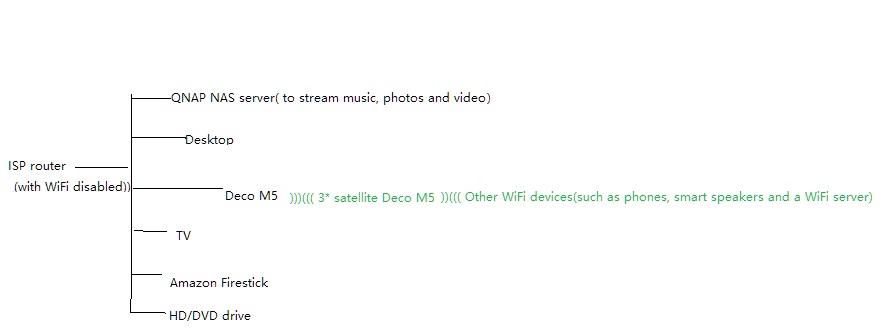
I have a QNAP NAS server which I use to stream music, photos and video to various devices around the house. This is wired [ethernet] to my router. The inbuilt WLAN on the server is turned off.
The router then connects [ethernet] to a Deco M5 which in turns serves 3 other M5s in various places around the house. The router is also is wired [ethernet] to four other devices - desktop, TV, an Amazon firestick and a HD/DVD drive. The WLAN on the router is disabled.
Aside from phones, etc, the main wifi devices are a pair of smart speakers and a WiFi server which are controlled through an app on my phone [Android, HEOS]
Once, [unfortunately I cannot remember exactly how long ago] both the LAN and WLAN elements worked seamlessly together. I could access the NAS server from any device, whether it was wifi or wired. For example, the smart speakers could stream music from the NAS, or I could stream videos to my phone [VLC] from the NAS.
Now that service does not work. No device on the wifi network can access, or even 'see' the NAS server. Access from the LAN is fine.
I have checked IP addresses, subnet mask addresses and gateway addresses across the devices and nothing jumps out - but then my knowledge is quite limited.
Correction - one thing does jump out. An Amazon firestick can access the NAS via the wifi, but only using the NAS proprietory Firestick app. Nothing else can - VLC for example, can't even find the NAS let alone access it. It tells me it is turned off. So that's interesting.
OK - so a problem across different hardware and software - but it used to work!
Anyone any idea what is going on [or not going on]?
Thanks for any thoughts, etc.
Something tells me it must be straight forward...
Thanks.
PS - I have kept back details of operating systems, versions etc for now so the problem can be more clearly expressed.