
Deco M4 configuration (router mode) for NVR1004H
 This thread has been locked for further replies. You can start a new thread to share your ideas or ask questions.
Issues :
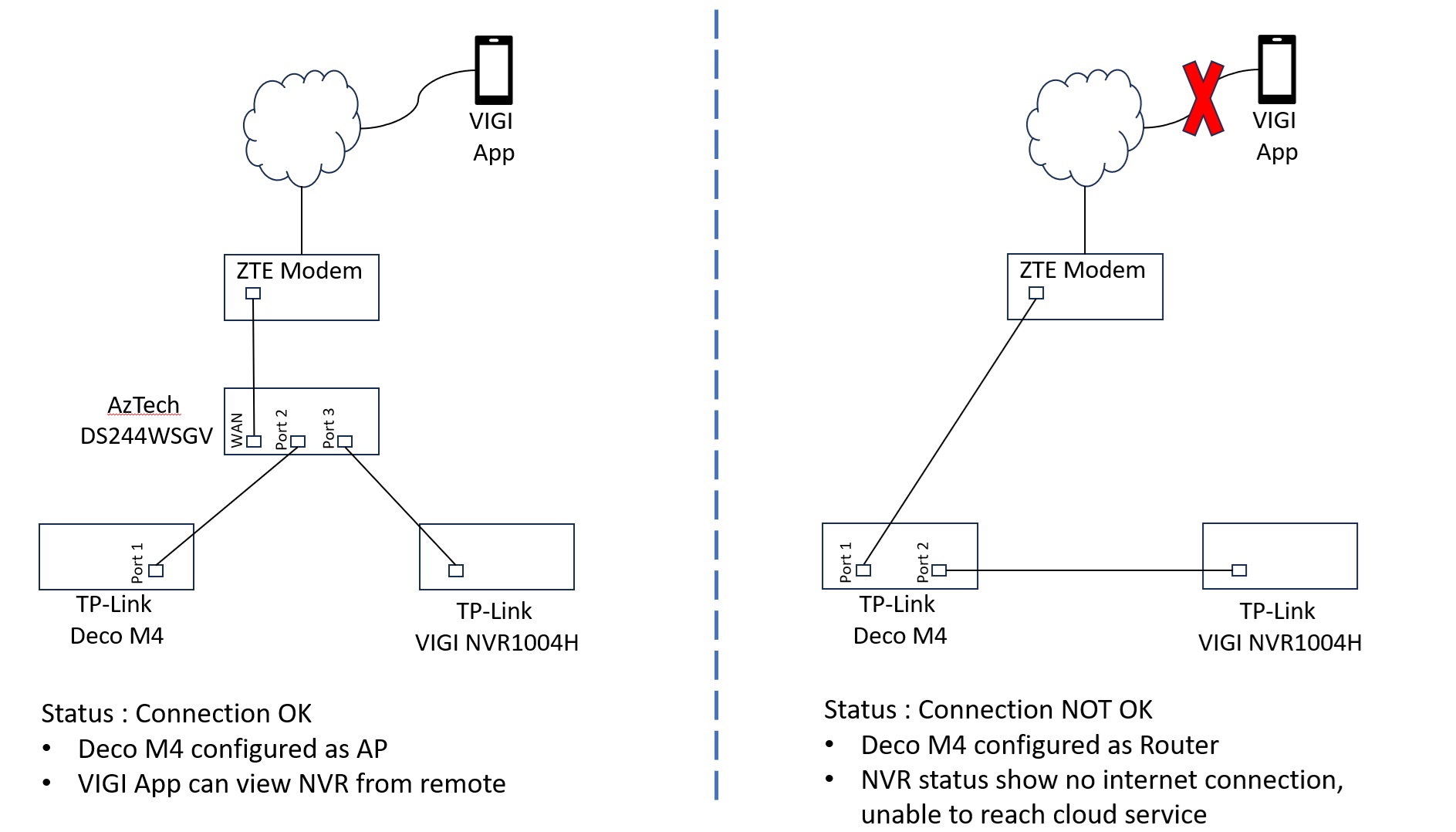
Unable to get NVR1004H establish cloud services when connect to Deco M4 (configured as router mode - right side of diagram). Deco M4 configuration verified good as internet connectivity is working fine
Hardware : VIGI NVR1004H-4P
Firmware : 1.1.1 Build 240514 Rel.69223n
Hardware : Deco M4
Firmware : 1.6.1 Build 20231227 Rel.80438
Tried :
- factory reset both NVR1004H and Deco M4
- swap another Deco M4
- Copy Link
- Subscribe
- Bookmark
- Report Inappropriate Content


Hi, I think you could try to set the "IPTV/VLAN" mode to "Custom". Then only enable the Internet VLAN and leave the IPTV VLAN disabled here:
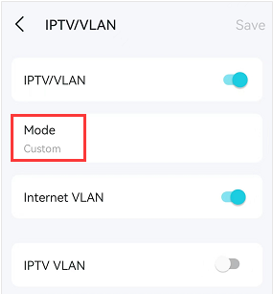
If you enable the IPTV VLAN Here, the second Ethernet port on the main Deco is reserved for the TV Set-top box only.
(PS: if there are no separate IPTV VLAN/Internet VLAN settings on the Deco APP, please try to install the 1.7.0 beta firmware on Deco M4 Here.)
Thank you very much and best regards.
- Copy Link
- Report Inappropriate Content
Hi, Thank you very much for the feedback.
Did you configure a static IP address on the VIGI NVR1004H-4P before?
When Deco M4 is on wireless router mode, is the LED solid white?
Could you please help me run a simple test:
connect the VIGI NVR1004H-4P to one of the satellite M4 via an Ethernet cable, not the main Deco.
Will you be able to access the NVR via the VIGI App?
Wait for your reply and best regards.
- Copy Link
- Report Inappropriate Content
Hi @David-TP
Did you configure a static IP address on the VIGI NVR1004H-4P before?
[desfoo] Yes, VIGI NVR is on static IP, it does not work well using Dynamic IP even if it is connected via AzTech
When Deco M4 is on wireless router mode, is the LED solid white?
[desfoo] Yes
connect the VIGI NVR1004H-4P to one of the satellite M4 via an Ethernet cable, not the main Deco.
Will you be able to access the NVR via the VIGI App?
[desfoo] Yes, working on satellite M4 both Port 1 & 2
Not prefer to connect VIGI NVR to satellite M4 as the fiber termination to ONT in at main Deco location.
- Copy Link
- Report Inappropriate Content
Hi, have you configured any IPTV/VLAN settings on the main Deco M4, such as:
https://www.tp-link.com/en/support/faq/2421/
---If IPTV/VLAN is not needed, I think you could disable it first.
Wait for your reply and best regards.
- Copy Link
- Report Inappropriate Content
Hi @David-TP
Yes, IPTV/VLAN is enabled. If I disable IPTV/VLAN then M4 LED is solid read.
IPTV setting is given by ISP, can't change any of the parameter value. However IPTV/VLAN is needed for movies streaming provided by my ISP.
- Copy Link
- Report Inappropriate Content
Hi, I think you could try to set the "IPTV/VLAN" mode to "Custom". Then only enable the Internet VLAN and leave the IPTV VLAN disabled here:
If you enable the IPTV VLAN Here, the second Ethernet port on the main Deco is reserved for the TV Set-top box only.
(PS: if there are no separate IPTV VLAN/Internet VLAN settings on the Deco APP, please try to install the 1.7.0 beta firmware on Deco M4 Here.)
Thank you very much and best regards.
- Copy Link
- Report Inappropriate Content
Information
Helpful: 0
Views: 525
Replies: 5
Voters 0
No one has voted for it yet.