Deco E4 AC1200 / Keine Verbindung zum Apple Appstore trotz Internetverbindung

This thread has been locked for further replies. You can start a new thread to share your ideas or ask questions.

Deco E4 AC1200 / Keine Verbindung zum Apple Appstore trotz Internetverbindung

This thread has been locked for further replies. You can start a new thread to share your ideas or ask questions.

Deco E4 AC1200 / Keine Verbindung zum Apple Appstore trotz Internetverbindung
2024-08-06 05:50:58
Model: Deco E4  
Hardware Version:
Firmware Version: 1.6.2 Build 20240308 Rel. 55841

Hallo,

seit ca. 2 Wochen kann ich keine Apps aus dem Apple AppStore laden oder aktualisieren. Die Deco´s habe ich seit 6 Monaten als Repeater im Einsatz ohne Probleme. Die Internetverbindung ist stark und stabil, nur der AppStore hat anscheinend keine Verbindung oder wird blockiert. Es muss an den Deco´s liegen, denn ohne funktioniert alles bestens. Weiß jemand, ob es eine Einstellung gibt, die ich anpassen oder ändern muss? Firmware habe ich schon aktualisiert.


Danke


Andre

  0      
  0      
#1
Options
4 Reply
Re:Deco E4 AC1200 / Keine Verbindung zum Apple Appstore trotz Internetverbindung
2024-08-07 09:07:37

  @Andre_Sz 

Hi


Please refer to the following link to change the primary DNS to 8.8.8.8 and the secondary DNS to 8.8.4.4:
https://www.tp-link.com/support/faq/1855/
Nice to Meet You in Our TP-Link Community. Check Out the Latest Posts: △Pre-release Firmware for Archer AX50 Introduces New Parental Control Features and Enhancements △Introducing AI QoS: Elevate Your Gaming Experience on the Archer GE800 Gaming Router △Connect TP-Link Archer BE550 to Germany's DS-Lite (Dual Stack Lite) Internet via WAN △Tether KidShield Test Recruitment - Safeguarding Children's Online Experience If you found the post or response helpful, please click Helpful. If an answer solves your problem, click "Recommended Solution" so that others can benefit from it.
  0  
  0  
#2
Options
Re:Deco E4 AC1200 / Keine Verbindung zum Apple Appstore trotz Internetverbindung
2024-08-07 17:38:23

  @Joseph-TP 

Hello,

thanks for the reply and help.

I have changed the dns like written in the link. But the Problem was not solved.

regards

Andre

  0  
  0  
#3
Options
Re:Deco E4 AC1200 / Keine Verbindung zum Apple Appstore trotz Internetverbindung
2024-08-08 10:29:09

  @Andre_Sz 

Hi


It is recommended that you disconnect the Deco Wi-Fi and use mobile data to test whether you can download or update the APP from the APP store. Or you could try connecting to other Wi-Fi in your home.
If it is possible, please provide a screenshot or information of the error message in the APP store.

Nice to Meet You in Our TP-Link Community. Check Out the Latest Posts: △Pre-release Firmware for Archer AX50 Introduces New Parental Control Features and Enhancements △Introducing AI QoS: Elevate Your Gaming Experience on the Archer GE800 Gaming Router △Connect TP-Link Archer BE550 to Germany's DS-Lite (Dual Stack Lite) Internet via WAN △Tether KidShield Test Recruitment - Safeguarding Children's Online Experience If you found the post or response helpful, please click Helpful. If an answer solves your problem, click "Recommended Solution" so that others can benefit from it.
  0  
  0  
#4
Options
Re:Deco E4 AC1200 / Keine Verbindung zum Apple Appstore trotz Internetverbindung
2024-08-08 18:35:21

  @Joseph-TP 

Hello,

that is exactly the problem. With mobile data or in another wifi i can update Apps or download from the AppStore quick and without Problems. I have removed the deco and started the wifi from the normal Router. Then i could use the AppStore in normal way.

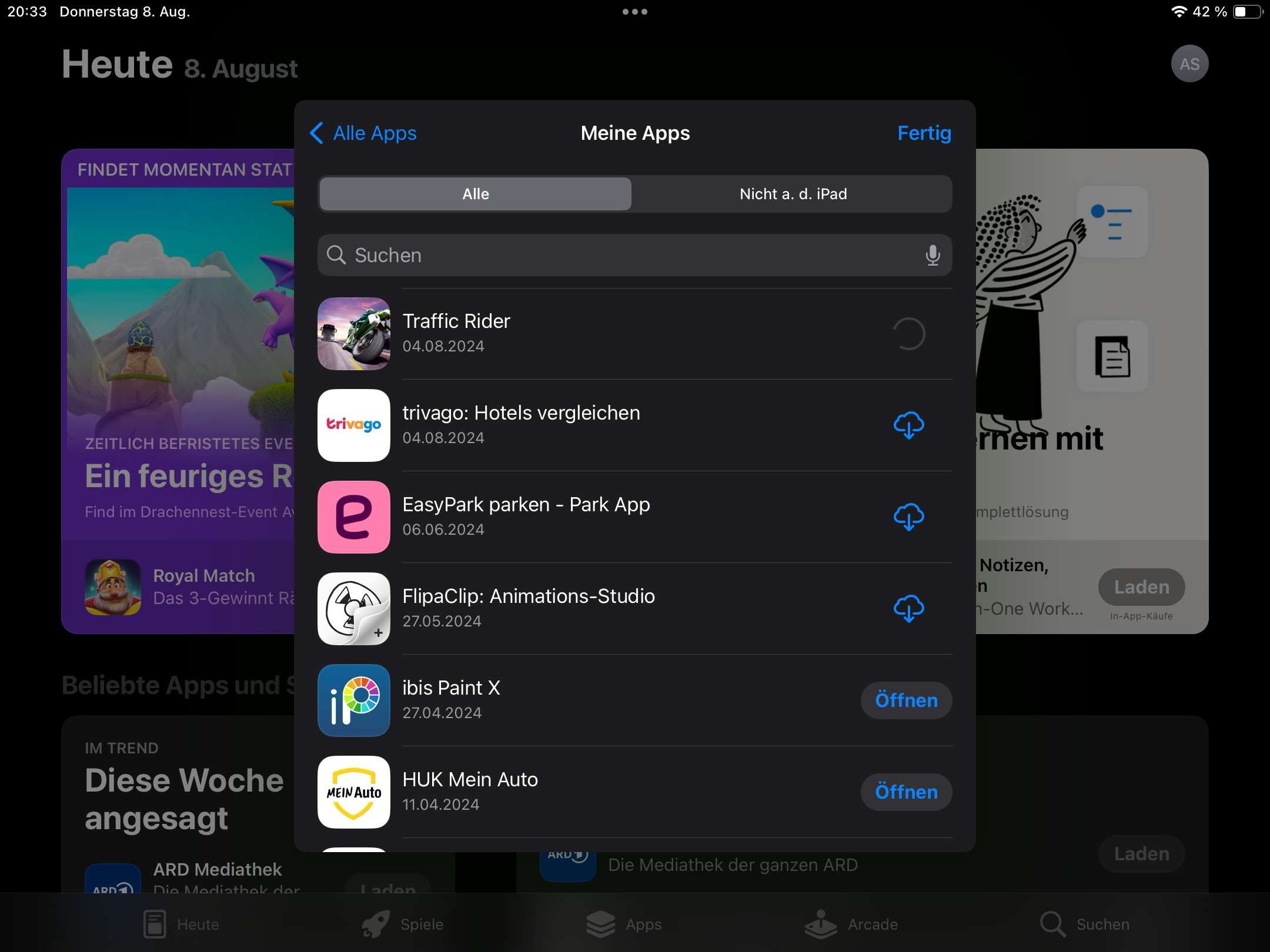
When i use the wifi from deco, i can not do this. And there is no error message. I can open the AppStore and see all the things inside, but i can not update oder load an App. AppStore is trying to load the whole time, but nothing is happen.


Fun fact:

Right now i have tested it again and now it is all okay! But only for few minutes. And i have done nothing. 
 

Enclosed you can see a picture from the situation.


Maybe you have an idea what the problem can be?


regards


Andre


  0  
  0  
#5
Options