
Implemented Extend Guest and IoT wifi to Easymesh nodes


Pretty much as the picture describes. I have a BE3600 (archer BE230) in my office, where the fiber box is located, and I am using an AX72 Pro in my living room to create a mesh network in the whole house with a CAT6 creating the backhaul connetion between the two.
The main wifi mesh network is working flawlessly, as i am getting high speeds in all the house with quite seamless AP roaming, and both nodes are updated to the latest firmware.
The problem is that the guest network is not being "replicated" from the AX72 Pro in the living room, where i actually need it the most (I have NAS and other sensible equipment to which I would not like to give guests access, if possible).
I know for sure that it is not impossible to have a system like this to work, as I have just upgraded from a mercusys AX3000 mesh system that supported whole house mesh with both main and guest networks, while costing half of the combineation of BE3600 and AX72Pro
- Copy Link
- Subscribe
- Bookmark
- Report Inappropriate Content


Hello all,
As far as I can confirm, the following models/versions have already received firmware updates to support extending the Guest/IoT Network via EasyMesh.
I'll provide a list for your reference to help with model selection, purchasing, and correctly configuring your Guest/IoT Network setups.
If you notice that I've missed any models, or if you find that a certain model does not, in fact, support this feature yet, please feel free to tag me for a double check.
Model & Hardware |
Original Firmware Version |
| Archer GE800_V1/V1.6 | 1.3.4 Build 20260618 (Pre-release firmware) |
| Archer GE550_V1.0/V1.6 | 1.3.0 Build 20260331 (Official firmware) |
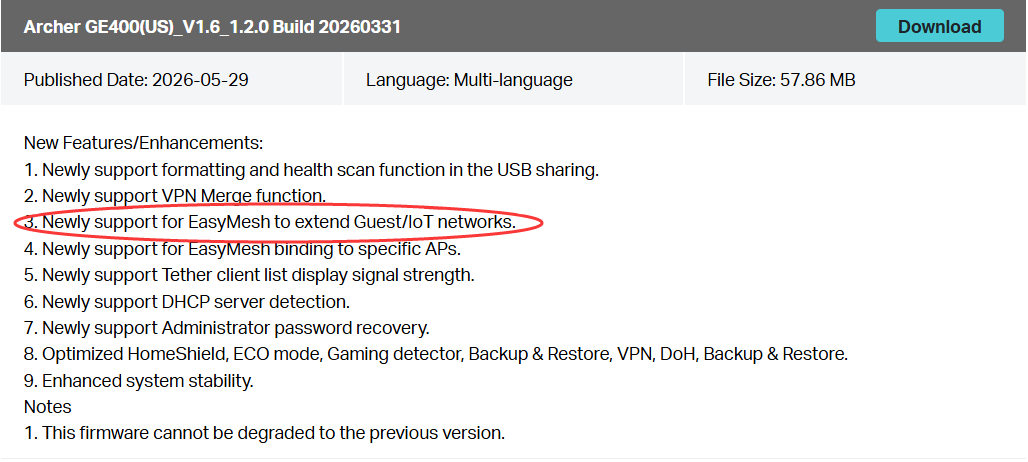
| Archer GE400_V1.0/V1.6 | 1.2.0 Build 20260331 (Official firmware) |
| Archer BE800_V1.0/V1.6/V1.20/V1.26 | 1.4.1 Build 20260401 (Official firmware) |
| Archer BE600_V1.0/V1.6 | 1.1.1 Build 20260113 (Official firmware) |
| Archer BE9700_V1.0/V1.6 | 1.1.1 Build 20260113 (Official firmware) |
| Archer BE6500_V1.6 | 1.2.3 Build 20260107 (Official firmware) |
| Archer BE6100_V1.0/V1.6 | 1.2.3 Build 20260107 (Official firmware) |
| Archer BE550 Pro_V2/V2.6 | 1.1.1 Build 20260113 (Official firmware) |
| Archer BE550_V2/V2.6 | 1.3.1 Build 20260403 (Official firmware) |
| Archer BE400_V1.0/V1.6 | 1.2.3 Build 20260107 (Official firmware) |
| Archer BE230_V2 | 1.3.1 Build 20260106 (Official firmware) |
*Original Firmware Version means starting from this specific version, the router supports the mentioned feature.
This feature will be added to more models/hardware through firmware updates. To verify if your device/hardware supports it, please monitor for new firmware releases. All key additions are documented in the firmware release notes.
Take Archer GE400 V1.6 for example:
 Tips: If you find no recent firmware for your model/hardware via Online Upgrade or on the official website, or if the latest available update’s release notes do not mention this feature, it likely indicates the feature is not yet supported. You are welcome to contact our support team for a final confirmation, especially if you suspect the online information may not be fully up to date. Contact Technical Support
If you require your model/hardware to support a new feature, make sure you leave your comment with the correct modem number and hardware version, then we can help check whether or when it might be supported.
Thank you all for your continued support as always.
- Copy Link
- Report Inappropriate Content
- Copy Link
- Report Inappropriate Content
- Copy Link
- Report Inappropriate Content
- Copy Link
- Report Inappropriate Content
- Copy Link
- Report Inappropriate Content

- Copy Link
- Report Inappropriate Content
- Copy Link
- Report Inappropriate Content
- Copy Link
- Report Inappropriate Content
Must have
- Copy Link
- Report Inappropriate Content
- Copy Link
- Report Inappropriate Content
- Copy Link
- Report Inappropriate Content
Information
Helpful: 127
Views: 28606
Replies: 172
Voters 127


































