
Implemented Extend Guest and IoT wifi to Easymesh nodes


Pretty much as the picture describes. I have a BE3600 (archer BE230) in my office, where the fiber box is located, and I am using an AX72 Pro in my living room to create a mesh network in the whole house with a CAT6 creating the backhaul connetion between the two.
The main wifi mesh network is working flawlessly, as i am getting high speeds in all the house with quite seamless AP roaming, and both nodes are updated to the latest firmware.
The problem is that the guest network is not being "replicated" from the AX72 Pro in the living room, where i actually need it the most (I have NAS and other sensible equipment to which I would not like to give guests access, if possible).
I know for sure that it is not impossible to have a system like this to work, as I have just upgraded from a mercusys AX3000 mesh system that supported whole house mesh with both main and guest networks, while costing half of the combineation of BE3600 and AX72Pro
- Copy Link
- Subscribe
- Bookmark
- Report Inappropriate Content

Hello @zEnterHacker
The behavior you reported seems abnormal, and the engineering team wants to investigate it further.
To help assist and streamline the identification of the behavior, I'll forward your case to the TP-Link support engineers, who will contact you at your registered email address later. Please keep an eye on your email inbox for a follow-up. Thank you.
- Copy Link
- Report Inappropriate Content

Kevin_Z wrote
zEnterHacker wrote
Well - I'm not going to change back to router mode for obvious reasons. The complete network structure and IP-addresses are managed by my central firewall. I also need full access from wired LAN clients to all WiFi clients, so I guess AP mode is correct for me. Further, the Guest Network Radio channels hosted by the MASTER does work - I'm getting an IP address and can connect to the LAN and further on to WAN.
The problem is only related to clients connected to the SATELLITE AP. So the system is not consistent. You simply cannot indicate in the guidance text that the Guest Networks can be synchronized via EasyMesh and not mention that this does not work for EasyMesh in AP mode. It just does not make sense.
And btw. my guidance text for the traffic separation says:
When enabled, the Guest Network settings of the main router can be synchronized with those of satellite devices.
It can also separate the traffic of the host network and guest network, ensuring the security of your home network.
I Guess the last line is only possible in router mode, but it should still create a unified meshed network SSID with identical functionallity no matter which AP a client connects to -
I mean that is the whole point of EasyMesh.
So I still think this needs to be fixed together with the abillity to turn on IOT network SSIDs either individually for each EasyMeshed AP or centrally if IOT is EasyMeshed.
Regards
zEnterHacker
@zEnterHacker You've done a good job.
You may find out what I haven't been aware of. Thank you.
So in your testing, the client got internet access when connected to the Master AX55's Guest network, but it lost internet access when switching to the satellite's Guest network. Could you please show me how you observed that? Is there an easy way to check which guest network you're connected to?
I'll discuss this behavior with the development and engineering team and report it for further investigation. I will let you know if they need more details from you. Thanks again.
Hi,
Yes correct.
This is my simplified network topology (erhernet backhaul using the WAN ports of the AX55 APs):
WAN
|
DMZ1 -------- Firewall / LAN DHCP / Default Gateway -------- DMZ2
|
MASTER AP wan port ---- LAN-SWITCH -------- wan port SATELLITE AP
| | | | | | | | | | | | | |
The way I tested that a client connected to MASTER AP did get an IP from the LAN DHCP server and could connect to the WAN and when the same client switched to be connected to the SATELLITE AP it would neither get an IP nor connect to the WAN was a two step proces - one using DHCP and one using a static IP address on the client:
1 Enable DHCP on the WiFi client
2 Connected to the EasyMeshed WiFi Guest SSID in close proximity to the MASTER AP
3 Got an IP
4 Started a constant ping 8.8.8.8 -t and got steady responses from 8.8.8.8
5 Moved to a position close the SATELLITE AP, and lost connection to the WAN, but the WiFi status told me I was still connected to the Guest SSID.
6 Moved back to a position close the MASTER AP and started to receive ping responses from 8.8.8.8
To rule out that this was in any way related to DHCP I disabled DHCP on the WiFi client and entered a valid static IP address and repeated the above schedule with the same results [ 2, (3), 4, 5, 6 ]
Running the same test on my standard EasyMeshed SSID works flawlessly.
Below settings are supposed to create an EasyMeshed Guest Network SSIDin Access Point mode
(Note the the AX55 DHCP server is et to "OFF", since DHCP is taken care of by my main firewall.)
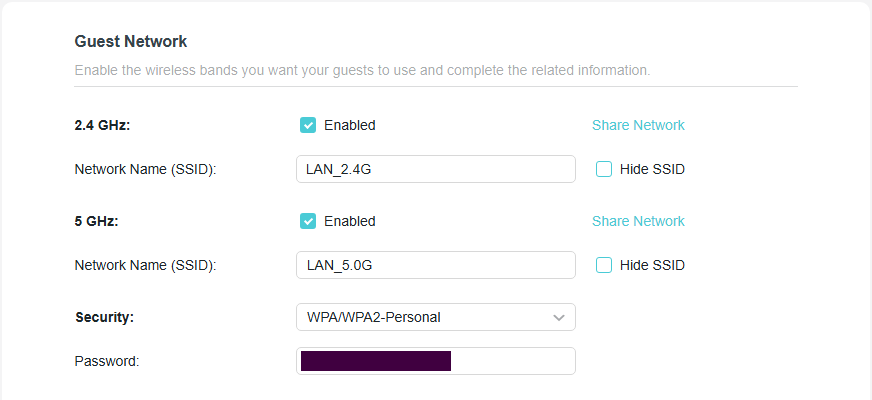
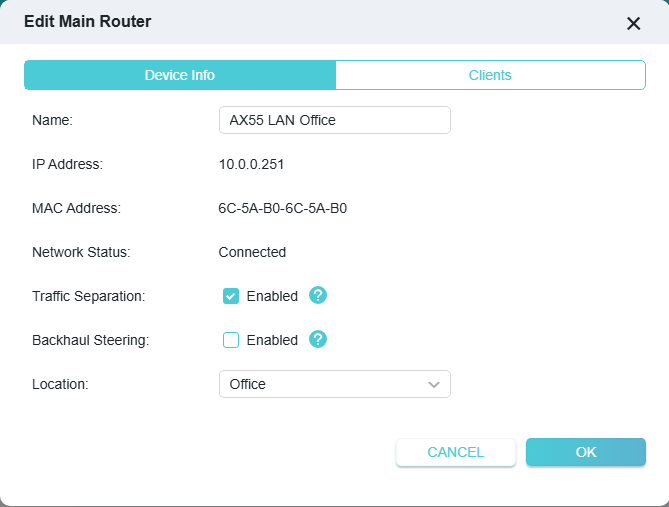
Hoping that my input can be used to cure the problem.
Best regards
zEnterHacker
- Copy Link
- Report Inappropriate Content
- Copy Link
- Report Inappropriate Content
Hello @Stef-Atl
BE3600 V2 1.1.7 Build 20260316 rel.38939(4555) has not yet added support for extending the Guest/IoT networks via EasyMesh.
It's expected to be implemented in version V1.3.3, the next official version, which is currently under testing.
- Copy Link
- Report Inappropriate Content
- Copy Link
- Report Inappropriate Content
Can you please add BE220? Its almost the same as BE230 ( BE230 includes a 2.5 Gbps Ethernet port and USB 3.0, whereas the BE220 drops to standard Gigabit ports and removes the USB port) This is the only difference. Thank you.
| Archer BE230_V2 | 1.3.1 Build 20260106 (Official firmware)
|
- Copy Link
- Report Inappropriate Content
Kevin_Z wrote
Hello @Stef-Atl
BE3600 V2 1.1.7 Build 20260316 rel.38939(4555) has not yet added support for extending the Guest/IoT networks via EasyMesh.
It's expected to be implemented in version V1.3.3, the next official version, which is currently under testing.
Is that version targeted for BE230 v1.2?
- Copy Link
- Report Inappropriate Content
lorenz29 wrote
Kevin_Z wrote
Hello @Stef-Atl
BE3600 V2 1.1.7 Build 20260316 rel.38939(4555) has not yet added support for extending the Guest/IoT networks via EasyMesh.
It's expected to be implemented in version V1.3.3, the next official version, which is currently under testing.
Is that version targeted for BE230 v1.2?
Unfortunately no. You cannot install the firmware on BE230 V1.2.
- Copy Link
- Report Inappropriate Content
- Copy Link
- Report Inappropriate Content
- Copy Link
- Report Inappropriate Content
Information
Helpful: 127
Views: 28411
Replies: 172
Voters 127



































