
BE6500 Dual-Band Wi-Fi 7 Router - setup Guest network with WPA/WPA2?

This thread has been locked for further replies. You can start a new thread to share your ideas or ask questions.

BE6500 Dual-Band Wi-Fi 7 Router - setup Guest network with WPA/WPA2?

This thread has been locked for further replies. You can start a new thread to share your ideas or ask questions.

BE6500 Dual-Band Wi-Fi 7 Router - setup Guest network with WPA/WPA2?
2025-03-31 02:50:12 - last edited 2025-04-10 02:38:39
Model: Archer BE6500  
Hardware Version: V1
Firmware Version: 1.0.5

Hey Guys,


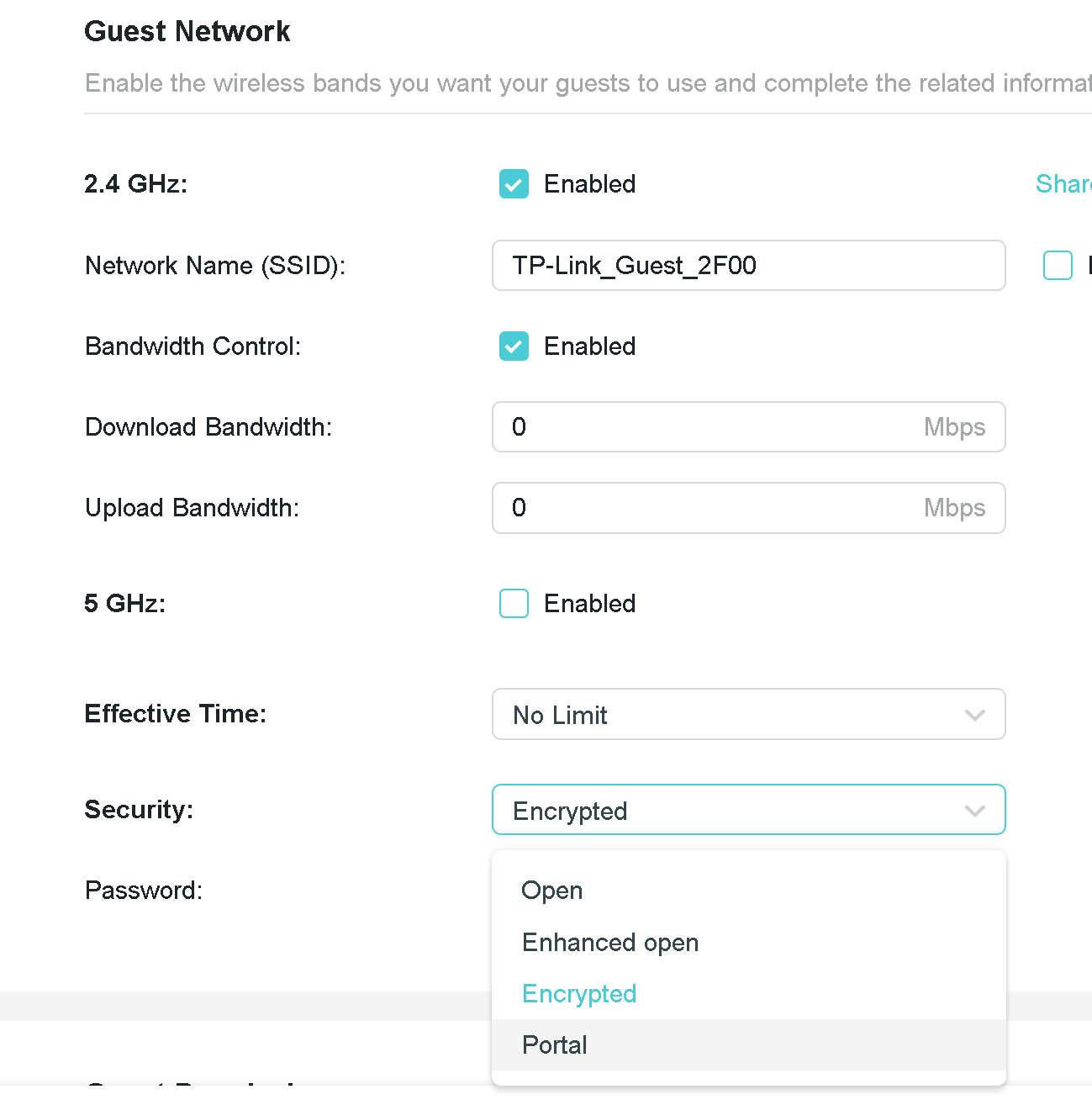
Can someone help me setup a guest network for older devices on the WPA/WPA2 settings?


I cant seem to be able to pick the security level when I set them up?


What am I missing?


Thanks.
 

  0      
  0      
#1
Options
1 Accepted Solution
Re: BE6500 Dual-Band Wi-Fi 7 Router - setup Guest network with WPA/WPA2?-Solution
2025-04-10 02:38:35 - last edited 2025-04-10 02:38:39

Hi@The-Q,

Please make sure you are tagging a TP-Link Admin (my account) if you want a timely response. Unless we are tagged we do not see that new responses have been added. We do not subscribe to every thread, so rely on Tagging to ensure responses.  

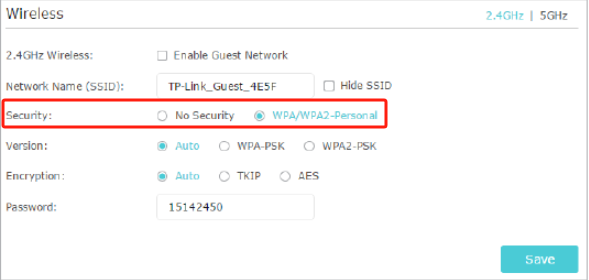
When you create guest network, you will see 'Security' as below:


Nice to Meet You in Our TP-Link Community. Check Out the Latest Posts: △Pre-release Firmware for Archer AX50 Introduces New Parental Control Features and Enhancements △Introducing AI QoS: Elevate Your Gaming Experience on the Archer GE800 Gaming Router △Connect TP-Link Archer BE550 to Germany's DS-Lite (Dual Stack Lite) Internet via WAN △Tether KidShield Test Recruitment - Safeguarding Children's Online Experience If you found the post or response helpful, please click Helpful. If an answer solves your problem, click "Recommended Solution" so that others can benefit from it.
Recommended Solution
  0  
  0  
#4
Options
7 Reply
Re: BE6500 Dual-Band Wi-Fi 7 Router - setup Guest network with WPA/WPA2?
2025-03-31 07:54:37

Hi @The-Q,

If you fail to apply or save the settings on the router, you can try the following steps for troubleshooting:
    1.Check whether your PC or mobile phone is still connected to the router's network.
    2.Confirm that the setting parameters you have entered are correct and meet the requirements of the router.
    3.Check whether the router's firmware has been updated to the latest version.
    4.Temporarily turn off the antivirus software and VPN on your PC or mobile phone.
    5.Reboot the router.
 

Nice to Meet You in Our TP-Link Community. Check Out the Latest Posts: △Pre-release Firmware for Archer AX50 Introduces New Parental Control Features and Enhancements △Introducing AI QoS: Elevate Your Gaming Experience on the Archer GE800 Gaming Router △Connect TP-Link Archer BE550 to Germany's DS-Lite (Dual Stack Lite) Internet via WAN △Tether KidShield Test Recruitment - Safeguarding Children's Online Experience If you found the post or response helpful, please click Helpful. If an answer solves your problem, click "Recommended Solution" so that others can benefit from it.
  0  
  0  
#2
Options
Re: BE6500 Dual-Band Wi-Fi 7 Router - setup Guest network with WPA/WPA2?
2025-04-01 02:59:17

  @The-Q 


Thanks for the response; however I think you missed the crux of the question I was asking.


How do I pick the security level when I set up the guest network? Where is the setting? I cant find it?


Thanks.


  0  
  0  
#3
Options
Re: BE6500 Dual-Band Wi-Fi 7 Router - setup Guest network with WPA/WPA2?-Solution
2025-04-10 02:38:35 - last edited 2025-04-10 02:38:39

Hi@The-Q,

Please make sure you are tagging a TP-Link Admin (my account) if you want a timely response. Unless we are tagged we do not see that new responses have been added. We do not subscribe to every thread, so rely on Tagging to ensure responses.  

When you create guest network, you will see 'Security' as below:


Nice to Meet You in Our TP-Link Community. Check Out the Latest Posts: △Pre-release Firmware for Archer AX50 Introduces New Parental Control Features and Enhancements △Introducing AI QoS: Elevate Your Gaming Experience on the Archer GE800 Gaming Router △Connect TP-Link Archer BE550 to Germany's DS-Lite (Dual Stack Lite) Internet via WAN △Tether KidShield Test Recruitment - Safeguarding Children's Online Experience If you found the post or response helpful, please click Helpful. If an answer solves your problem, click "Recommended Solution" so that others can benefit from it.
Recommended Solution
  0  
  0  
#4
Options
Re: BE6500 Dual-Band Wi-Fi 7 Router - setup Guest network with WPA/WPA2?
2025-05-01 01:08:53
This setting you show is not available on the BE3600 Dual-Band Wi-Fi 7 Router guest network
  1  
  1  
#5
Options
Re: BE6500 Dual-Band Wi-Fi 7 Router - setup Guest network with WPA/WPA2?
2025-05-01 01:11:17
@Joseph-TP - sorry I did not Tag you. I have this same issue
  0  
  0  
#6
Options
Re: BE6500 Dual-Band Wi-Fi 7 Router - setup Guest network with WPA/WPA2?
2025-05-01 13:18:10

  @Alex_the_dog 


Hi,


If you, like the OP, just need an additional network with different security settings to connect an older device, then use the "IoT Network" instead. It should allow you to select "WPA2-PSK[AES]+WPA-PSK[TKIP]".

  0  
  0  
#7
Options
Re: BE6500 Dual-Band Wi-Fi 7 Router - setup Guest network with WPA/WPA2?
2025-05-01 22:44:43

  @woozle  - Thanks Mate - sovles the probloem of older devices perfectly!

  0  
  0  
#8
Options


