
BE6500 Dual-Band Wi-Fi 7 Router - setup Guest network with WPA/WPA2?
 This thread has been locked for further replies. You can start a new thread to share your ideas or ask questions.
Hey Guys,
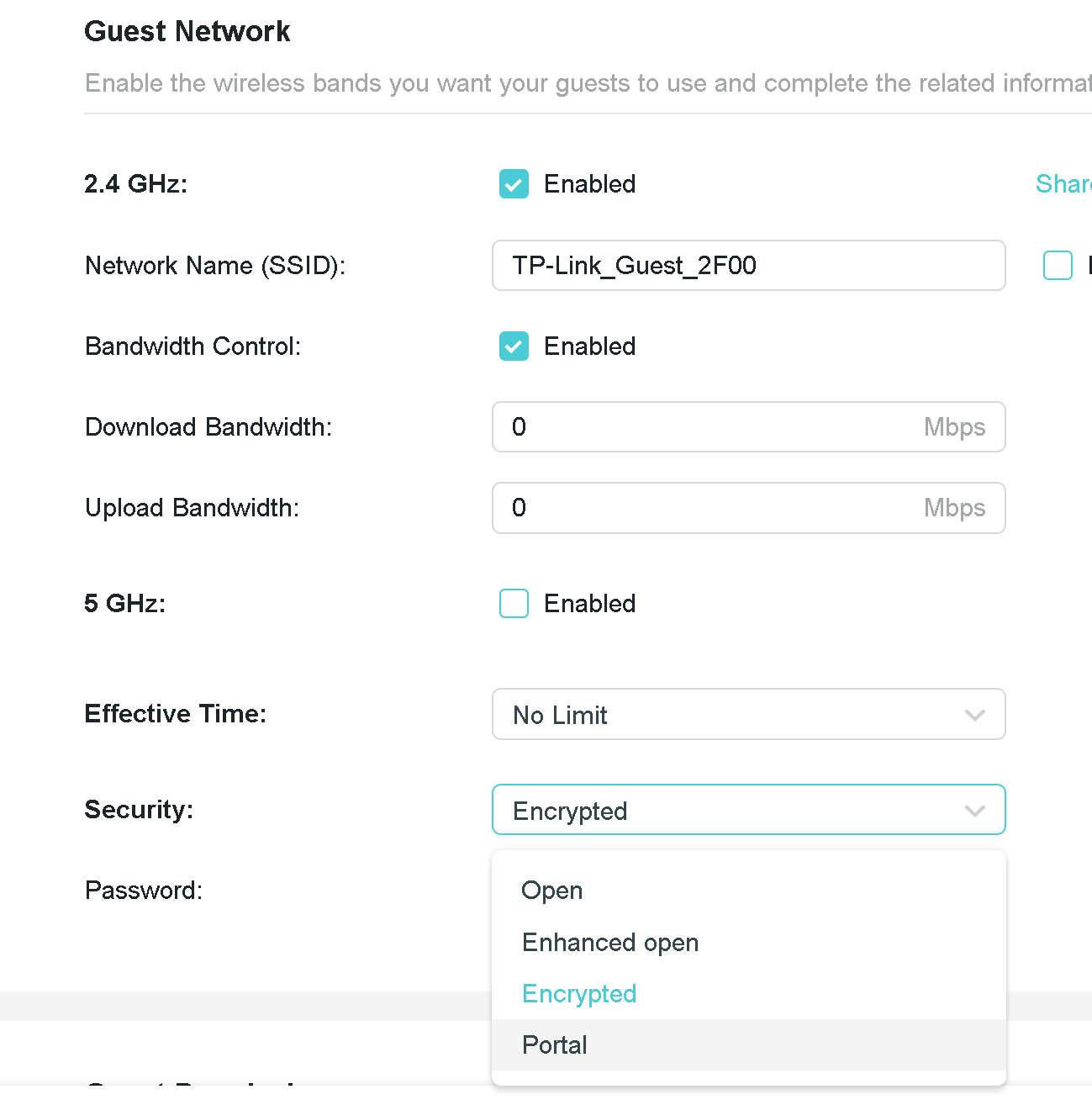
Can someone help me setup a guest network for older devices on the WPA/WPA2 settings?
I cant seem to be able to pick the security level when I set them up?
What am I missing?
Thanks.
- Copy Link
- Subscribe
- Bookmark
- Report Inappropriate Content


Hi@The-Q,
Please make sure you are tagging a TP-Link Admin (my account) if you want a timely response. Unless we are tagged we do not see that new responses have been added. We do not subscribe to every thread, so rely on Tagging to ensure responses.
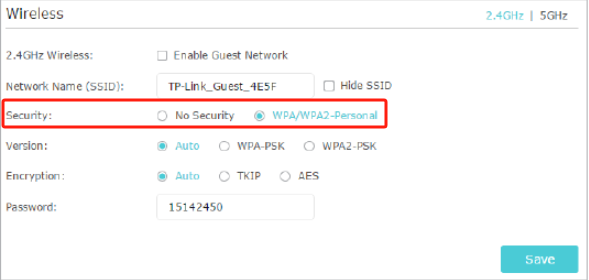
When you create guest network, you will see 'Security' as below:
- Copy Link
- Report Inappropriate Content
Hi @The-Q,
If you fail to apply or save the settings on the router, you can try the following steps for troubleshooting:
1.Check whether your PC or mobile phone is still connected to the router's network.
2.Confirm that the setting parameters you have entered are correct and meet the requirements of the router.
3.Check whether the router's firmware has been updated to the latest version.
4.Temporarily turn off the antivirus software and VPN on your PC or mobile phone.
5.Reboot the router.
- Copy Link
- Report Inappropriate Content
Thanks for the response; however I think you missed the crux of the question I was asking.
How do I pick the security level when I set up the guest network? Where is the setting? I cant find it?
Thanks.
- Copy Link
- Report Inappropriate Content
Hi@The-Q,
Please make sure you are tagging a TP-Link Admin (my account) if you want a timely response. Unless we are tagged we do not see that new responses have been added. We do not subscribe to every thread, so rely on Tagging to ensure responses.
When you create guest network, you will see 'Security' as below:
- Copy Link
- Report Inappropriate Content

- Copy Link
- Report Inappropriate Content
- Copy Link
- Report Inappropriate Content

Hi,
If you, like the OP, just need an additional network with different security settings to connect an older device, then use the "IoT Network" instead. It should allow you to select "WPA2-PSK[AES]+WPA-PSK[TKIP]".
- Copy Link
- Report Inappropriate Content
@woozle - Thanks Mate - sovles the probloem of older devices perfectly!
- Copy Link
- Report Inappropriate Content
Information
Helpful: 0
Views: 1974
Replies: 7
Voters 0
No one has voted for it yet.