Archer BE800 Totally bugged , DHCP Server does not respond , even after hard reset :(

This thread has been locked for further replies. You can start a new thread to share your ideas or ask questions.

Archer BE800 Totally bugged , DHCP Server does not respond , even after hard reset :(

This thread has been locked for further replies. You can start a new thread to share your ideas or ask questions.

Archer BE800 Totally bugged , DHCP Server does not respond , even after hard reset :(
2025-03-31 21:07:59
Model: Archer BE800  
Hardware Version: V1
Firmware Version:

Hi All,


Facing big issue with my archer BE800.


After 7 month running perfectly , yesterday evening my modem rebooted , and never , in fact restarted.

Got for 4 / 5 jours the exclamation mark icon on the screen , fixed , and modem had no reaction.


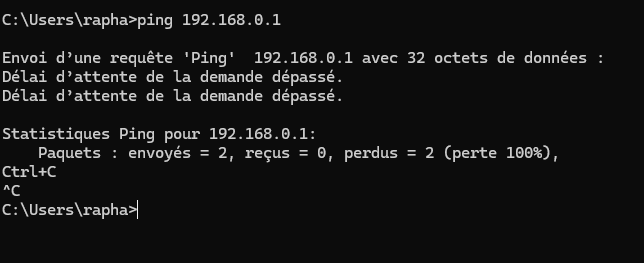
Tried to plug ethernet straight onto it , and no ping on 192.168.0.1.

Tried rebooting numerous times , no success

Tried enter the HArd reset mode to reload the Firmware : Nop change , same story.


I had to replug my LSP modem which I hate and reset the whole home network.


Any help pleeeeaaaaaase ?


Thanks in advance!,

 

  0      
  0      
#1
Options
3 Reply
Re:Archer BE800 Totally bugged , DHCP Server does not respond , even after hard reset :(
2025-04-01 03:15:48

Hi@Dwarfi_Haarlem,

May I know if your network topology diagram is as follows:
ISP Network—BE800)))((( client devices
(Note: — stands for wired connection,)))((( stands for wireless connection )


Did you update firmware or change any settings of BE800 recently?

How did you recover the firmware of the router? Did you do the same steps as below: How to recover the router when it bricked

Is the network not working at all?

Nice to Meet You in Our TP-Link Community. Check Out the Latest Posts: △Pre-release Firmware for Archer AX50 Introduces New Parental Control Features and Enhancements △Introducing AI QoS: Elevate Your Gaming Experience on the Archer GE800 Gaming Router △Connect TP-Link Archer BE550 to Germany's DS-Lite (Dual Stack Lite) Internet via WAN △Tether KidShield Test Recruitment - Safeguarding Children's Online Experience If you found the post or response helpful, please click Helpful. If an answer solves your problem, click "Recommended Solution" so that others can benefit from it.
  0  
  0  
#2
Options
Re:Archer BE800 Totally bugged , DHCP Server does not respond , even after hard reset :(
2025-04-05 10:12:46

Dear  @Joseph-TP ,


My ISP is wired to the Archer (RJ45)

My BE800 is Wired to my PC (RJ45)


ISP--ARCHERBE800--LAPTOP


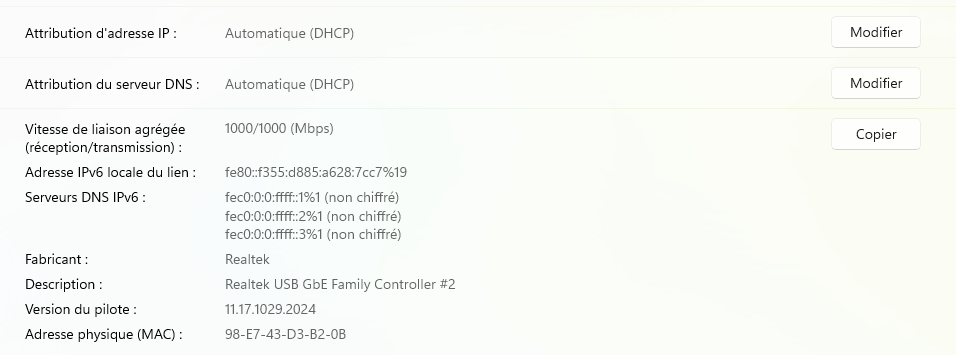
Router does not boot , or DHCP do not assign any IP Adress:


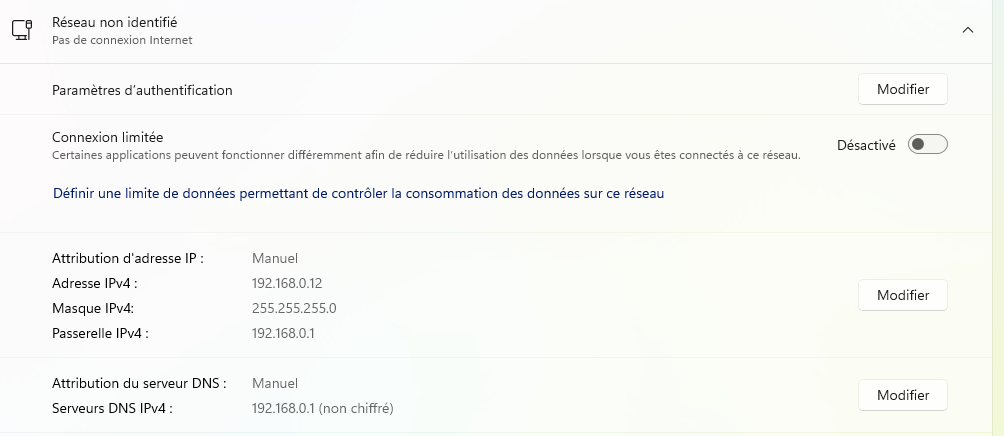
When I assign manual the IP setup , nothing happens neither : 


Ping do not work :


So I reset the modem few times in a HARD Reset mode , and could get an IP and relaoded the firmware.

The modem reboots , and again , no IP , no DHCP , no Manual IPv.4 using fixed assigned IP 192.168.0.10 routed to 192.168.0.1 , none works.


I can only access to the Hard reset mode , on the webpage when IP assignement works using the little toggle , pressing the Reset button for 10 sec which allows to reload the firmware , but nothing else works despite proper firmware re-loading.


Please help , I am now using my LSP modem which isn't compatible with my Mesh network and it is really cumbersome ....

  0  
  0  
#3
Options
Re:Archer BE800 Totally bugged , DHCP Server does not respond , even after hard reset :(
2025-04-10 02:02:53

Hi @Dwarfi_Haarlem,

Sorry for the late reply.

It seems that router is bricked. Please contact local support for further help.

Nice to Meet You in Our TP-Link Community. Check Out the Latest Posts: △Pre-release Firmware for Archer AX50 Introduces New Parental Control Features and Enhancements △Introducing AI QoS: Elevate Your Gaming Experience on the Archer GE800 Gaming Router △Connect TP-Link Archer BE550 to Germany's DS-Lite (Dual Stack Lite) Internet via WAN △Tether KidShield Test Recruitment - Safeguarding Children's Online Experience If you found the post or response helpful, please click Helpful. If an answer solves your problem, click "Recommended Solution" so that others can benefit from it.
  0  
  0  
#4
Options