AX23 V2 does not work as AP

This thread has been locked for further replies. You can start a new thread to share your ideas or ask questions.

AX23 V2 does not work as AP

This thread has been locked for further replies. You can start a new thread to share your ideas or ask questions.

AX23 V2 does not work as AP
2025-05-03 00:00:07 - last edited 2025-05-07 07:11:32
Model: Archer AX23  
Hardware Version: V2
Firmware Version: 1.0.2 Build 20250224 rel.65449(4555)

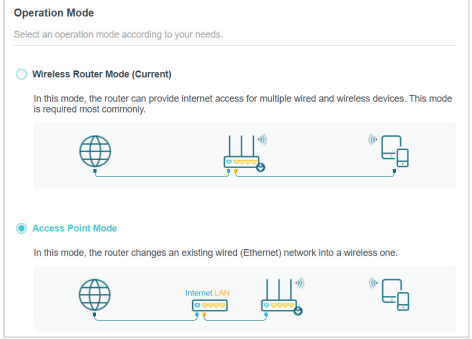
Today I received my AX23 V2 and was disappointed because I couldn't set it up in AP mode. There is no Operation Mode in WebGUI (neither in the Tether app) to switch between Router and AP. When I change LAN IP to match WAN subnet, I get this message: "WAN IP address and LAN IP address cannot be in the same subnet. Please enter another one." TP-Link website says clearly this model has AP mode and V1 emulator from https://emulator.tp-link.com/Emulator_AX23v1/index.html allows to change LAN IP to the same subnet as WAN IP.


So unless there's a firmware update or something in the next few days I'm going to return this router and buy a different model.

1
1
#1
1 Accepted Solution
Re:AX23 V2 does not work as AP-Solution
2025-05-07 06:18:42 - last edited 2025-05-07 07:11:32

Hi@h7dek7,

Thank you for contacting our community.


It is recommended that you can hard reset the router firstly. The router can work as an access point, transforming your existing wired network to a wireless one.

1. Visit http://tplinkwifi.net, and log in with your TP-Link ID or the password you set for the router.

2. Go to Advanced > System > Operation Mode, select Access Point Mode and click SAVE. The router will reboot and switch to Access Point mode.

3. After rebooting, connect the router to your existing wired router via an Ethernet cable.

4. Log in again to the web management page http://tplinkwifi.net, and go to Advanced > Quick Setup.


Welcome to Our Community! Get the latest posts: △New Firmware for Archer GE550/GE650 V1 Introduces AI-QoS, EasyMesh IoT Expansion, and More! △New Firmware Releases for Archer BE805 V1/BE450 V1 to Support VPN Merge, New ECO Mode, and More! More posts, please see: △ Get the Ongoing Pre-release Firmware for Wi-Fi Routers Here— Subscribe for Updates! Urgent problems with your Wi-Fi Router, Range Extender, or DSL Modem? Please reach out via private Messages or @Joesph-TP in your new thread directly. Click Or ☆Recommended Solution if the post/answer helps.
Recommended Solution
0
0
#2
3 Reply
Re:AX23 V2 does not work as AP-Solution
2025-05-07 06:18:42 - last edited 2025-05-07 07:11:32

Hi@h7dek7,

Thank you for contacting our community.


It is recommended that you can hard reset the router firstly. The router can work as an access point, transforming your existing wired network to a wireless one.

1. Visit http://tplinkwifi.net, and log in with your TP-Link ID or the password you set for the router.

2. Go to Advanced > System > Operation Mode, select Access Point Mode and click SAVE. The router will reboot and switch to Access Point mode.

3. After rebooting, connect the router to your existing wired router via an Ethernet cable.

4. Log in again to the web management page http://tplinkwifi.net, and go to Advanced > Quick Setup.


Welcome to Our Community! Get the latest posts: △New Firmware for Archer GE550/GE650 V1 Introduces AI-QoS, EasyMesh IoT Expansion, and More! △New Firmware Releases for Archer BE805 V1/BE450 V1 to Support VPN Merge, New ECO Mode, and More! More posts, please see: △ Get the Ongoing Pre-release Firmware for Wi-Fi Routers Here— Subscribe for Updates! Urgent problems with your Wi-Fi Router, Range Extender, or DSL Modem? Please reach out via private Messages or @Joesph-TP in your new thread directly. Click Or ☆Recommended Solution if the post/answer helps.
Recommended Solution
0
0
#2
Re:AX23 V2 does not work as AP
2025-05-07 07:11:29 - last edited 2025-05-07 07:13:04

I must have been blind of something. I've checked 3 times all GUI options and couldn't find the Operation Mode. Thanks!

0
0
#3
Re:AX23 V2 does not work as AP
2025-05-08 03:22:56

Hi@h7dek7,

It is good news to hear that your issue was resolved. Feel free to contact us if you have other questions.

Welcome to Our Community! Get the latest posts: △New Firmware for Archer GE550/GE650 V1 Introduces AI-QoS, EasyMesh IoT Expansion, and More! △New Firmware Releases for Archer BE805 V1/BE450 V1 to Support VPN Merge, New ECO Mode, and More! More posts, please see: △ Get the Ongoing Pre-release Firmware for Wi-Fi Routers Here— Subscribe for Updates! Urgent problems with your Wi-Fi Router, Range Extender, or DSL Modem? Please reach out via private Messages or @Joesph-TP in your new thread directly. Click Or ☆Recommended Solution if the post/answer helps.
0
0
#4