
Connection Deco units wirelessly in parallel?
 This thread has been locked for further replies. You can start a new thread to share your ideas or ask questions.
I have set the system up as access point and rebooted, but I was not able to understand the process to connect two units wirelessly from the main unit next to the router, how do I change them so I get two in parallel to extend the range for my office in the garden?
- Copy Link
- Subscribe
- Bookmark
- Report Inappropriate Content


Hi, can I have the firmware version of your Deco E4?
You can refer to this link to add the two satellite E4 wirelessly into the Mesh system first:
How to add an additional unit to your Deco network
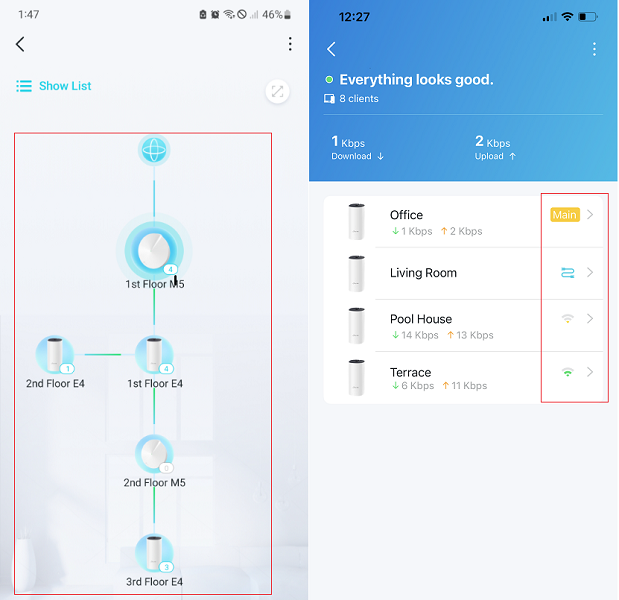
After the setup, you can see the current network topology on the Deco APP, such as:
Then Deco E4_v4 with the latest firmware 1.1.2 Build 20250226 Rel. 35508 supports customizing the signal source. If it is not the desired daisy chain, you can manually select the connection preference:Connection Preference: Customize Your Preferred Signal Source
Best regards.
- Copy Link
- Report Inappropriate Content

@MR888 Sounds like you're close! You’ve set one unit as an access point, but to get the second unit connected wirelessly and extend your range, you'll want to set it to "wireless repeater" or "mesh mode" depending on your system. Check if there's a WDS (Wireless Distribution System) or mesh option in the settings — that will let both units work in parallel to boost your signal all the way to your garden office. 🌱📶 Keep going, you’re almost there!
- Copy Link
- Report Inappropriate Content
Hi, can I have the firmware version of your Deco E4?
You can refer to this link to add the two satellite E4 wirelessly into the Mesh system first:
How to add an additional unit to your Deco network
After the setup, you can see the current network topology on the Deco APP, such as:
Then Deco E4_v4 with the latest firmware 1.1.2 Build 20250226 Rel. 35508 supports customizing the signal source. If it is not the desired daisy chain, you can manually select the connection preference:Connection Preference: Customize Your Preferred Signal Source
Best regards.
- Copy Link
- Report Inappropriate Content
Information
Helpful: 0
Views: 414
Replies: 2
Voters 0
No one has voted for it yet.