Password to tplinkrepeater

This thread has been locked for further replies. You can start a new thread to share your ideas or ask questions.

Password to tplinkrepeater

This thread has been locked for further replies. You can start a new thread to share your ideas or ask questions.

Password to tplinkrepeater
2025-05-11 13:05:51 - last edited 2025-06-19 02:07:30
Model: RE705X  
Hardware Version:
Firmware Version:

Hello. 


I connected my device to the power supply and then to WiFi using WPS. When I go to the tplinkrepeater.net website, only the option to log in appears. The problem is that according to the instructions, the option to create a password should appear, but unfortunately it does not. I also cannot create a password from the application, because only the option to log in also appears. But how do I log in without a password? There is no password anywhere in the documentation or on the device itself. Standard ones like "admin", "12345", etc. do not work. I will also add an important piece of information that I tried to reset the device, and the problem persists.


  0      
  0      
#1
Options
2 Accepted Solutions
Re:Password to tplinkrepeater-Solution
2025-05-11 14:54:05 - last edited 2025-06-19 02:07:30

  @TheTrollAren 


Please try once more like this:


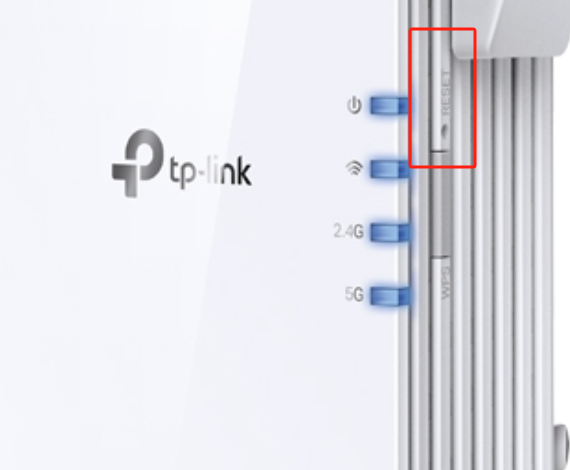
- Reset the RE705X by pressing its small "Reset" button.
- Wait 2 to 3 minutes and then check if your wireless client (PC, smartphone, etc.) can see a Wi-Fi network named "TP-Link_Extender". If no Wi-Fi network with the name "TP-Link_Extender" appears, then the reset was not done correctly.
- Connect your wireless client to the "TP-Link_Extender" network.
- In your web browser type either http://192.168.0.254/ or http://www.tplinkrepeater.net/ .
- When the Web GUI opens check whether you are now prompted to create a password or not.

Recommended Solution
  1  
  1  
#2
Options
Re:Password to tplinkrepeater-Solution
2025-05-12 08:46:40 - last edited 2025-06-19 02:07:33

Hi @TheTrollAren,

Thank you for contacting our community.

When you reset, please keep the power on. Then use a pin to press the reset hole for 1sec.


If you reset successfully, you will need to create a new password to log in to the web management.

Please refer to the video for configuration: Set Up TP-Link Range Extender via Web Browser

Nice to Meet You in Our TP-Link Community. Check Out the Latest Posts: △Pre-release Firmware for Archer AX50 Introduces New Parental Control Features and Enhancements △Introducing AI QoS: Elevate Your Gaming Experience on the Archer GE800 Gaming Router △Connect TP-Link Archer BE550 to Germany's DS-Lite (Dual Stack Lite) Internet via WAN △Tether KidShield Test Recruitment - Safeguarding Children's Online Experience If you found the post or response helpful, please click Helpful. If an answer solves your problem, click "Recommended Solution" so that others can benefit from it.
Recommended Solution
  0  
  0  
#3
Options
2 Reply
Re:Password to tplinkrepeater-Solution
2025-05-11 14:54:05 - last edited 2025-06-19 02:07:30

  @TheTrollAren 


Please try once more like this:


- Reset the RE705X by pressing its small "Reset" button.
- Wait 2 to 3 minutes and then check if your wireless client (PC, smartphone, etc.) can see a Wi-Fi network named "TP-Link_Extender". If no Wi-Fi network with the name "TP-Link_Extender" appears, then the reset was not done correctly.
- Connect your wireless client to the "TP-Link_Extender" network.
- In your web browser type either http://192.168.0.254/ or http://www.tplinkrepeater.net/ .
- When the Web GUI opens check whether you are now prompted to create a password or not.

Recommended Solution
  1  
  1  
#2
Options
Re:Password to tplinkrepeater-Solution
2025-05-12 08:46:40 - last edited 2025-06-19 02:07:33

Hi @TheTrollAren,

Thank you for contacting our community.

When you reset, please keep the power on. Then use a pin to press the reset hole for 1sec.


If you reset successfully, you will need to create a new password to log in to the web management.

Please refer to the video for configuration: Set Up TP-Link Range Extender via Web Browser

Nice to Meet You in Our TP-Link Community. Check Out the Latest Posts: △Pre-release Firmware for Archer AX50 Introduces New Parental Control Features and Enhancements △Introducing AI QoS: Elevate Your Gaming Experience on the Archer GE800 Gaming Router △Connect TP-Link Archer BE550 to Germany's DS-Lite (Dual Stack Lite) Internet via WAN △Tether KidShield Test Recruitment - Safeguarding Children's Online Experience If you found the post or response helpful, please click Helpful. If an answer solves your problem, click "Recommended Solution" so that others can benefit from it.
Recommended Solution
  0  
  0  
#3
Options