
[RESOLVED] RE655BE (EU) Stability issues when MLO is active

Update: Starting with 1.0.8 has finally fixed the issue. Cheers!
Hello,
I set the RE655BE (EU) up as AP mode.
Configured OFDMA on all bands, and MU-MIMO where possible (5 & 6). These settings can only be set on the web interface, not the app for some reason.
I set everything as Wifi7 WPA3 (or WPA2/WPA3), disabled WPS (though the AP is still signaling the WPS tag on the 2.4 and 5 bands for some reason), put bandwidth for every band to their respective maximum (40, 160, 320), and set the lowest channel on all bands.
I haven't tried EasyMesh, as I have no other EasyMesh devices. The router has wifi completely turned off, so the RE655BE is the only networking device emitting wifi in my home's network.
It's rock solid, and the signal is great even though I have a TON of neighbors and office wifi signals around me (it's a high density mixed-use apartment neighborhood).
Buuut... If I turn on MLO, even though I only have one device using it, stability breaks. It happens more often when my MLO smartphone is far away from the AP. After a while, all wifi goes offline (including non-MLO). OFDMA and MU-MIMO don't change how often it crashes. The AP is still accessible from ethernet, but no wifi available whatsoever.
When wifi was down, I logged into the AP using ethernet, and did a small test: I changed configurations on MLO, and also on different bands (because that triggers a wifi network restart), but it didn't make wifi work again. I have to reboot it to make wifi work again.
So... In summary, if you disable MLO, the RE655BE is a rock solid device.
But MLO is just a no-go for now.
Hoping that you will fix MLO sooner than later.
Cheers!
- Copy Link
- Subscribe
- Bookmark
- Report Inappropriate Content

Hi @apreslin ,
I believe an official US firmware version will be released, but I don't know the exact release date. It is recommended to keep an eye on the official website for firmware update announcements or enable Auto Update for the range extender.
- Copy Link
- Report Inappropriate Content
ISP modem/router (wifi disabled) — RE655BE (AP wifi) )))((( Smartphone
No EasyMesh. I already have 3rd party DNS servers all around (in my case 9.9.9.9 and 1.1.1.2)
Best regards,
heffeque
- Copy Link
- Report Inappropriate Content
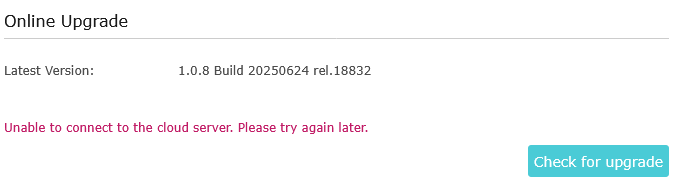
Well it's getting to be pretty long amount of time here to sort out the bugs with this extender/AP. Yet another bug that I have previously mentioned is that the check for updates doesn't work on the US version, at least in AP mode. Haven't testing in repeater mode. All these bugs are not a good look. Version 1.0.8 is going on 6 months old at this point. I have a lot of TP-Link products, but I'm feeling pretty disappointed here, and it will make me look at competing products and ease into another ecosystem.
Joseph-TP wrote
Hi @apreslin ,
I believe an official US firmware version will be released, but I don't know the exact release date. It is recommended to keep an eye on the official website for firmware update announcements or enable Auto Update for the range extender.
- Copy Link
- Report Inappropriate Content
Hi @heffeque ,
Would you mind changing the DNS server to 1.1.1.1? One of our users reported an improvement after changing the DNS to 1.1.1.1. Please see here.
heffeque wrote
ISP modem/router (wifi disabled) — RE655BE (AP wifi) )))((( Smartphone
No EasyMesh. I already have 3rd party DNS servers all around (in my case 9.9.9.9 and 1.1.1.2)
Best regards,
heffeque
- Copy Link
- Report Inappropriate Content
Hi@apreslin ,
I hope everything is well with you.
I understand your feelings; firmware release dates vary by region. I will report your feedback to the relevant department, hoping to expedite the release of the new firmware.
Additionally, could you please tell me your current firmware version? What specific error are you encountering? Are you still getting the message "It is not possible to connect with the cloud server. Please try again later" when trying to update the firmware?
If possible, please provide me with your complete network topology, for example: ISP modem—router )))((( client devices
(Note: — stands for wired connection,)))((( stands for wireless connection )
Similarly, please change the DNS Server of the main router to 1.1.1.1 and see if there is any improvement.
- Copy Link
- Report Inappropriate Content
@Joseph-TP I changed the DNS to 1.1.1.1 on router and RE655BE, but it's no better than 9.9.9.9 (login works on web page, but fails on "Tether" app). It doesn't say that the password is incorrect, it just says "Login failed. Please try again. If the problem persists , please try to reboot your TP-Link device or contact Technical Support".
- Copy Link
- Report Inappropriate Content
Joseph-TP wrote
Hi@apreslin ,
I hope everything is well with you.
I understand your feelings; firmware release dates vary by region. I will report your feedback to the relevant department, hoping to expedite the release of the new firmware.
Additionally, could you please tell me your current firmware version? What specific error are you encountering? Are you still getting the message "It is not possible to connect with the cloud server. Please try again later" when trying to update the firmware?
If possible, please provide me with your complete network topology, for example: ISP modem—router )))((( client devices
(Note: — stands for wired connection,)))((( stands for wireless connection )
Similarly, please change the DNS Server of the main router to 1.1.1.1 and see if there is any improvement.
Changing the DNS to use Cloudflare 1.1.1.1 does make the "check for upgrade" work. So that's good news. It would not work when set to my router, which is what the rest of the devices on my network use. That probably will fix the NTP issues with this device too.
So now just looking to have the errant WPS flag turned off
- Copy Link
- Report Inappropriate Content
@apreslin The newest version fixes the WPS flag issue, but at least in my case breaks access via mobile app (and almost broke it via web too, though after several reboots it ended up working).
- Copy Link
- Report Inappropriate Content

Hello @apreslin ,
Based on your description, the inability to access the cloud server appears to be caused by the router's DNS, especially after you changed the DNS settings on your RE655BE router. After the change, the "Check for Updates" function worked correctly.
EDIT: This doesn't mean there's a problem with the router's DNS, but rather that there might be a difference in DNS resolution between the Range Extender and the router.
For the new firmware, you can try manually updating to version 1.1.3, build number 20251110, rel. 18833, which fixes the WPS flag error.
- Copy Link
- Report Inappropriate Content
Joseph-TP wrote
Hello @apreslin ,
Based on your description, the problem seems to be caused by your router's DNS, especially after you changed the DNS on your RE655BE router. After that, the "check for update" function worked correctly.
You can try manually updating to version 1.1.3, Build 20251110, rel.18833, which fixes the WPS flag error.
There are no other devices on my network that have any issue using my router's DNS, and there are dozens of them.
But anyhow manually putting in the DNS for that is fine for a workaround there for me, although that may happen to others.
You have not put version 1.1.3, Build 20251110, rel.18833 on the United States site https://www.tp-link.com/us/support/download/re655be/#Firmware , is it ready? And if so, what is making someone not post it there?
- Copy Link
- Report Inappropriate Content
Information
Helpful: 3
Views: 8545
Replies: 74
Voters 3
