
Massive Bufferbloat Issues on VX800 (Upload) +250ms – Any Fix or Feedback Yet?
Massive Bufferbloat Issues on VX800 (Upload) +250ms – Any Fix or Feedback Yet?

Hey everyone,
I'm experiencing a serious issue with the new VX800 and was wondering if anyone else has found a solution – or at least received any feedback from the manufacturer.
I have a DE Telekom DSL connection (50/20 Mbit), I recently switched to the VX800, and while the hardware seems great overall, I'm running into massive bufferbloat on the upload using Ethernet or WIFI – hitting up to 240 ms loaded.
What’s strange is that my old DSL router Archer VR2100v, on the exact same line (no special QoS settings), had only about 70 ms upload bufferbloat. Both routers sync at the same speeds (50/20 Mbit), yet the VX800 performs significantly worse +240 ms
This is really frustrating for online gaming and video calls. And unfortunately, the VX800 offers no options and yes, I’m already on the latest firmware (See below)
I’m hoping a future update will fix this issue. The hardware clearly has potential, but the lack of control over bufferbloat makes it hard to recommend.
Has anyone received a response from the manufacturer or ISP regarding this issue? Any workaround or official statement would be appreciated!
Thanks in advance!
Here some Infos:
Old Router Archer VR2100v 3 Years Old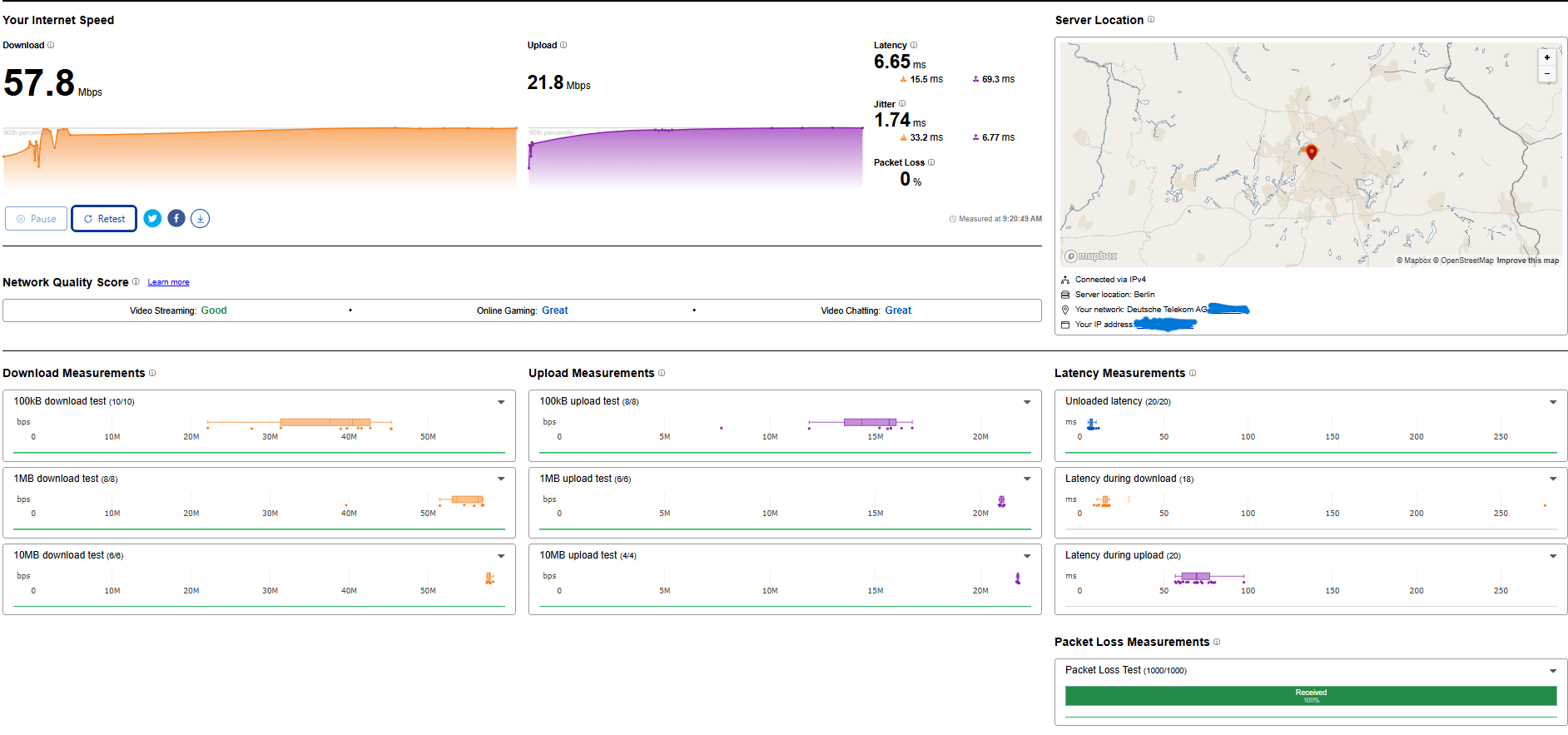
Firmwareversion:
1.18.0 0.9.1 v009e.0 Build 241018 Rel.43535n
Hardwareversion:
Archer VR2100v v1 00000000
Letzte Version:
1.18.0 0.9.1 v009e.0 Build 241018 Rel.43535n
New Router: VX800 1 month Old

Firmwareversion:
0.9.0 3.0.0 v603c.0 Build 240926 Rel.39238n
Hardwareversion:
VX800v v1.0 00000000
Seriennummer:
224A5H4000791
Letzte Version:
0.9.0 3.0.0 v603c.0 Build 240926 Rel.39238n
- Copy Link
- Subscribe
- Bookmark
- Report Inappropriate Content
Update and Solution about the +250ms Bufferbloat Issue with the VX800v (Status: 15 March 2026)
I am the original user who created this thread, and I wanted to give an update about what happened since then and how I finally solved the problem.
1. Support and Firmware Updates
On 09 July 2025, about two months after my original post, I received an email from the engineering team.
They reduced my bufferbloat from over +250 ms to about +110 ms using a beta firmware that was specially adjusted for my device (VX800v)
This did not solve the problem completely, but it improved it.
Later, on 12 December 2025, I received another exclusive firmware update (version 800.0.16) from the engineering team.
This update included a latency optimization for the DSL modem inside the router.
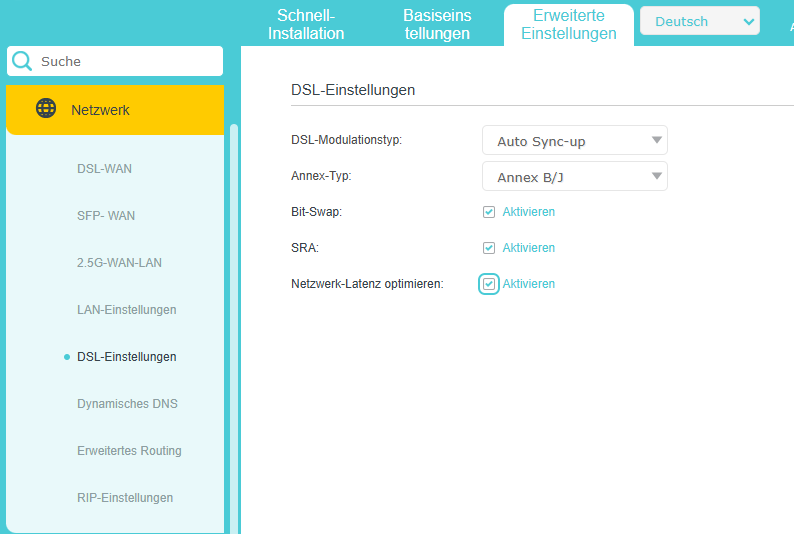
Result:
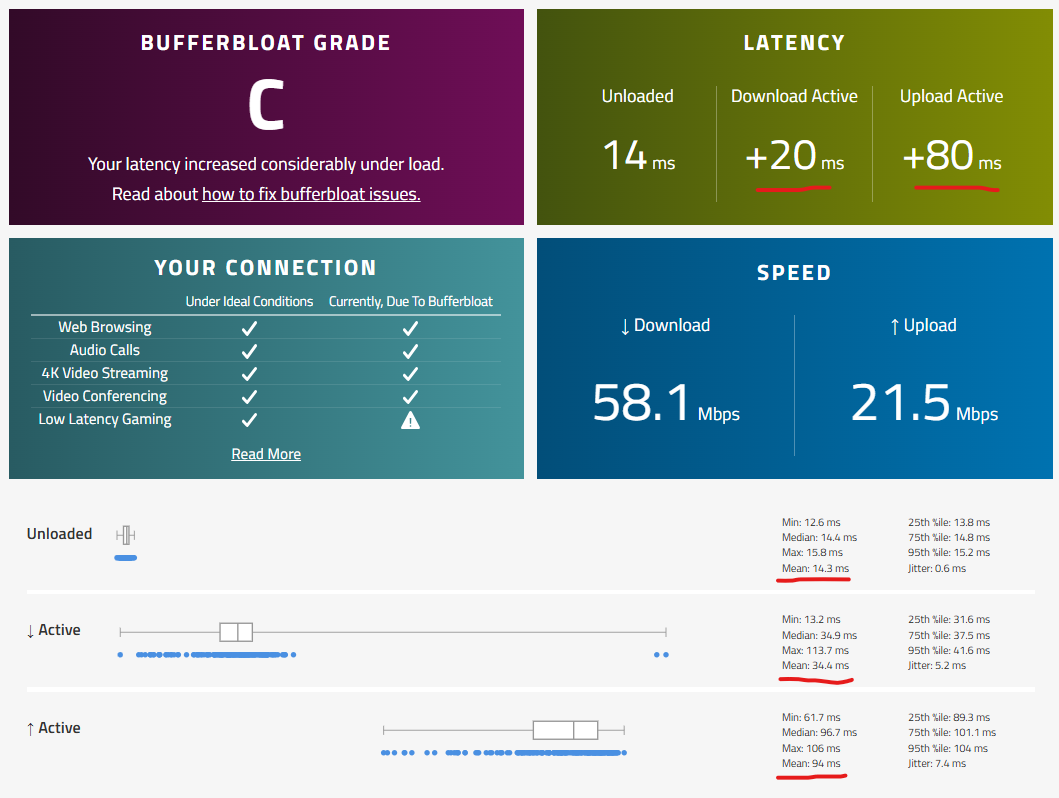
Before: about 150–250 ms Bufferbloat, After the update: about 100 ms
This is definitely an improvement, and I want to thank the engineering team for their help and testing.
The technical support also told me: "These adjustments are the result of extensive testing to achieve the best possible outcome."
In other words, it is unlikely that the latency will improve further than this.
2. My Own Tests
Because I was still not satisfied, I decided to look for my own solution.
Test with an External DSL Modem
First, I wanted to check if the DSL modem inside the VX800v might be the problem.
So I: disabled the modem inside the VX800v and used a separate DSL bridge modem
Result:
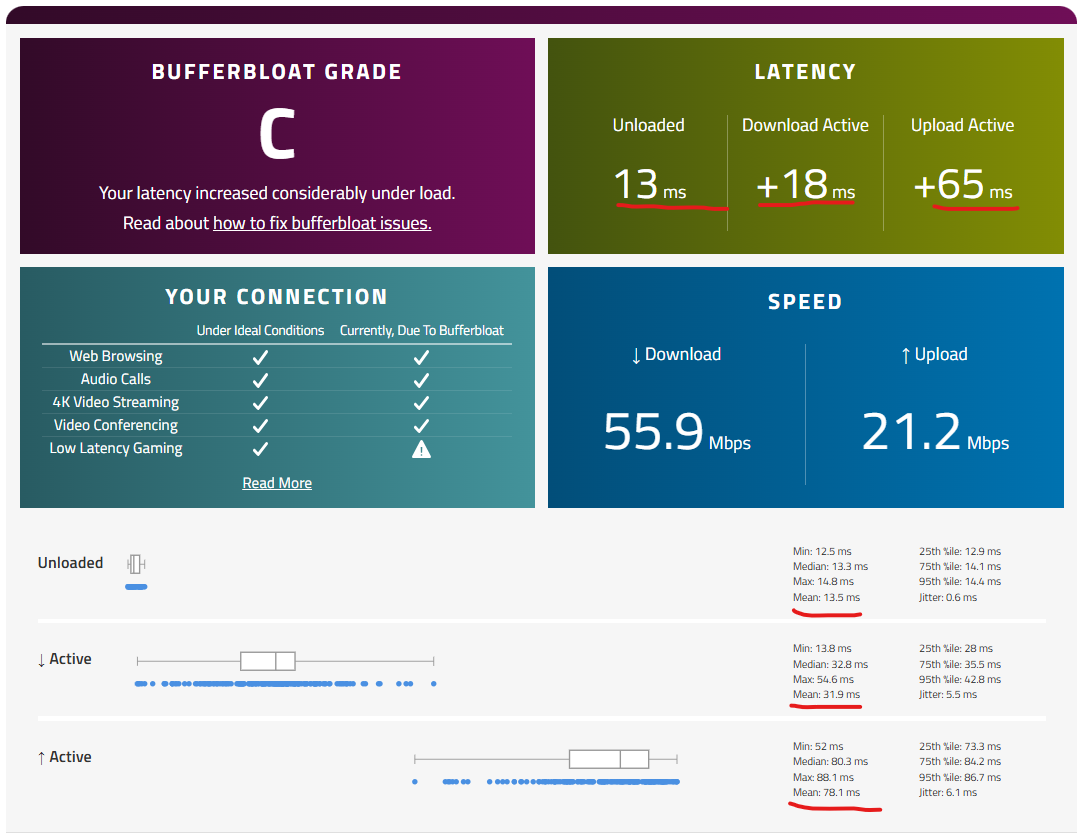
The latency dropped from 100 ms to about 80 ms. this is about 20ms improvement.
This showed that the problem is not only the modem, but also the router software.
3. Switching to an OpenWrt Router
After that, I bought a router that supports OpenWrt.
I installed: OpenWrt 24.10.5
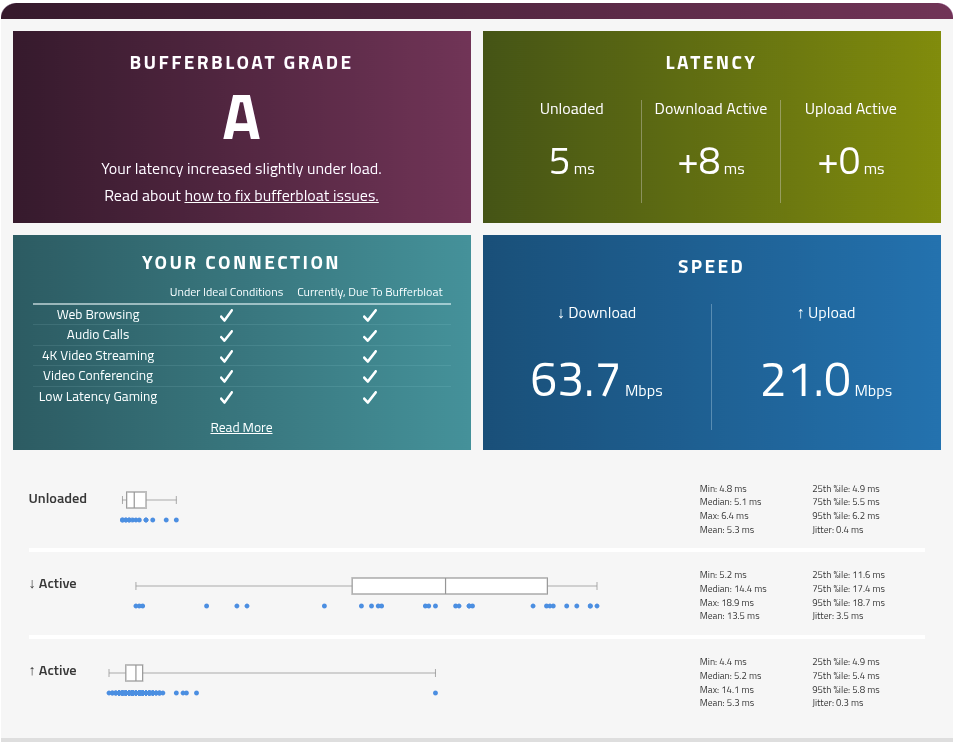
With the correct settings I was able to completely remove bufferbloat.
No bufferbloat, Stable latency And Gaming, video, and uploads at the same time without ping spikes 🎮
4. Final Result
I was only able to fully solve the problem by using:
a separate DSL modem
and an OpenWrt router
Now the bufferbloat is completely gone and the connection is stable.
- Copy Link
- Report Inappropriate Content
More Pics:
Old Router Archer VR2100v 3 Years Old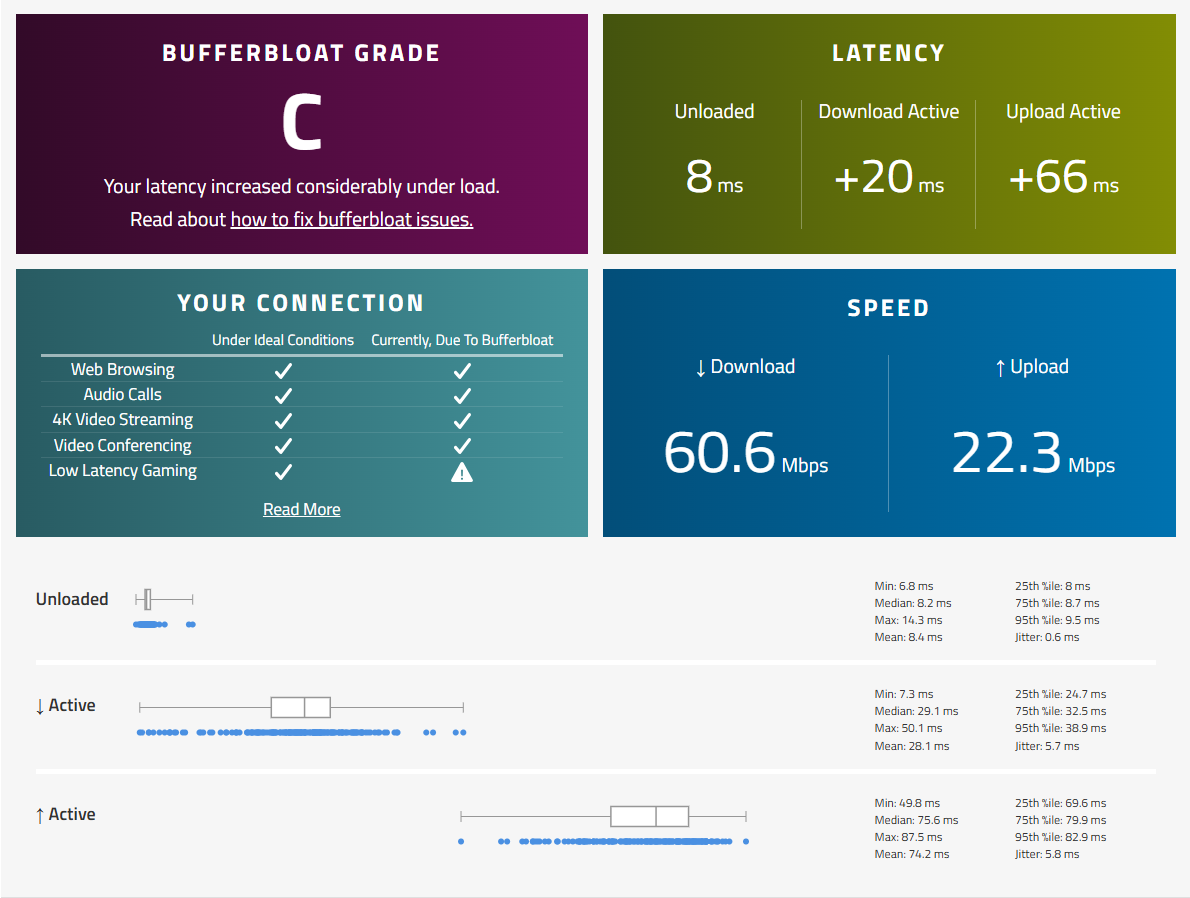
New Router: VX800 1 moth Old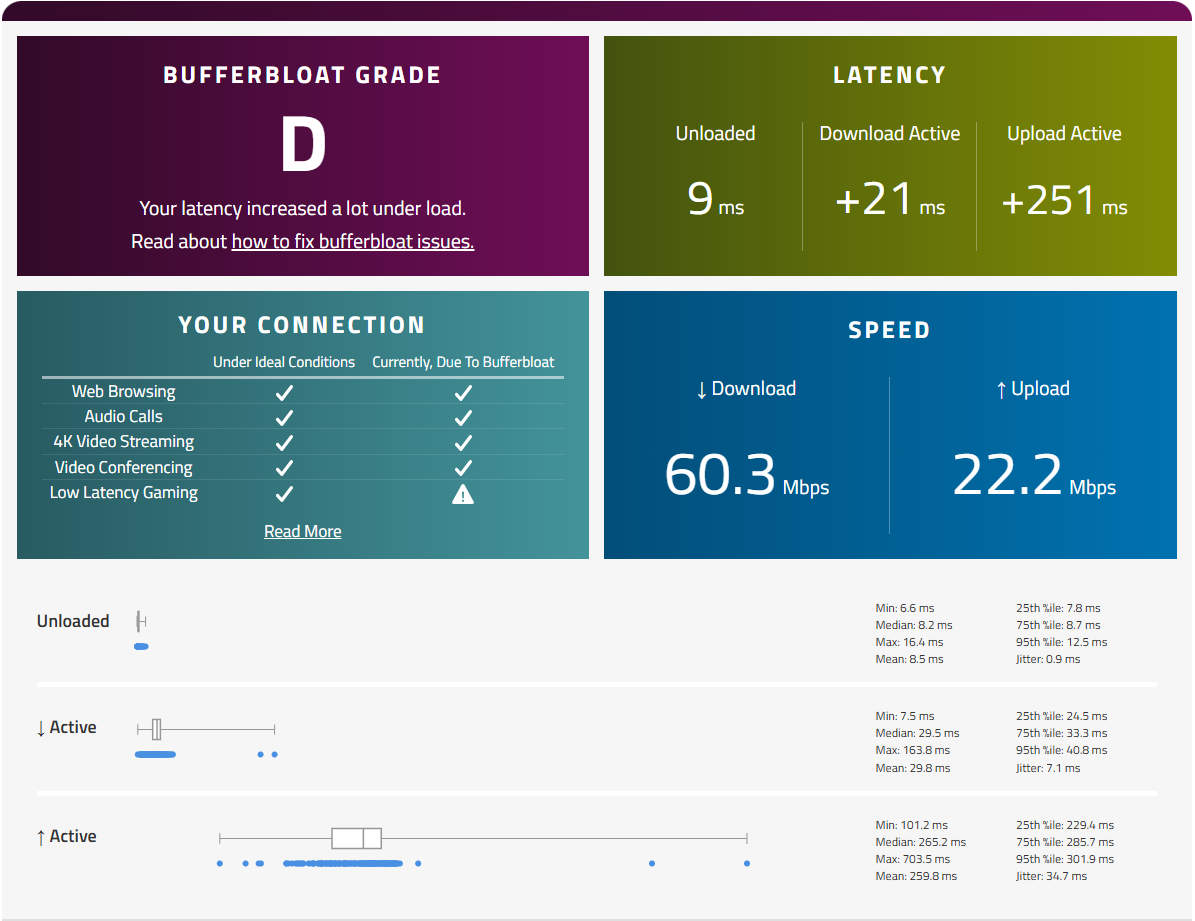
- Copy Link
- Report Inappropriate Content

That one is the newest firmware
https://static.tp-link.com/upload/firmware/2025/202504/20250403/VX800v_v1_0.10.0_3.0.0%20Build250312.zip
But doesnt solve the problem.
And boy, your problem is not your mean Latency . the maximum latency goes up to 700ms in your case at upload , according to your photo.
- Copy Link
- Report Inappropriate Content
Thanks for pointing that out!
Yes, you're right – the average (mean) latency is bad enough, but the maximum upload latency spikes up to 700 ms, which makes pretty much unusable under load.
I’ve installed the latest firmware (Build 250312), but sadly no improvement so far.
- Copy Link
- Report Inappropriate Content
i am quiet confident that a solution will be found. Im in contact with the support right now and we are continously in exchange.
My post is below
Vx800 Bufferbloat
- Copy Link
- Report Inappropriate Content

Thank you for contacting our community.
VX800v is a customized device specifically designed for local Service Providers. Its software is tailored to meet the unique requirements of these providers, ensuring alignment with their specific needs. Due to the specialized nature of the firmware on your device, our ability to provide troubleshooting may be limited.
We can certainly offer some troubleshooting tips that may help resolve your issue. Please consider the following:
1. Enable QoS for Gaming;
2. Change to different wireless channels;
3. Try wired connection instead of wireless connection.
If the problem persists after trying these steps, we recommend contacting the technical support of your Service Provider who supplied the device, as they are best suited to provide the necessary assistance for your device.
- Copy Link
- Report Inappropriate Content

Hi@SLKingX,
Have you been in contact with the local support or Internet service provider of the modem? If they have further updates, you are also welcome to share the solution here.
- Copy Link
- Report Inappropriate Content
Yeah, exactly! It’s wild that the VR2100v did a better job without any QoS settings at all. Just plug and play – and way less bufferbloat.
I totally agree with you – I actually like the VX800v a lot too! Solid performance, nice design, and lots of potential. But yeah, there’s definitely more going on than just missing QoS/SQM.
What really puzzles me:
I only have two devices connected – my laptop and phone, that’s it.
No smart home, no TV, no torrenting, nothing heavy. So it’s kinda weird that there’s even anything to manage or prioritize. Just two connections... and still massive upload latency. 😅
Let’s hope TP-Link sees this and digs a bit deeper into the issue in future firmware updates!
- Copy Link
- Report Inappropriate Content
Thanks a lot for the reply and the suggestions.
Here’s a quick summary of what I’ve already tried:
-
Enable QoS for Gaming
I looked for QoS settings, I tried all available settings, but unfortunately no improvement.
-
Change to different wireless channels
I’ve also tested different Wi-Fi channels – again, no difference.
Also, important to note: the issue occurs even on wired Ethernet, so Wi-Fi is not the cause here.
-
Try wired connection
Most of my bufferbloat tests were done using Ethernet on my laptop (Wi-Fi 6 capable, just like my phone).
The problem shows up clearly on a stable wired connection.
I only have two devices in my entire network (Laptop and Phone), so it’s definitely not a congestion or traffic management issue on my side.
The strange part is that my old router (VR2100v) handled bufferbloat way better without any tuning. Just same line, same devices – and it worked. That makes me believe the issue is likely related to how the VX800v handles upstream traffic, or maybe something deeper in the firmware.
I totally understand the VX800v is customized for ISPs – but I hope this feedback helps, because the hardware is really promising otherwise!
Thanks again for your time and support.
Best regards
- Copy Link
- Report Inappropriate Content
Thank you for your reply.
Sounds more like a performance issue with the Archer VX800v. I would recommend contacting your local support team or internet service provider to troubleshoot issues with this customized device.
- Copy Link
- Report Inappropriate Content
Hello,
Just wanted to give an update after further testing and a reply from TP-Link support.
Unfortunately, the problem still exists even after installing the latest firmware:
-
Firmware version: 0.10.0 3.0.0 Build 250312 Rel.26205n
-
Hardware version: VX800v v1.0
-
Serial number: 224A5H4000791
-
💡 Summary of the issue:
With just two devices connected (my laptop via Ethernet and my smartphone via Wi-Fi 6), I’m experiencing upload bufferbloat of up to 240 ms, sometimes more.
This happens consistently, even with minimal usage and low-bitrate content (e.g., YouTube in 480p).
🧪 Additional Observations (Real-world Testing):
-
When playing online games laptop and on my Phone a YouTube video starts buffering (even at 480p), my latency spikes immediately – and drops back once the video is fully loaded.
-
Same effect happens when my girlfriend scrolls through TikTok. Each video load causes a latency jump, visible even while I’m just browsing on my wired laptop.
-
These tests were done with only two devices connected, no background traffic, no smart home devices, and using a Telekom DSL line (50/20 Mbit).
🧠 Possible Cause: Memory Usage?
When I first got the VX800v, the memory usage was about 40%. Now, without major changes, it’s often around 70%, and I’ve even seen it spike up to 89%.
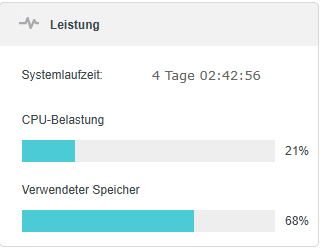
I'm wondering if high memory usage or poor memory cleanup might affect QoS or packet handling – especially under low-latency scenarios like gaming or video calls.
📌 Official Support Contact
TP-Link support has been responsive and helpful, but unfortunately, no fix has been found so far. I've also shared all this information via email.
If anyone has received further updates or found a workaround, I’d be super grateful if you could share.
Thanks again
- Copy Link
- Report Inappropriate Content
Information
Helpful: 1
Views: 2945
Replies: 15
Voters 1