Beginner seeking help with DecoM4 mesh issues

This thread has been locked for further replies. You can start a new thread to share your ideas or ask questions.

Beginner seeking help with DecoM4 mesh issues

This thread has been locked for further replies. You can start a new thread to share your ideas or ask questions.

Beginner seeking help with DecoM4 mesh issues
2025-05-26 12:11:58 - last edited 2025-06-23 02:56:20
Model: Deco M4  
Hardware Version:
Firmware Version: 1.62 Build 20240308

Hi folks.


Despite having and running my Deco M4R for a few years, I have just discovered with my new provider and hub, that i have in all likelihood being doing things wrong! My wireless speeds away from the main hub are appalling.


I would appreciate any help, but please be advised..... I am an old guy with very (very) limited knowledge and ability and would appreciate any advice in the most simplistic language please.


Until today I have been running the Ethernet from the hub to a TP Link 1GB Switch unit and from there wired to the Deco M4 main and to other devices (SKY/TV). I recenty read that I should be to the Deco first and from there to the switch?


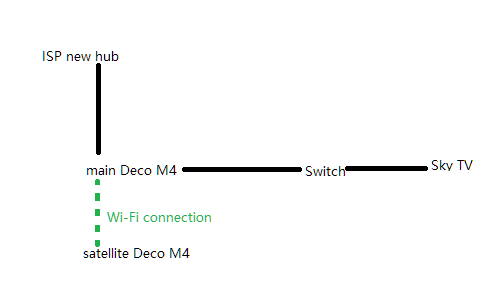
Now, I have a new Hub on floor one (top of stairs near bedrooms.) I have a Ethernet (cat 6) connection to my main Deco through my roof space down to the ground floor. From this Deco I have a wired connection to the 'switch' unit. From the switch I have other devices wired connected (TV/SKY). The TP link switch unit (green light) is showing the Deco connected at 1GB.


I have another satellite Deco M4 in another room with the option to wire but currently on wifi.


With this new set up my speeds have dropped to less than 30mb on the ground floor and only the wifi near the router and the wired desktop computer have good (excess 500mb) speeds.


I am clearly doing something wrong and suspect my DECO settings are somehow wrong. I would be most grateful for any advice please.


Thank you very much.

  0      
  0      
#1
Options
1 Accepted Solution
Re:Beginner seeking help with DecoM4 mesh issues-Solution
2025-05-27 05:54:41 - last edited 2025-06-23 02:56:20

  @Garibaldi384 

Hi, thank you very much for the feedback.

It is suggested to connect the satellite M4 via an Ethernet cable to establish Ethernet backhaul with the main Deco. 

General questions about Ethernet Backhaul feature on Deco

The wireless backhaul would increase the speed loss of the satellite unit:Why is my satellite Deco unit not getting the same speed as the main Deco?


After that, there is a new 1.7.0 version for Deco M4_V1/V2:

Deco M4_V1/V2_1.7.0 Official Ready for Test!

It is also suggested to update to this version first.


By the way, the following network layout should work well:

Best regards.


Recommended Solution
  0  
  0  
#2
Options
1 Reply
Re:Beginner seeking help with DecoM4 mesh issues-Solution
2025-05-27 05:54:41 - last edited 2025-06-23 02:56:20

  @Garibaldi384 

Hi, thank you very much for the feedback.

It is suggested to connect the satellite M4 via an Ethernet cable to establish Ethernet backhaul with the main Deco. 

General questions about Ethernet Backhaul feature on Deco

The wireless backhaul would increase the speed loss of the satellite unit:Why is my satellite Deco unit not getting the same speed as the main Deco?


After that, there is a new 1.7.0 version for Deco M4_V1/V2:

Deco M4_V1/V2_1.7.0 Official Ready for Test!

It is also suggested to update to this version first.


By the way, the following network layout should work well:

Best regards.


Recommended Solution
  0  
  0  
#2
Options